How to Get Google Performance Max to Work in 2026
When Google announced Performance Max in 2020, there was a lot of speculation that it would be the new way to run advertising campaigns on the platform. Traditional search was dying.
Fast-forward 5 years, and not much has changed. Google has slowly rolled out more automated features. Demand Gen in 2023 (replacing Discovery) and AI Max in May 2025 have seen advertiser controls taken away in favor of machine learning.
However, these campaign types have so far been supplemental to legacy models. Traditional search (albeit with broad match) continues to be effective and some advertisers still see Standard Shopping outperform Performance Max.
That said, Google has been working quietly on Performance Max, introducing new features in hopes that it will someday be the only campaign advertisers need to run.
This article will explore some proven strategies for success with Performance Max in 2026 and how you can leverage it in your strategy to drive performance (and in certain cases outperform legacy campaign types).
TL;DR
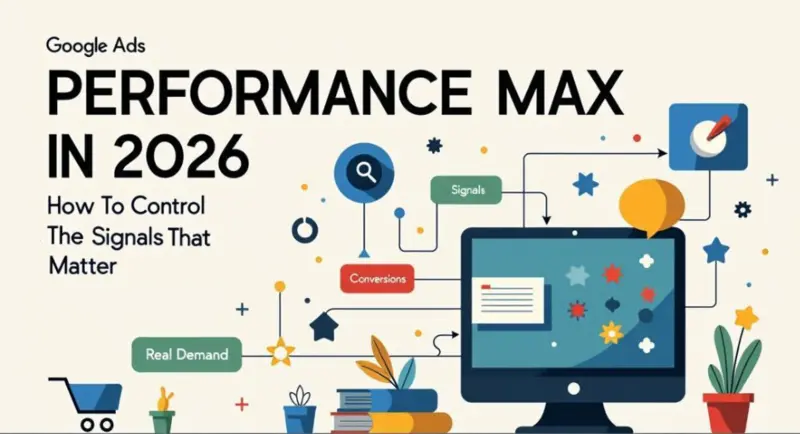
Performance Max isn’t broken — it optimizes exactly for the signals you feed it.
By default, those signals favor retargeting, existing customers, and view-through attribution, which inflates reported ROAS.
The fix isn’t more automation, but better signal design — sharper conversion goals, constrained inventory, and clear separation between discovery and conversion.
In 2026, Performance Max works best when treated as a paid media system, not a set-and-forget campaign. If you want the broader framework for managing algorithmic campaigns, start with the Advertising hub
Why Performance Max Still Struggles for Many Advertisers
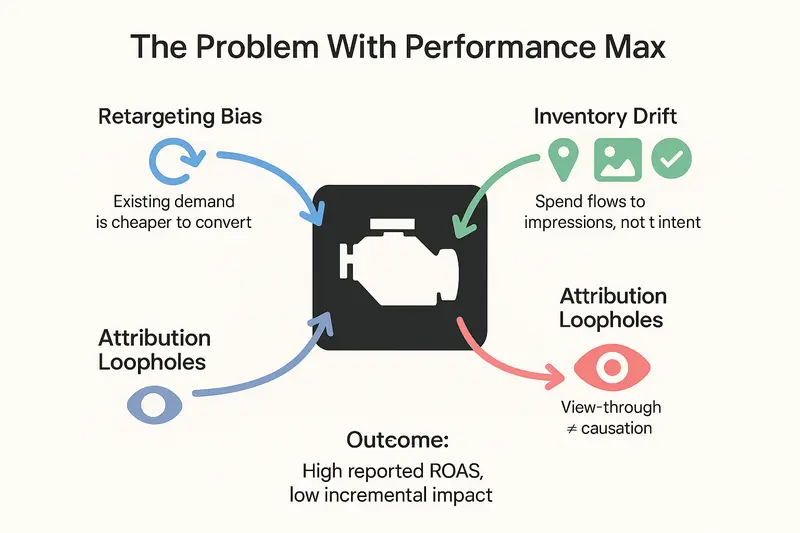
I’ve reviewed before some of the problems with Performance Max campaigns. Let’s revisit those to better understand the ‘why’ behind the strategy.
Performance Max Over-Indexes on Retargeting by Design
Performance Max’s tendency to over-serve retargeting isn’t accidental. It’s a direct result of how the system is built.
The campaign runs across all available inventory, including display and video, while simultaneously optimizing toward conversions. Most conversions (leads or sales) don’t have immediately – shoppers research, compare and return later.
During that consideration window, Performance Max continues serving ads across upper-funnel placements. When the user eventually converts, those impressions receive partial credit and reinforce the idea that retargeting and repeat exposure are “working”
This isn’t a problem for businesses in the flooring industry where the user journey is long and shoppers buy once every 10-15 years. However, for brands with shorter cycles and repeat customers – this can be a serious problem.
Why Performance Max Prioritizes Existing Customers
In its pursuit of conversions, Performance Max naturally gravitates toward existing customers because they are the easiest to convert.
Without explicit signals to distinguish new from repeat buyers, the system treats all conversions equally. A returning customer and a first-time buyer look identical in the optimization model.
The result is a self-reinforcing cycle: Performance Max spends more budget reaching users who are already familiar with the brand, claims credit for conversions that would have happened anyway, and learns to do even more of the same.
Google has introduced controls to prioritize new customers or adjust bids for lapsed ones, but these features are only as effective as the underlying data. Poor match rates or incomplete customer lists limit their impact and fail to properly address the issue.
Automation Comes at the Cost of Inventory Control
Performance Max’s promise of full automation comes with a clear tradeoff: limited control over where budget is actually spent.
There’s no way to tell Performance Max to favor Search over Display, or Shopping over Discovery. As a result, significant portions of spend often flow into awareness-oriented placements like Discover, Gmail, Maps, and Display.
When a conversion eventually occurs, those impressions may receive attribution credit, justifying continued spend in channels that played little role in the final decision.
In reality, most purchase decisions are finalized through Search or Shopping. Awareness placements can support the journey, but they rarely close it. When spend allocation doesn’t reflect that reality, reported performance improves while true efficiency suffers.
The strategies below don’t “fix” Performance Max. They change the signals it learns from by shifting optimization away from cheap attribution and toward real demand.
How to Make Performance Max Work in 2026
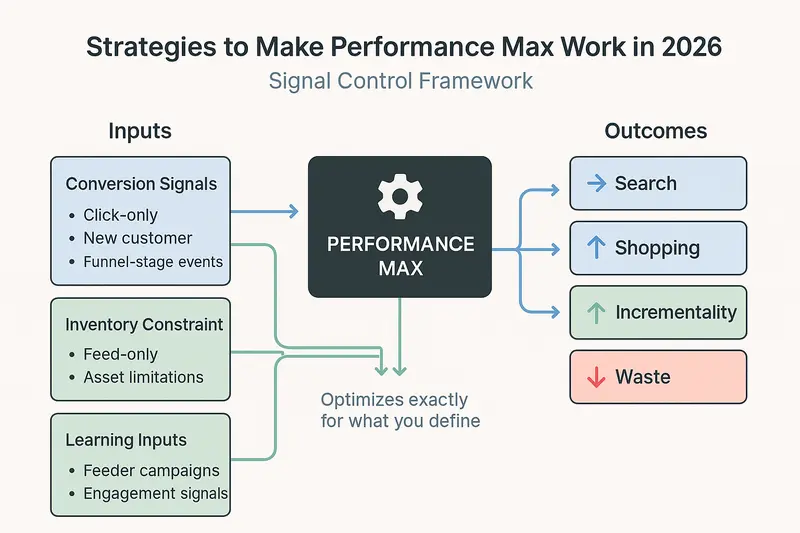
Any advertiser with solid conversion tracking can implement these strategies. The real challenge isn’t setup – it’s knowing which signals to use, and when.
Strategy 1: Remove Attribution Noise with Click-Based Conversions
When Performance Max reports strong ROAS but fails to move top-line sales, the campaign is often attributing a high volume of view-through conversions.
This is a measurement control lever, not an optimization trick.
The Fix: Require a Click Signal
A little known but powerful setting in Google conversion tracking is requiring a specific GCLID. Add a new conversion action to your ad account – Conversion (Click Only).
To set it up, make sure to set up a cookie for first-click GCLID in your user’s web client. Then, assign the cookie value as the Custom Cookie Prefix in your conversion tag settings.
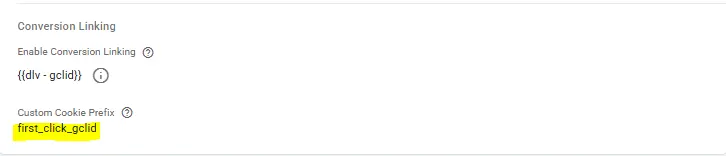
For a guide with the script to set this up, read my blog on first-click attribution.
If you want to implement click-based/offline conversion uploads, see the Google Ads API conversion tracking guide.
Case Study: Click-Based Optimization Doubled True ROAS in 14 Days
In a client account that I recently started managing, a Performance Max campaign was running with impressive results.
1250%
ROAS
$0.35
Cost per Store Visit
When I dug deeper, I noticed something alarming. 80% of the conversions where view-through (impression) conversions.
The real click-through performance:
250%
ROAS
$2.79
Cost per Store Visit
Seeing this, I set up a campaign with click-only conversions and ran an A/B test against the legacy campaign.
The results came in quickly. After 2 weeks of running the campaigns side by side, click-through ROAS doubled.
| Campaign | ROAS (all) | ROAS (Click Only) | Cost per Store Visit | Cost per Store Visit (Click Only) |
|---|---|---|---|---|
| All Conversions | 1250% | 250% | $0.35 | $2.78 |
| Click-Only Conversions | 500% | 500% | $1.65 | $1.65 |
Without digging, the all conversions campaign looks much stronger. But, this understates the value of each conversion.
Click-only conversion optimization effectively removed view-through conversions from the campaign.
Channel Breakdown
This was even more pronounced by a channel spend breakdown.
| Channel | All Conversions Campaign | Click-Only Conversions Campaign |
|---|---|---|
| Search | 3% | 35% |
| Maps | 85% | 50% |
| Video | 5% | 10% |
| Discover | 5% | 4% |
| Gmail | 0% | 0% |
| Display | 2% | 1% |
While maps was still prioritized to drive in-store traffic, click-based optimization was able to increase priority of real demand drivers like search.
Takeaway: Verify your campaign performance. Both with conversion ad event type and channel performance.
Strategy 2: Constrain Performance Max to Transactional Inventory
For e-commerce advertisers, Google Shopping is a powerful channel due to it’s click-based nature – advertisers are only charged per click.
Setting up a feed-only campaign requires a valid product feed set up through Google Merchant Center. Once this is linked to Google Ads, create a campaign with feed enabled, and no assets in your asset group.
Setup in Google Ads (vs Google Ads Editor) to be able to create an asset group with no assets.
Follow these steps to set up a Feed Only PMax campaign
Case Study: Feed-Only PMax Cut Cost per Sale by 45%
I ran a test with a fully built out PMax campaign (all assets) and a feed-only campaign to drive sales of a product.
The results revealed the true nature in how Performance Max works with and without a feed.
The All Assets campaign excelled at driving engagement with the website. Actions like the retailer locator, design preview, and visualization tool were stronger in this campaign.
Feed only exceled in driving sales – it’s ultimate goal. This is because the only inventory it ran on was Google Shopping and Display.
For the purpose of this exercise, we only looked at click-through conversions.
| Campaign | Cost per Sale | Cost per Click | Cost per Engagement |
|---|---|---|---|
| All Assets | $210 | $2.70 | $7 |
| Feed-Only | $116 | $1.10 | $9 |
The feed-only campaign excelled at driving efficient clicks to product detail pages – the highest converting pages on the site. Conversely, the all assets campaign drove traffic to a landing page that was more focused on education.
There’s a place for both in an effective strategy, but sales-focused campaigns would benefit from the feed-only approach.
Strategy 3: Separate Discovery from Conversion with Feeder Campaigns
Another way to control the PMax algorithm is through funnel stage conversion events. We’ve reviewed what conversion events map to stages of the funnel in regards to Meta Ads, but it works very similarly in Performance Max.
Rather than spending 100% of your budget on acquiring sales or leads, building an audience of interested individuals helps downstream performance.
To implement, set up two campaigns:
- Campaign 1: Optimize for sales/leads. Budget allocation: 90%
- Campaign 2: Optimize for product views or add to carts. Budget allocation: 10%
This is the feeder campaign strategy for Performance Max – a deliberate budget allocation strategy to separate discovery from conversion.
The goal:
- Lower cost per add to cart from the feeder campaign
- Lower combined cost per sale over time
I set up and ran this strategy for a period of three months with some positive results.
Case Study: Feeder Campaigns Reduced Blended CPA Year Over Year
Year over year performance from all campaigns:
+15%
Conversions
-5%
Cost per Conversion
When broken down by campaign, the feeder campaign shows where it’s effectiveness lies.
| Campaign | Cost per Click | Cost per Add to Cart | Cost per Sale |
|---|---|---|---|
| Sales | $1.55 | $49 | $325 |
| Feeder | $0.75 | $39 | $600 |
This becomes even clearer when looking at a channel spend breakdown.
| Channel | Sales Campaign | Feeder Campaign |
|---|---|---|
| Search | 50% | 35% |
| Maps | 0% | 0% |
| Video | 41% | 10% |
| Discover | 7% | 55% |
| Gmail | 1% | 0% |
| Display | 1% | 0% |
While the feeder campaign performance looks bad, it’s mostly due to the overemphasis on Discover placements which aren’t good at attributing last click conversions due to conversion time lag.
Nonetheless, better performance from the account overall year over year shows the effectiveness of driving up the funnel – even if it’s harder to attribute.
Performance Max Isn’t a Campaign Type – It’s a System
The core takeaway is simple: Performance Max optimizes toward the signals you feed it.
If you only ask it to generate as many conversions as possible — regardless of where they come from — it will do exactly that, often by finding your existing customers along the way.
Planning for Performance Max in 2026 means shifting from campaign setup to signal design.
That includes:
- Optimizing for more than one signal to reflect different stages of the funnel (product views, add to cart, purchases)
- Sharpening existing signals so the system can distinguish real demand from cheap attribution (click-only conversions, new customer signals)
- Constraining inventory intentionally when the goal is transactional performance (feed-only setups)
Finding the right balance isn’t about discovering a hidden setting, but being deliberate with the few levers we still control.
For more advanced accounts, this can extend beyond the UI into tools like the Google Ads API, where conversion signals and campaign logic can be managed more explicitly. But even without that level of sophistication, the same principle applies.
Once these strategies are in place, give them space to learn. Allow at least a full month for stabilization, then evaluate performance year over year, not week over week.
Final Thoughts: Better Signals Beat More Automation
Performance Max isn’t the future of Google Ads because it replaces strategy. It’s the future because it forces better strategy.
As Google continues to remove levers, the remaining points of control matter more than ever. Performance Max will always do what it’s told — the challenge is being precise about what you ask it to optimize for.
The advertisers seeing success in 2026 aren’t fighting automation or chasing the newest feature. They’re designing cleaner signals, separating discovery from conversion, and respecting how long real buying decisions take.
In many accounts, Performance Max won’t outperform traditional Search or Shopping by default. But when used intentionally with the right signals and supported by complementary campaigns, it can become one of the most efficient ways to scale.
The goal isn’t to give Google more control. It’s to give the algorithm better instructions.