
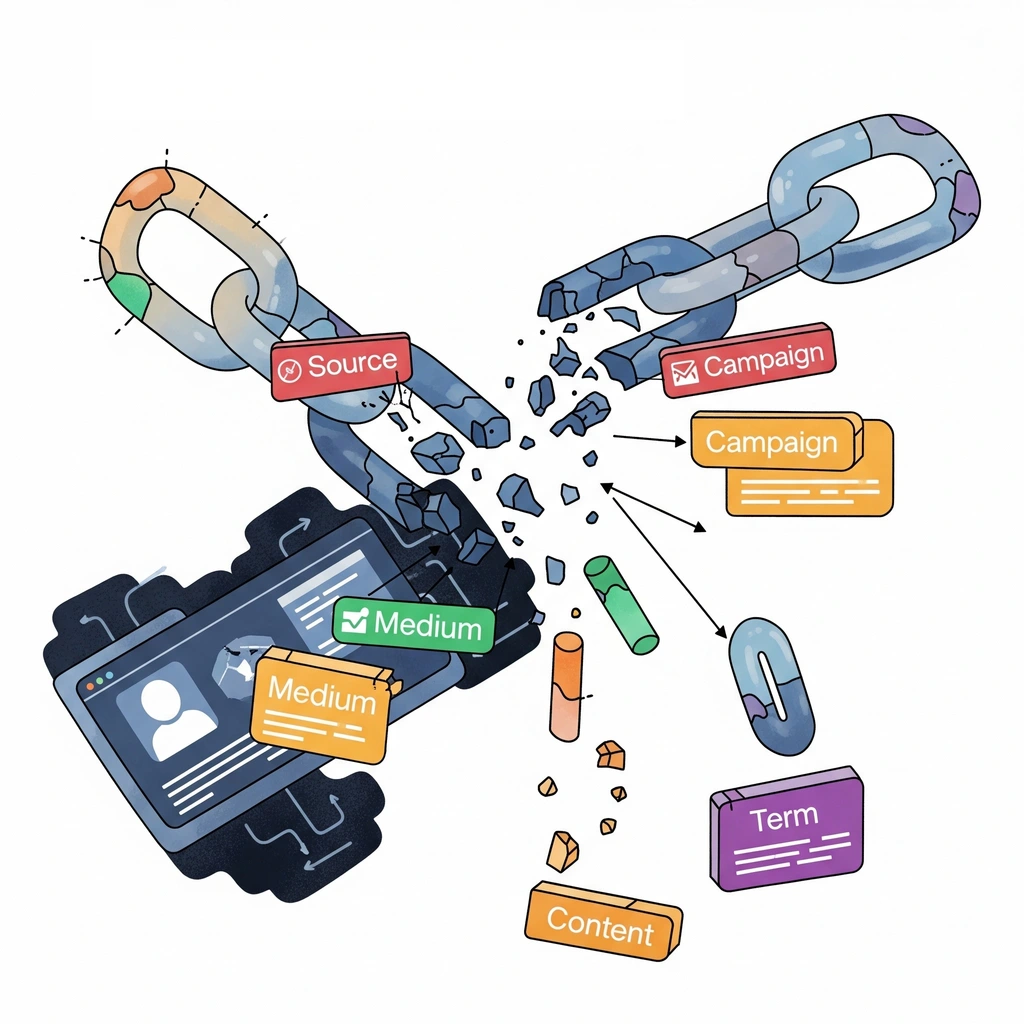
Creating Persistent UTM Tracking: A Complete Guide to Better Attribution
Tracking and attribution are one of the toughest challenges marketers face in 2025, 60% said they were looking to augment measurement strategies according to eMarketer.
Last month, a client spent $50,000 on Google Ads that drove 200 qualified leads. But according to their CRM, only 12 leads were attributed to Google Ads. The other 188? Marked as ‘direct traffic’ or ‘organic search.’
If this sounds familiar, you’re not alone. Up to 40% is lost due to poor UTM persistence, costing businesses millions in misallocated budgets and missed optimization opportunities.
TL;DR
The Problem: Marketing attribution is lost when UTM parameters drop off as users navigate websites, leading to incomplete data and poor strategic decisions.
The Solution: Use Google Tag Manager and localStorage to create persistent UTM tracking that maintains attribution data across sessions and page visits.
Key Benefits:
- Maintain first-touch attribution for long sales cycles
- Pass UTMs to third-party platforms like Calendly
- Capture accurate source data in forms and checkouts
- No developer required – just GTM implementation
Bottom Line: This free method provides attribution value, helping you stop losing attribution data and make better marketing decisions.
The (Not So) Hidden Cost of UTM Drop-off
From data warehouses to customer data platforms (CDP) and customer relationship management (CRM) tools, connecting the dots from first visit to purchase has become a multi-billion dollar industry.
However with complexity comes cost. Subscriptions can run in the thousands of dollars to upwards of six and seven figures for large businesses. For those just getting started, there are more cost-effective means of tracking online engagement.
One method that has been used widely by marketers for years offers a free, easy, built-in approach. Urchin tracking modules (UTMs) have been a staple of website analytics tracking since Google introduced Google Analytics – tracking things like the source of traffic, campaign and keyword driving the click, and more.
The problem faced by many marketers with UTMs is their persistence. By default, UTMs are contained in the URL, but drop-off as a user navigates through a website.
While this does not pose a problem for simple site tracking, it does pose a challenge for more complex flows where users navigate between several pages before completing a purchase or filling in a form.
It’s no surprise that more advanced tracking tech is becoming increasingly common in advertising strategies.
Before jumping into the technical details, let’s review how UTM parameters work and how to set them up.
How UTM Parameters Work
UTM parameters are their core are identifiers attached to a URL string that allow platforms to ingest information about where a user came from. A standard set of UTM parameters looks something like this:
utm_source=google&utm_medium=cpc&utm_campaign=4th_july_sale&utm_content=ad1&utm_term=keyword
Free UTM builders are available all over the internet. My campaign tracking template also has a customizable format you can steal!
UTM Parameters 101
Most commonly used in analytics platforms like Google Analytics, UTM parameters are captured from the URL used to create groups of users. Any user data submissions like forms or checkout steps can have hidden fields that capture UTM parameters, enabling the storage of these parameters against certain goals.
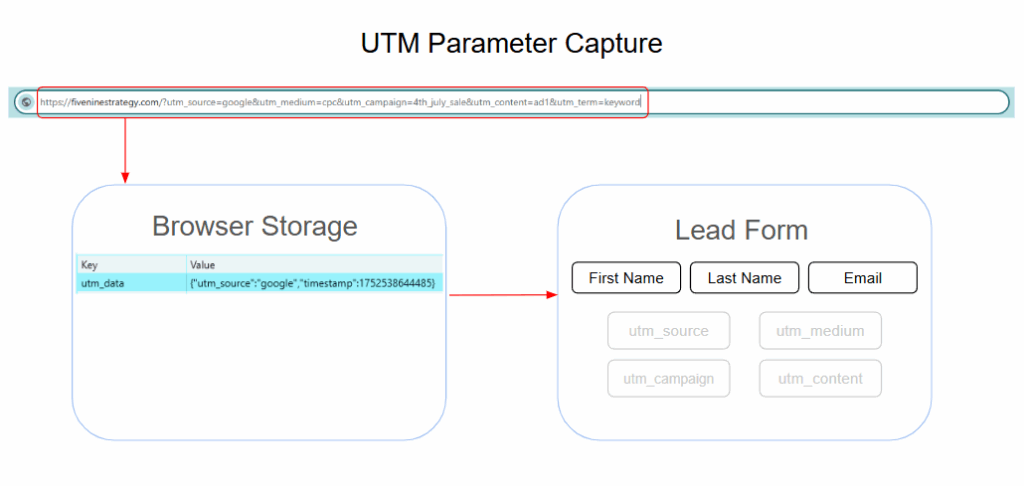
These fields are fully customizable so UTMs for each ad campaign might look slightly different. However, it’s best to create some standardized format for each parameter for clean analysis.
Some examples for each parameter:
- UTM Source: Google, Meta (or Facebook), Reddit, chatgpt.com
- UTM Medium: paid, cpc, referral, display, video
- UTM Campaign: Q1 newsletter, Holiday sale, Non-Brand Search
- UTM Content: Video, Static, GIF
- UTM Term: {{Keyword}}
Key Challenges with UTM Parameters
UTMs do not come without their set of challenges. Three such ways UTMs present challenges include:
- Parameters stored in the URL are susceptible to drop-off as users navigate through the website.
- They do not persist across sessions, so a user that visits the site multiple times may have several different sources or campaigns.
This presents potential tracking problems that lead to:
- Overattributing last-click: In a long journey where users visit a website through different sources, the credit is often applied to a direct visit at the end of the journey.
- Lack of source reporting: Attribution loss leads to less visibility into where new customers are really coming from and less information to determine what’s working.
- Flawed budget allocation: Any companies deciding which marketing channels to eliminate based on performance in Google Analytics loses key intelligence when making decisions.
Any good marketer knows the challenge of making budgeting decisions with incomplete data. With this knowledge, let’s look at a way to better track UTMs.
Creating Persistent UTM Tracking with JavaScript
Creating persistent UTM tracking requires the use of browser storage – the way any first-party or third-party cookies are stored.
Browser Storage: localStorage vs sessionStorage
There are two primary forms of browser tracking that each have their unique benefits.
Local Storage
Persists across sessions indefinitely making it a much more sticky way of tracking. Benefits include:
- Cross-session persistence: Maintains attribution data even when users close and reopen browsers
- Long-term attribution: Ideal for businesses with extended sales cycles (B2B, high-ticket items)
- First-touch attribution: Preserves the original marketing source that introduced the customer
Session Storage
Persists across site navigation, but expires at the end of the session. Benefits include:
- Privacy-friendly: Automatically expires when browser session ends
- Last-click attribution: Focuses on the most recent marketing touchpoint
- Reduced storage concerns: No long-term data accumulation
For the purpose of this setup, we will be using localStorage, but sessionStorage could also be used if privacy concerns outweigh attribution accuracy needs.
Google Tag Manager Implementation Guide
There are three steps involved in setting up a cookie to track UTM parameters in localStorage
- Capture UTM parameters on page load
- Store UTM parameters in localStorage & data layer
- Create tags to call back parameters on specific pages or forms
Step 1: Store UTM Parameters in localStorage
To begin, create a custom javascript variables to capture all 5 standard UTMs in a new first-party cookie.
No special customization needed – the variable first checks if any UTM parameters exist, then stores the parameters located in the URL string.
Variable Type: Custom Javascript
Variable Name: Store First-Click UTM Parameters
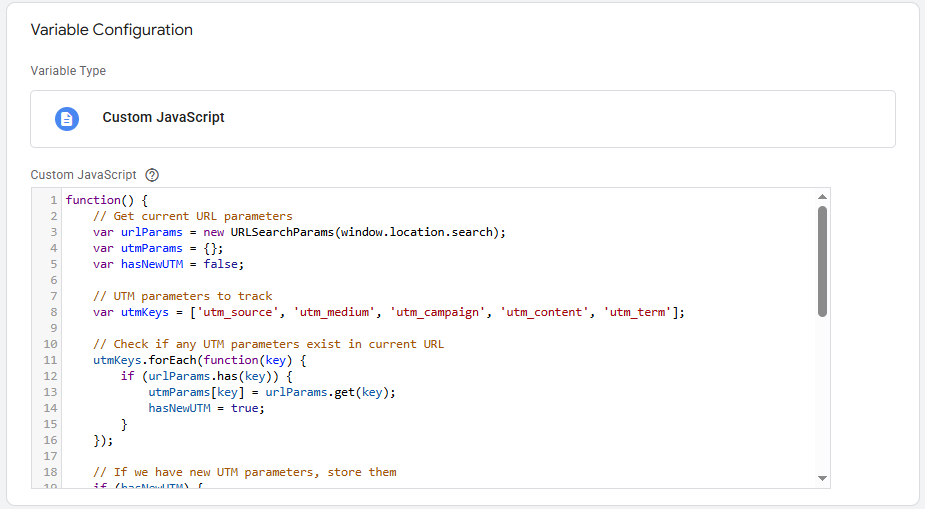
See Detailed Code
function() {
    // Get current URL parameters
    var urlParams = new URLSearchParams(window.location.search);
    var utmParams = {};
    var hasNewUTM = false;

    // UTM parameters to track
    var utmKeys = ['utm_source', 'utm_medium', 'utm_campaign', 'utm_content', 'utm_term'];

    // Check if any UTM parameters exist in current URL
    utmKeys.forEach(function(key) {
        if (urlParams.has(key)) {
            utmParams[key] = urlParams.get(key);
            hasNewUTM = true;
        }
    });

    // If we have new UTM parameters, store them
    if (hasNewUTM) {
        localStorage.setItem('first_click_utm', JSON.stringify(utmParams));
        localStorage.setItem('first_click_utm_timestamp', Date.now().toString());
        console.log('New UTM parameters stored:', utmParams);
        return utmParams;
    }

    // Otherwise, return stored UTM data
    var storedUTM = localStorage.getItem('first_click_utm');
    if (storedUTM) {
        try {
            var storedData = JSON.parse(storedUTM);
            console.log('Using stored UTM data:', storedData);
            return storedData;
        } catch (e) {
            console.log('Error parsing stored UTM data:', e);
            return {};
        }
    }

    return {};
}
With this variable, it’s possible to set up a tag that captures UTM parameters each time a new page loads.
Step 2: Capture UTM Parameters on Page Load
This uses the variable created above to ensure UTMs are stored each time a user hits your site. It will first check if UTM parameters exist and only create a new cookie if none are present.
To ensure UTM parameters are captured wherever a user enters your site, place a tag on all pages.
Tag: Custom HTML – Capture UTM on Page Load
Trigger: All Pages
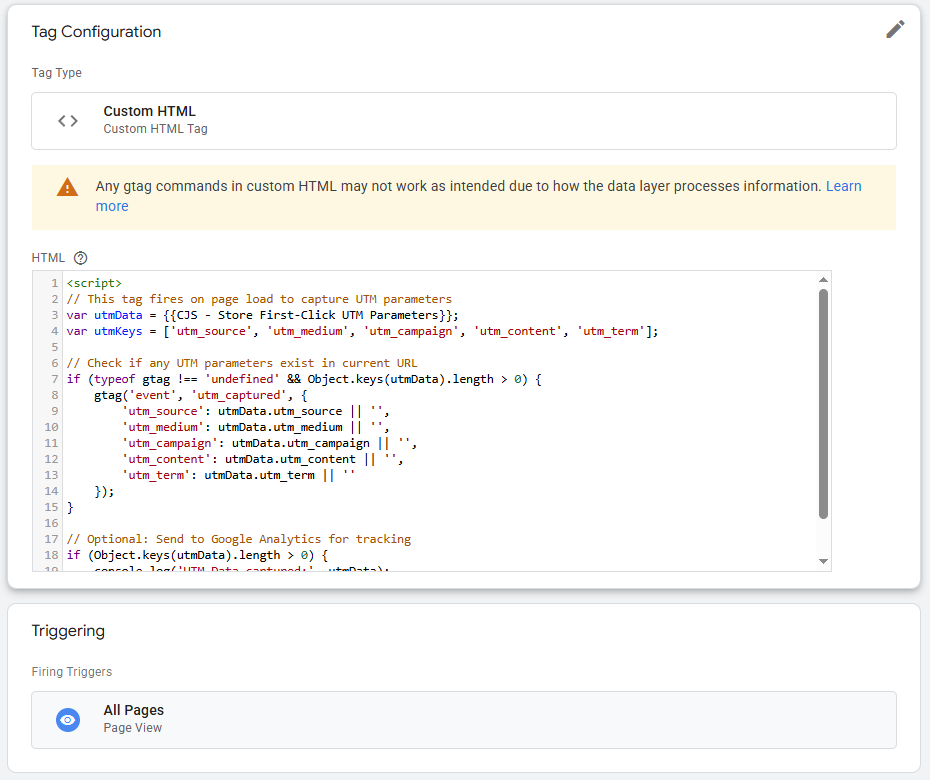
See Detailed Code
<script>
// This tag fires on page load to capture UTM parameters
var utmData = {{CJS - Store UTM Parameters}};
var utmKeys = ['utm_source', 'utm_medium', 'utm_campaign', 'utm_content', 'utm_term'];

// Check if any UTM parameters exist in current URL
if (typeof gtag !== 'undefined' && Object.keys(utmData).length > 0) {
    gtag('event', 'utm_captured', {
        'utm_source': utmData.utm_source || '',
        'utm_medium': utmData.utm_medium || '',
        'utm_campaign': utmData.utm_campaign || '',
        'utm_content': utmData.utm_content || '',
        'utm_term': utmData.utm_term || ''
    });
}

// Optional: Send to Google Analytics for tracking
if (Object.keys(utmData).length > 0) {
    console.log('UTM Data captured:', utmData);
}
</script>
From here, UTMs can be applied for a host of uses. Let’s take a look at two specific use cases that solve common attribution challenges in digital marketing.
Advanced UTM Use Cases
With persistent UTM tracking in place, you can now leverage this data to solve attribution problems that plague most marketing campaigns. The two most impactful applications address external platform integration and long-funnel conversion tracking.
Use Case 1: Passing UTM Parameters to Third-Party Sites
Certain booking platforms like Calendly don’t automatically capture UTMs, or will only pull from the URL string. To ensure parameters are passed through, a tag can be set up to fire on outbound click.
Tag: Custom HTML – Calendly Link Modification
Trigger: Outbound Click
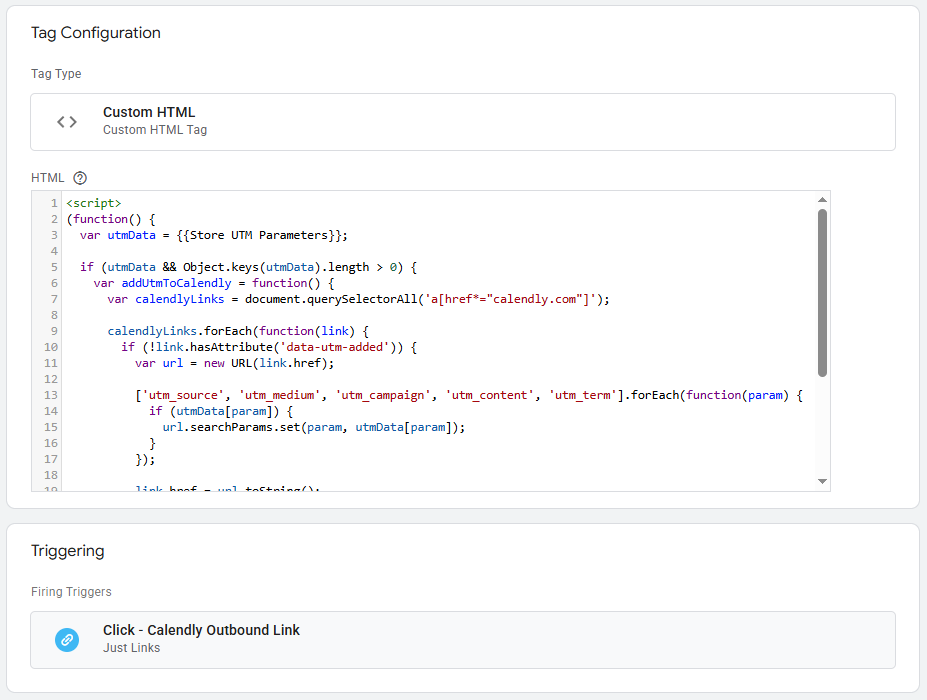
See Detailed Code
<script>
(function() {
  var utmData = {{Store UTM Parameters}};

  if (utmData && Object.keys(utmData).length > 0) {
    var addUtmToCalendly = function() {
      var calendlyLinks = document.querySelectorAll('a[href*="calendly.com"]');

      calendlyLinks.forEach(function(link) {
        if (!link.hasAttribute('data-utm-added')) {
          var url = new URL(link.href);

          ['utm_source', 'utm_medium', 'utm_campaign', 'utm_content', 'utm_term'].forEach(function(param) {
            if (utmData[param]) {
              url.searchParams.set(param, utmData[param]);
            }
          });

          link.href = url.toString();
          link.setAttribute('data-utm-added', 'true');
        }
      });
    };

    addUtmToCalendly();
    setTimeout(addUtmToCalendly, 1000);
  }
})();
</script>
Since UTM parameters are appended to the link upon click, there’s no concern with polluting site analytics. This is effectively allows for attribution closer to the original traffic source.
Use Case 2: Capturing UTM Parameters in Forms
When a user fills out a form, UTM parameters can be captured from the URL. However in long funnels, UTMs typically drop off from the URL.
To ensure they are replaced when a user reaches the form, a tag can be set up to insert UTM parameters on certain pages.
Tag: Custom HTML – Insert UTMs into URL
Trigger: Page View (i.e. page path = /checkout)
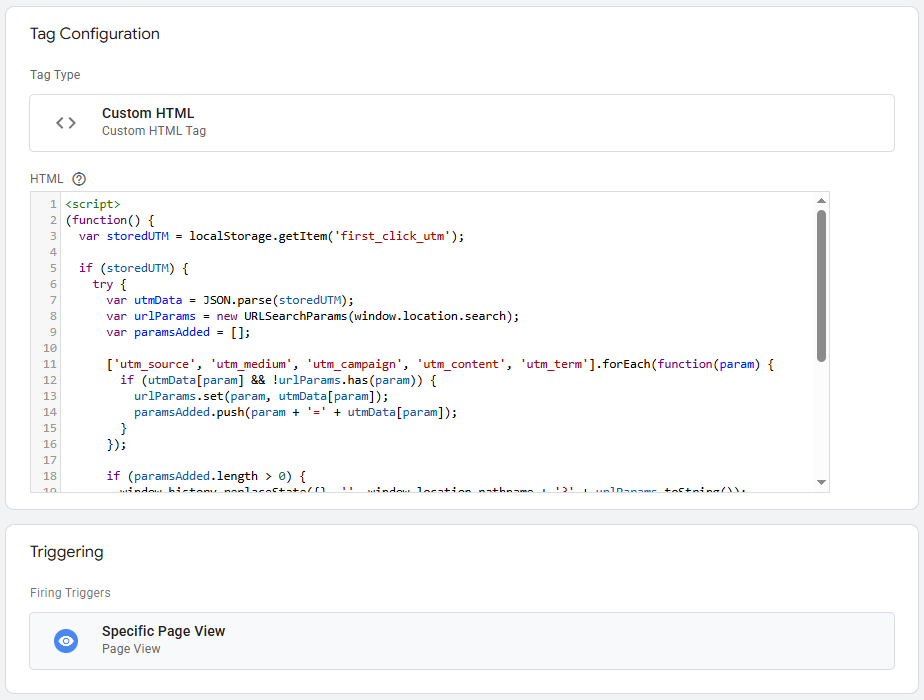
See Detailed Code
<script>
(function() {
  var storedUTM = localStorage.getItem('first_click_utm');

  if (storedUTM) {
    try {
      var utmData = JSON.parse(storedUTM);
      var urlParams = new URLSearchParams(window.location.search);
      var paramsAdded = [];

      ['utm_source', 'utm_medium', 'utm_campaign', 'utm_content', 'utm_term'].forEach(function(param) {
        if (utmData[param] && !urlParams.has(param)) {
          urlParams.set(param, utmData[param]);
          paramsAdded.push(param + '=' + utmData[param]);
        }
      });

      if (paramsAdded.length > 0) {
        window.history.replaceState({}, '', window.location.pathname + '?' + urlParams.toString());

        window.dataLayer = window.dataLayer || [];
        dataLayer.push({
          'event': 'utm_restored',
          'restored_parameters': paramsAdded
        });
      }
    } catch (e) {
      console.error('Error parsing UTM data:', e);
    }
  }
})();
</script>
This method is particularly useful for longer sales cycles where visitors take several sessions to consider before ultimately converting.
Just be sure your form is set up with hidden fields to capture UTM parameters. For a refresher on how this is done, refer to my article on GCLID tracking.
Privacy & Compliance Considerations
While localStorage is strictly first-party cookies, the collection of marketing identifiers is regulated under privacy lawsa like General Data Protection Regulation (GDPR) or California Consumer Privacy Act (CCPA).
GDPR Requirements
UTM persistence is not necessarily an essential cookie so it falls into a gray area between functionality and marketing. GDPR requires legitimate interest for website functionality or marketing attribution accuracy.
Since this approach falls under those bounds, it’s unlikely to breach privacy regulation. However, just to be safe it’s worth including UTM tracking in your cookie consent banner and provide opt-out mechanisms.
CCPA Compliance
CCPA on the other hand classifies ‘personal information’ when it can identify or relate to a particular consumer. While UTMs don’t explicitly identify customers, they are a user identifier.
To comply with CCPA, specify localStorage usage for marketing attribution and explain data retention periods (indefinite in this case).
Following these guidelines will eliminate any risk of compliance breach.
Turning UTM Tracking Into a Competitive Advantage
UTM persistence is often overlooked because of the technical implementation needed. However, it’s easier than ever to implement a solution without the help of a developer through Google Tag Manager.
While enterprise attribution platforms offer sophisticated tracking capabilities, the localStorage approach outlined here provides 80% of the value at a fraction of the cost.
Just be sure to have a plan for where better attribution will create business transformation. Maybe it’s in your lead flow or checkout funnel. Maybe it’s just improving channel attribution in an analytics platform.
Use it to take your measurement and analytics work to the next level. Whether you’re a small business trying to optimize a modest ad budget or a seasoned pro looking for better solutions in your toolkit, implementing this solution isn’t just an optimization – it’s a potential insight goldmine.
Start with the basic implementation outlined above, test it with your current campaigns, and watch as your work transforms into actionable attribution insights. Your future self (and your marketing budget) will thank you.
For businesses ready to take attribution tracking to the next level, explore our multi-touch attribution case study to see how comprehensive measurement frameworks can transform marketing performance.