Stop Bot Traffic in Meta Ads: Cut Fake Clicks, Keep Real Leads
Bots—automated scripts that click, view, and submit—don’t just waste spend; they train Meta’s algorithm to find more junk. Social platforms won’t solve this for you, so marketers have two choices: accept the noise or harden their funnel.
This is less a targeting issue and more a consequence of platform mechanics. Meta will optimize toward whatever signal is easiest to produce, including junk.
Below are simple, proven steps you can implement today. From placement controls and on-site protection to tag-level verification, get the methods I use in real campaigns to avoid bots. Plus, read a case study showing how cleaning up bot traffic improved Cost per Qualified Lead (CPQL).
TLDR
Bots waste budget and poison Meta’s algorithm by rewarding fake engagement and junk leads. To fight back:
- Cut bad placements → Remove Audience Network & Reels for cleaner traffic.
- Optimize for real actions → Conversions or multi-page sessions, not link clicks.
- Add site-level protection → Cloudflare + honeypots filter most bot traffic.
- Validate with quality metrics → Track qualified leads only via offline conversions or CRM.
Result: fewer leads, higher quality, and lower Cost per Qualified Lead (CPQL).
Why Bot Traffic Is a Problem in Meta Ads
For advertisers on platforms like Facebook, bots present two key challenges.
Let’s take a look at both situations and some solutions.
Inflated Engagement: How Bots Skew Campaign Metrics
Placements like Facebook or LinkedIn’s audience network are notorious for containing high levels of bot traffic.
It’s pretty easy to see when you look at the engagement metrics. Low engagement rate, low engagement times.
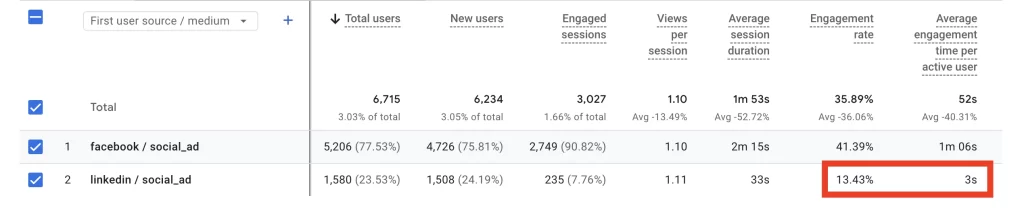
This can pose a serious problem when optimizing campaigns for engagement, particularly in LinkedIn (which has a less sophisticated algorithm).
There are a few straightforward fixes for this.
Fix 1: Remove Audience Network (and Reels) Placements
In Meta, a standard practice is removing audience network placements altogether. This does lead to higher CPMs, but also better quality traffic (which is always the goal).
LinkedIn actually has a better solve – publisher block lists. Upload a list of audience network publishers that you don’t want to receive ads. Starting with all mobile apps is a good way to start.
Fix 2: Optimize for Conversions, Not Clicks
This tactic only applies to Facebook since traffic through its feed is efficient enough to drive high volumes of conversions.
Note: it’s possible to get high conversion volume on LinkedIn, but you’re much better off using on-platform placements like Lead Forms or Conversation Ads.
Optimizing for conversions (even if they’re just low level like Add to Carts) is a good way to not reward bots.
Whatever you do, stay away from traffic campaigns (particularly link clicks). Easy goals to achieve (page views, link clicks, post engagements) are much more prone to bots due to the simplicity of the action.
I’ve found that optimizing for multiple page sessions is highly effective at driving quality traffic. If you want the broader framework for managing paid systems when the algorithm is doing the steering, start with the Advertising hub.
The only real fool proof way to eliminate bots is to require some form of payment. However, some times that’s not possible. One particular instance is in Lead Gen.
The Lead Generation Problem: Fake Form Submissions
B2B or brick and mortar businesses rely on lead gen to drive sales. However, acquiring leads is not always as easy as it seems.
Add in fraudulent form submissions from bots, and lead generation becomes incredibly frustrating. We’ve reviewed how to import offline conversions to Facebook for better lead qualification.
While this is a viable strategy, it’s often a heavy lift on internal teams. Let’s instead look at some options you can implement for free, without too much headache.
Fix 1: Install Cloudflare Bot Protection
Cloudflare is a robust software offering services like CDN (content delivery network), site performance optimization (selective caching) and most importantly, bot protection.
The best part is that they offer a generous free tier. Setup does require access to a website’s hosting account, but shouldn’t take more than 30 minutes for a skilled web developer.
Once integrated, simply turn on ‘bot fight mode’ and see the number of bots making it to your site dramatically decrease. For added protection, add Cloudflare’s Turnstile to your forms to require human verificaiton with submissions.
This will mitigate most bot traffic, but for extra measures, removing fraudulent submissions from tag fires helps optimize for better quality leads.
Fix 2: Use Honeypot Form Verification
A honeypot is a common tactic used to weed out fraudulent form submissions. It works as a hidden field in the form so users cannot see or fill it out. Bots, however, can see it and will fill it out – marking the submission as fraudulent.
To add this check into your lead submission conversion tags, simply create a variable that captures the value of the honeypot.
Variable Type: Custom Javascript
Detailed Script
function () {
 var el = document.querySelector('#input_17_29');
 return !!(el && el.value && el.value.trim().length > 0);
}
Apply this custom javascript to your form submission tag as a verification check.
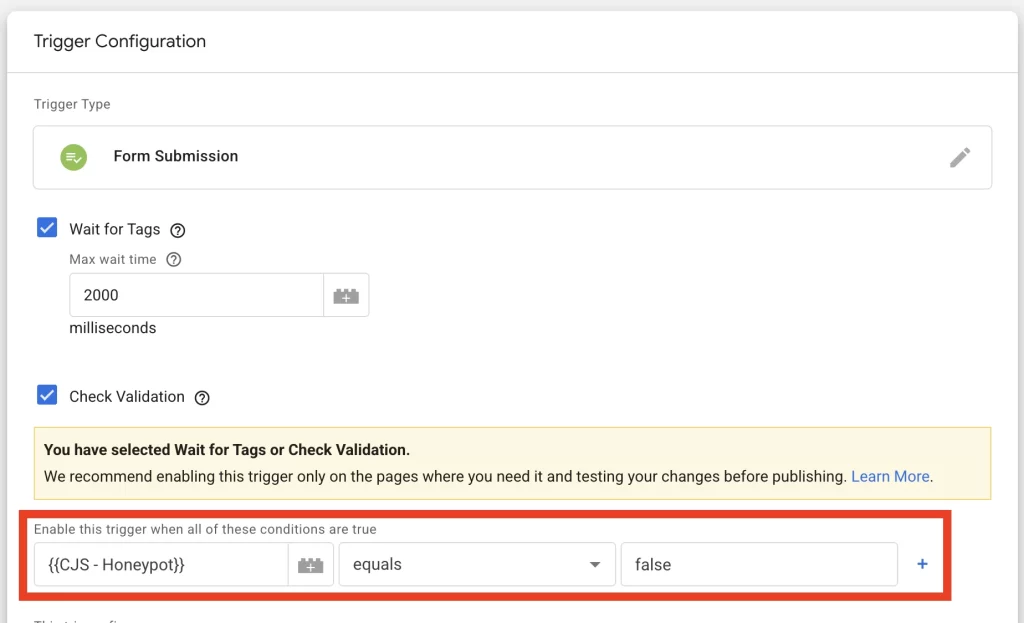
Setting it to enable the trigger if false ensure that the trigger will only fire when the honeypot isn’t filled out (aka it’s not a bot).
Bot Mitigation Case Study
We inherited a campaign that was driving a significant volume of bot submissions to a form offering a detailed quote. This led Meta to prioritize profiles like those bots, leading to a vicious cycle.
What was a slow start escalated into a high daily volume of bot leads.
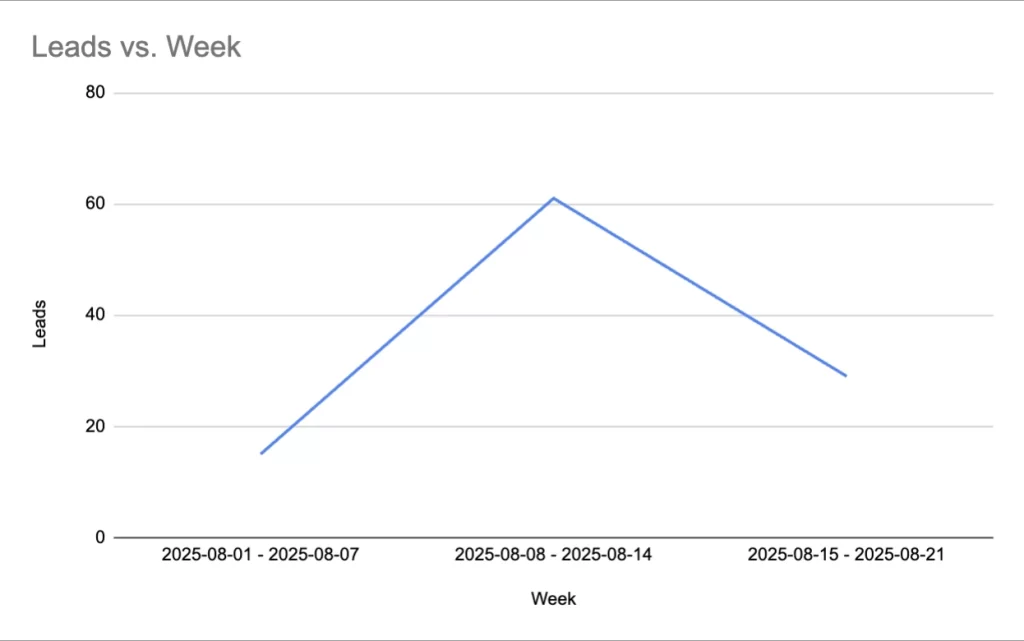
Obviously, this was unsustainable particularly as each lead had to be contacted to confirm qualification status. We paused the campaign and did some quick work to troubleshoot the problem.
Analysis and Findings
Upon further analysis, we identified a few areas of opportunity. These translated to actionable steps to improve campaign performance.
Overdelivery on Reels placements (Quick Win)
Reels on Facebook was driving significant lead volume which raised a red flag. Typically reels act as an awareness placement more than a lead generation driver.
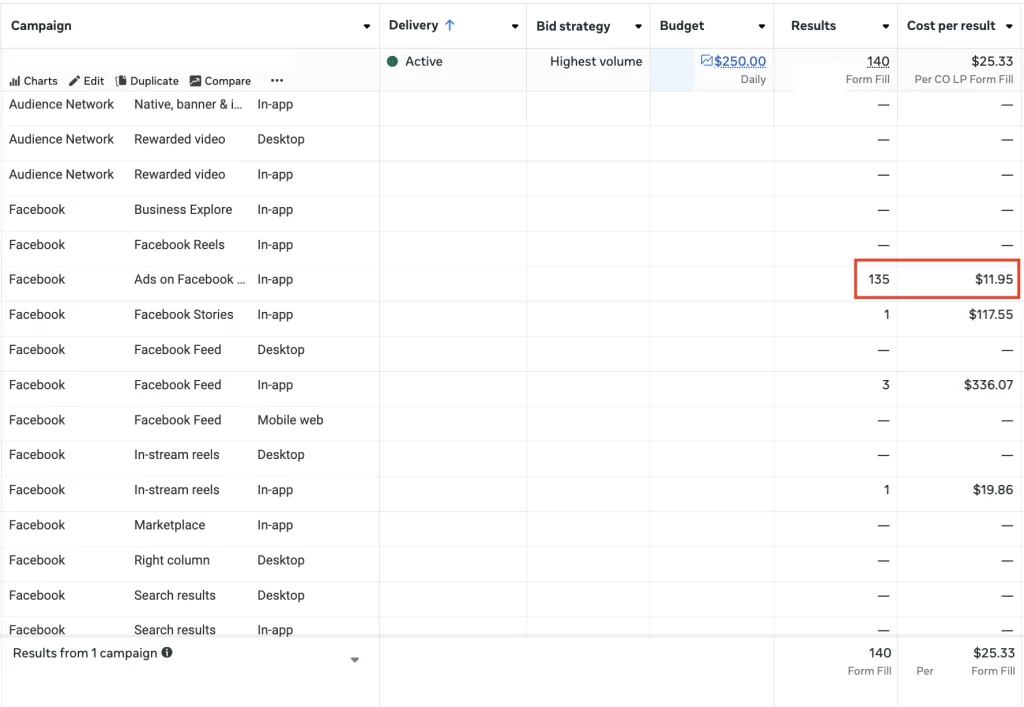
The solve: remove Reels placements from targeting.
While this did raise CPM and CPC, it also led to better quality traffic.
No Bot Protection Measures in Place
After inheriting the landing page, we did a quick sweep of the page’s HTML to determine that no bot protection measures were in place other than a simple CAPTCHA.
With today’s bot sophistication, simple CAPTCHAs aren’t able to reliably weed out bot traffic.
The solve: Implement Cloudflare on the page to block bot traffic before it makes it to the site.
This no-cost implementation (other than updates to the server host names) helped drive a meaningful improvement in page traffic quality.
Simple Form Submission Pixel Trigger
The conversion tag was set up to fire on all form submission events regardless of the contents of the form.
The solve: Add a honeypot and verification step to the trigger
Updating the conversion tag to include verification brought the tag fire volume to 95% equal to actual leads submitted.
Results and Impact
After implementing these changes, we saw a dramatic decrease in leads, but a subsequent improvement in lead quality.
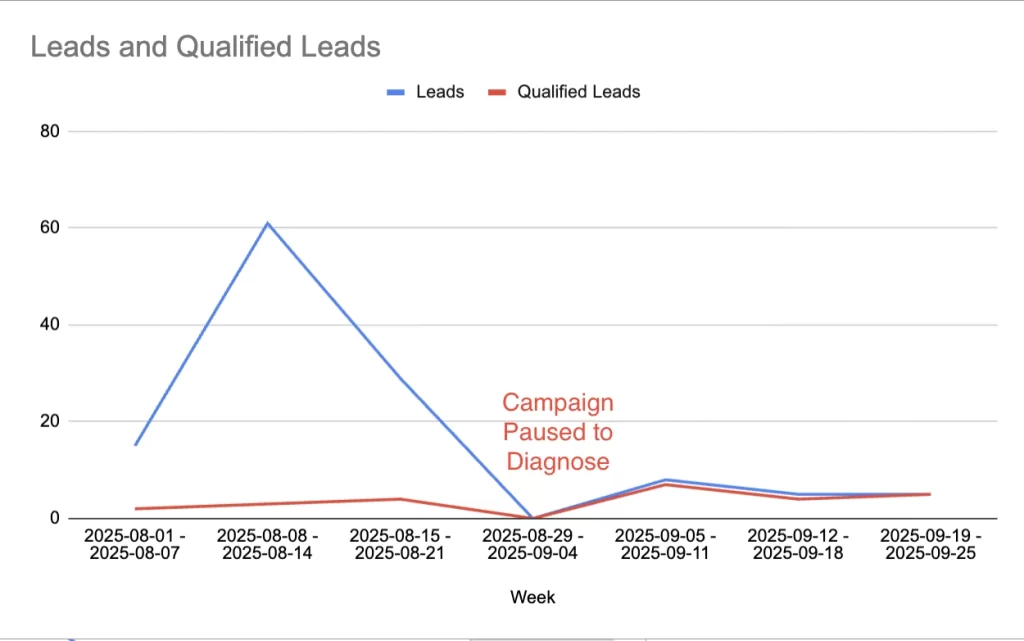
What was 105 leads in the month of August with a 10% qualification rate became 18 leads in September with a 89% qualification rate
| Before Optimization | After Optimization | |
| Spend | $4,000 | $5,000 |
| Leads | 105 | 18 |
| Qualified Leads | 9 | 16 |
| Cost per Lead | $38 | $278 |
| Cost per Qualified Lead | $444 | $312 |
This ultimately meant that cost per qualified lead improved 30%, but also enabled smoother communication with the leads and limited sales frustration.
Takeaway
While removing bot leads increases cost per lead and often times cost per click, it helps lower cost per qualified lead – a metric that actually matters more.
That pair with the benefit of reaching out to fewer leads (making it easier on sales) makes these improvements worth the effort.
Ultimately, quality is the most important metric – both in traffic and in leads.
Actionable Checklist for Meta Bot Mitigation
If you’re dealing with a spam submission problem, here’s a simple checklist to follow to help address the issue:
- Remove Audience Network (test Reels OFF)
- Optimize to Conversions or Multi-Page Sessions
- Cloudflare Bot Fight Mode + Turnstile
- Honeypot verification
- Fire Lead_verified only (with event_id, _fbp/_fbc, hashed IDs via CAPI)
- Report CPQL and % verified; import offline conversions
These steps are great initial actions to take in any case where spam submissions are happening.
The Big Picture: Clean Data, Better Campaigns
Filtering out bots isn’t just about saving budget — it’s about protecting Meta’s algorithm from being trained on bad data. When bots inflate your lead volume, Meta doubles down on finding more of them. When you filter bots out, Meta learns to find actual customers.
That’s why bot mitigation pairs naturally with:
- Server-side tracking (sGTM + CAPI) to ensure only verified, enriched data reaches Meta.
- Customer data hashing to safely pass real identifiers for better match rates.
- Incrementality testing to confirm that your cleaned-up campaigns drive true lift, not just vanity metrics.
In short: cutting bots decreases leads in the short term, but it drives more qualified leads long-term by training your campaigns to target higher-intent users. Quality always beats volume, and clean data is the foundation of scalable growth.