
Connect Meta Ads to ChatGPT with MCP: Fast Cloud Run Setup
Marketers don’t need another dashboard. They need answers, fast. Model Context Protocol (MCP) lets AI tools like ChatGPT securely call your own data as if it were built-in. No more CSVs, no screenshots.
In this guide, you’ll connect Meta Ads to ChatGPT through a lightweight MCP server so you can ask for performance snapshots, audit creatives, and check pacing in plain language.
To brush up on what an MCP is, check out my guide to MCP for marketers.
👉 Skip straight to setup guide
TL;DR: What You’ll Build
- Spin up a FastAPI MCP server on Cloud Run.
- Store your Meta access token in Secret Manager.
- Expose four tools:
list_ads,get_ad_creatives,get_insights,audit_ads. - Test with
curl, then connect via ChatGPT → Connectors.
Meta MCP Use Cases You Can Run Today
Direct connection to Meta Ads unlocks fast, everyday wins—no exports, no dashboards.
Weekly Performance Snapshot (CPC, CPM, CTR)
Ask for last week’s CPC, CPM, CTR by campaign with a one-line summary.
Prompt: “Show last 7 days of spend, CPC, CPM, CTR by campaign for
act_XXXX. Call out any outliers.”
Creative QA & UTM Hygiene (Pre-Launch)
Catch long copy, missing UTMs, or broken links in seconds.
Prompt: “Audit top 50 ads for copy length >125 chars, missing UTM parameters, or 404 links. List fixes.”
Budget Pacing & Month-End Targets
See if you’re on track to hit target spend by month-end.
Prompt: “Are we pacing to $50k this month on
act_XXXX? Recommend daily adjustments.”
Trend Explanations for Stakeholders
Natural-language summaries you can drop into Slack.
Prompt: “Explain why CPC rose >15% WoW at the ad-set level. Include likely causes and next steps.”
Creative Wear-Out Alerts
Flag ads where performance is sliding with rising frequency.
Prompt: “Find ads with frequency >4 and CTR down >20% WoW. Suggest two new variants to test.”
UTM hygiene (easy win)
Enforce tagging standards without opening a spreadsheet.
Prompt: “Scan active ads for missing or duplicated UTM parameters. Provide corrected destination URLs.”
Time-Lag Reality Check
Avoid premature judgments on campaigns with long conversion cycles.
Prompt: “Show conversion time-lag buckets for the last 30 days and warn if we’re under-counting recent spend.”
These are just a taste of what’s possible. The limits are your imagination! Now let’s take a look at how to setup the MCP server.
Setup Guide: From Token to ChatGPT in Under 2 Hours
Setting up an MCP server may seem daunting, but can be completed in as little as 2 hours with the pre-built app and files contained in this article.
Step 1: Get Meta Marketing API Access (ads_read)
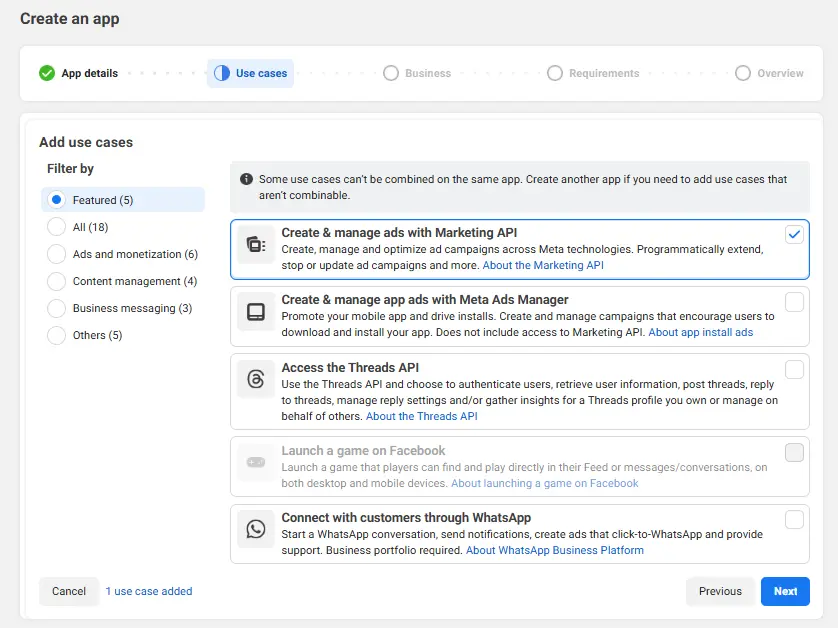
To start, set up a Meta Developer app to gain access to Meta’s API. Create a new app and select Marketing API as the access required.
Create a new app and select Marketing API as the access required.
By default, the necessary scopes will be enabled, but check to make sure the following permission is enabled.
- ads_read
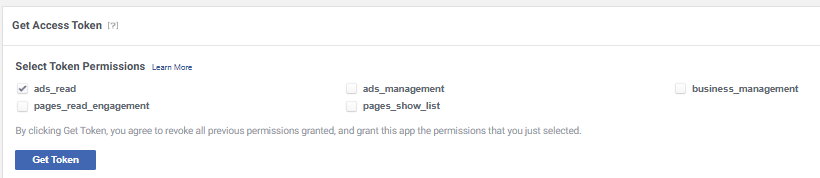
Next, navigate to the ‘tools’ tab and request a key for ads_read to start begin server setup.
Save this key somewhere secure, you’ll need it in the next step.
With this, you can start setting up a MCP server on Cloud Run.
Step 2: Store Your Token in Secret Manager
If you haven’t created a Cloud Run account, refer back to my sGTM setup article for steps on creating an account.
Disclaimer: You will need a credit card.
Step 2a: Create new Google Cloud Project
Select Create Project and name it something related to mcp-meta. This server will be used as the go-between for Meta Ads API and OpenAI.
You can now move forward with creating a Cloud Run service to host the MCP server.
Step 2b: Add API Key to Secret Manager
To store the ads_read API key, navigate to Security > Secret Manager. You’ll need to enable the service if this is the first time you’re using it.
Select ‘Create Secret’ and update the field with your API key.
Make sure to name it something standard like META_ACCESS_TOKEN
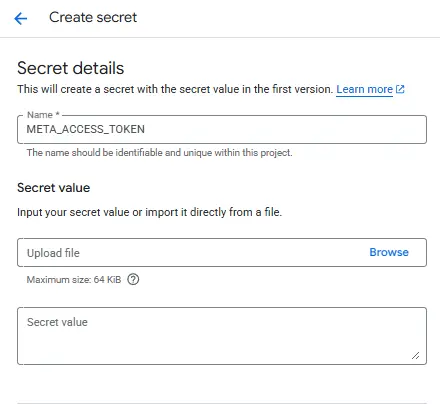
You’ll assign the appropriate permissions after creating a Cloud Run service.
Step 2c: Create Cloud Run service
Navigate to Cloud Run > Services and select Create Service. Choose a name for the service (something like mcp-meta-runner).
You may be prompted to enable Cloud Run Admin API – if so, click Enable and choose a server location.
Finally, build a container image URL using GitHub – select Continuously deploy from a repo and follow through the flow.
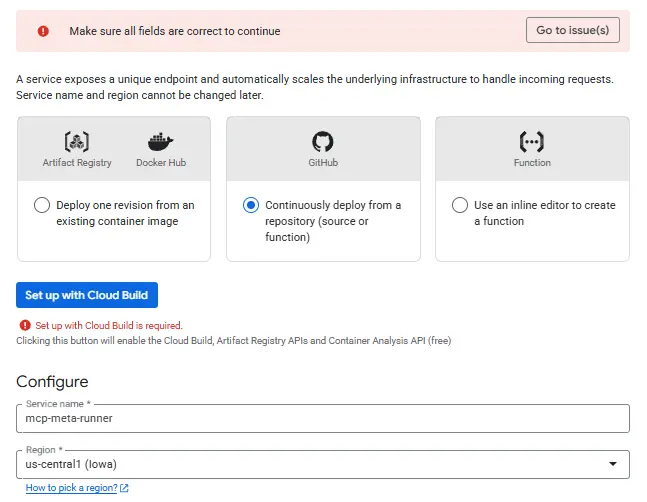
You will need to create a GitHub account if you don’t already have one. In GitHub create a new repository and name it something like meta-mcp.
Assign this repository to your Cloud Run service account and choose Dockerfile. Next, we’ll build out the dockerfile in your GitHub repo.
Step 3: Deploy the MCP Server (FastAPI + Docker)
To deploy a MCP server on Cloud Run, a few files need to be setup in your repository. These act as the essential communication for the MCP app to talk between APIs.
- Requirements
- Dockerfile
- App
Just want the code? See my repository on GitHub.
Step 3a: Build Requirements Text File
Build a new file in your repository by opening the repository and clicking ‘add file’ in the top right. Name the file requirements.txt and add the following contents.
Detailed Code
fastapi==0.110.0
starlette==0.36.3
anyio==4.4.0
uvicorn==0.29.0
httpx==0.27.2
requests==2.32.3
Select ‘Commit Changes’ in the top right to publish the file. Next, build the Dockerfile.
Step 3b: Build A Dockerfile
A dockerfile is the method for building a server container image – the file that reads your app and starts the commands. Cloud Build reads the file, builds an image with everything your app needs, then allows Cloud Run to use that image to execute.
Create a new file and name is Dockerfile (capitalization is important) with the following contents.
Detailed Code
FROM python:3.11-slim

ENV PYTHONUNBUFFERED=1 \
   PYTHONDONTWRITEBYTECODE=1

WORKDIR /app

COPY requirements.txt .
RUN pip install --no-cache-dir -r requirements.txt

COPY . .

CMD ["sh","-c","uvicorn app:app --host 0.0.0.0 --port ${PORT:-8080}"]
Select ‘Commit Changes’ to publish. Now we’ll build the app that translates Meta’s data to OpenAI’s desired format.
Step 3c: Build a Python App
The app operates as the basis for the MCP server. It includes details about what APIs will be called and the data that will be transferred.
This starter app has four built in tools:
- list_ads: Returns ad dimensions (campaign, ad set, creative)
- get_ad_creatives: Bulk fetches creative IDs and pulls copy, links, URL tags, and Advantage+ creative features
- get_insights: Pulls common performance data (spend, impressions, clicks, etc.)
- audit_ads: A high-level audit to check copy character count, URL hygeine, Advantage+ flags, etc.
These can be further customized to include custom metrics or additional audit factors.
Detailed Code
# app.py
import os, time, json, random, logging
from typing import Dict, Any, List, Optional

import requests
from fastapi import FastAPI, Request
from fastapi.responses import JSONResponse, PlainTextResponse, StreamingResponse
from fastapi.middleware.cors import CORSMiddleware
from starlette.middleware.base import BaseHTTPMiddleware

import asyncio

APP_NAME = "mcp-meta"
APP_VER  = "0.2.0"  # web-friendly revision
META_API_VERSION = os.getenv("META_API_VERSION", "v23.0")
ACCESS_TOKEN     = os.getenv("META_ACCESS_TOKEN")  # injected from Secret Manager
GRAPH            = f"https://graph.facebook.com/{META_API_VERSION}"

# ---------- Logging & shared-secret setup (define BEFORE using) ----------
logging.basicConfig(level=logging.INFO)
log = logging.getLogger("mcp-meta")

# Optional: shared secret to block random internet callers.
MCP_SHARED_KEY = os.getenv("MCP_SHARED_KEY", "").strip()
log.info("MCP_SHARED_KEY enabled? %s", "YES" if MCP_SHARED_KEY else "NO")

# ----------------------------- FastAPI app & middleware -----------------------------
app = FastAPI()

ALLOWED_ORIGINS = [
    "https://claude.ai",
    "https://www.claude.ai",
    "https://console.anthropic.com",
    "https://chatgpt.com",
    "https://chat.openai.com",
    "https://platform.openai.com",
]

app.add_middleware(
    CORSMiddleware,
    allow_origins=["*"],               # temporarily allow all origins for debugging
    allow_credentials=False,           # must be False when using allow_origins=["*"]
    allow_methods=["GET", "POST", "OPTIONS"],
    allow_headers=["*"],
    expose_headers=["MCP-Protocol-Version", "Mcp-Session-Id"],
)

@app.middleware("http")
async def _reqlog(request: Request, call_next):
    log.info("REQ %s %s Origin=%s", request.method, request.url.path, request.headers.get("origin"))
    resp = await call_next(request)
    log.info("RESP %s %s %s", request.method, request.url.path, resp.status_code)
    return resp

# Always surface MCP-Protocol-Version so clients can see it
class MCPProtocolHeader(BaseHTTPMiddleware):
    async def dispatch(self, request: Request, call_next):
        proto = request.headers.get("Mcp-Protocol-Version") or "2024-11-05"
        response = await call_next(request)
        response.headers["MCP-Protocol-Version"] = proto
        return response

app.add_middleware(MCPProtocolHeader)

# ----------------------------- HTTP client (pooling + retries) ---------------------

class FBError(Exception): pass

_session = requests.Session()
_adapter  = requests.adapters.HTTPAdapter(
    max_retries=0, pool_connections=20, pool_maxsize=50
)
_session.mount("https://", _adapter)

_TRANSIENT_CODES = {"1","2","4","17","32","613"}  # common transient Meta error codes

def _ensure_token():
    if not ACCESS_TOKEN:
        raise FBError("META_ACCESS_TOKEN is not set")

def g(path: str, params: Optional[Dict[str, Any]] = None, max_attempts: int = 5) -> Dict[str, Any]:
    _ensure_token()
    if params is None: params = {}
    params["access_token"] = ACCESS_TOKEN
    url = f"{GRAPH}/{path.lstrip('/')}"
    for attempt in range(1, max_attempts + 1):
        r = _session.get(url, params=params, timeout=60)
        if r.status_code < 400:
            return r.json()
        # parse error
        try:
            err = r.json().get("error", {})
        except Exception:
            err = {"message": r.text, "code": "unknown"}
        code = str(err.get("code"))
        fbtrace = err.get("fbtrace_id")
        msg = f"{err.get('message')} (code={code}, fbtrace_id={fbtrace})"
        # transient -> retry with jitter
        if code in _TRANSIENT_CODES and attempt < max_attempts:
            time.sleep(min(2**attempt, 20) + random.random())
            continue
        raise FBError(msg)

def _chunk(seq: List[str], n: int):
    for i in range(0, len(seq), n):
        yield seq[i:i+n]

# ----------------------------- Tools descriptor ------------------------------------

TOOLS = [
    {
        "name": "list_ads",
        "description": "List ads in an ad account with campaign/adset/creative context.",
        "inputSchema": {
            "type": "object",
            "properties": {
                "account_id": {"type": "string", "description": "Ad account id, e.g. act_1234567890"},
                "limit": {"type": "integer", "minimum": 1, "maximum": 500, "default": 50},
                "after": {"type": ["string","null"], "description": "Pagination cursor"}
            },
            "required": ["account_id"]
        }
    },
    {
        "name": "get_ad_creatives",
        "description": "Fetch creative copy/links/flags for ads or creatives.",
        "inputSchema": {
            "type": "object",
            "properties": {
                "ad_ids": {"type":"array","items":{"type":"string"}},
                "creative_ids": {"type":"array","items":{"type":"string"}}
            },
            "oneOf": [{"required":["ad_ids"]}, {"required":["creative_ids"]}]
        }
    },
    {
        "name": "get_insights",
        "description": "Pull performance insights for account/campaign/adset/ad.",
        "inputSchema": {
            "type": "object",
            "properties": {
                "scope_id": {"type":"string","description":"act_<id> | <campaign_id> | <adset_id> | <ad_id>"},
                "level": {"type":"string","enum":["account","campaign","adset","ad"], "default":"ad"},
                "date_preset": {"type":"string","description":"e.g. last_7d,last_30d"},
                "time_range": {"type":"object","properties":{"since":{"type":"string"},"until":{"type":"string"}}},
                "fields": {"type":"array","items":{"type":"string"},
                    "default":["ad_id","ad_name","spend","impressions","clicks","cpc","cpm","ctr"]},
                "breakdowns":{"type":"array","items":{"type":"string"}},
                "limit":{"type":"integer","minimum":1,"maximum":500,"default":100},
                "after":{"type":["string","null"]}
            },
            "required":["scope_id"]
        }
    },
    {
        "name": "audit_ads",
        "description": "Run simple creative lints: copy length, URL hygiene, variant coverage.",
        "inputSchema": {
            "type":"object",
            "properties":{
                "ad_ids":{"type":"array","items":{"type":"string"}},
                "rules":{"type":"object","properties":{
                    "max_primary_text":{"type":"integer","default":125},
                    "max_headline":{"type":"integer","default":40}
                }}
            },
            "required":["ad_ids"]
        }
    }
]

# ----------------------------- Tool implementations --------------------------------

def tool_list_ads(args: Dict[str, Any]) -> Dict[str, Any]:
    account_id = args["account_id"]
    limit = int(args.get("limit", 50))
    after = args.get("after")
    fields = "id,name,effective_status,adset{id,name},campaign{id,name},creative{id}"
    params = {"fields": fields, "limit": limit}
    if after: params["after"] = after
    return g(f"{account_id}/ads", params)

def _creative_fields() -> str:
    # In v23, creative_features_spec is nested under degrees_of_freedom_spec
    return "object_story_spec,asset_feed_spec,url_tags,degrees_of_freedom_spec"

def tool_get_ad_creatives(args: Dict[str, Any]) -> Dict[str, Any]:
    out: Dict[str, Any] = {}
    if "creative_ids" in args and args["creative_ids"]:
        for batch in _chunk(args["creative_ids"], 25):
            ids = ",".join(batch)
            res = g("", params={"ids": ids, "fields": _creative_fields()})
            out.update({k: v for k, v in res.items()})
    else:
        for ad_id in args["ad_ids"]:
            res = g(f"{ad_id}", params={"fields": f"creative{{{_creative_fields()}}}"})
            out[ad_id] = res.get("creative", {}) or {}
    return out

def tool_get_insights(args: Dict[str, Any]) -> Dict[str, Any]:
    scope_id   = args["scope_id"]
    level      = args.get("level", "ad")
    fields     = args.get("fields") or ["ad_id","ad_name","spend","impressions","clicks","cpc","cpm","ctr"]
    breakdowns = args.get("breakdowns")
    date_preset= args.get("date_preset")
    time_range = args.get("time_range")
    limit      = int(args.get("limit", 100))
    after      = args.get("after")

    if date_preset and time_range:
        date_preset = None

    params = {"level": level, "fields": ",".join(fields), "limit": limit}
    if breakdowns: params["breakdowns"] = ",".join(breakdowns)
    if date_preset: params["date_preset"] = date_preset
    if time_range: params["time_range"] = json.dumps(time_range)
    if after: params["after"] = after
    return g(f"{scope_id}/insights", params)

def _lint_issue(kind: str, detail: str) -> Dict[str, str]:
    return {"type": kind, "detail": detail}

def tool_audit_ads(args: Dict[str, Any]) -> Dict[str, Any]:
    ad_ids = args["ad_ids"]
    rules  = {"max_primary_text": 125, "max_headline": 40}
    rules.update(args.get("rules", {}) or {})

    raw = tool_get_ad_creatives({"ad_ids": ad_ids})
    findings: List[Dict[str, Any]] = []

    for ad_id, creative in raw.items():
        issues: List[Dict[str, str]] = []
        bodies: List[str] = []
        titles: List[str] = []
        links:  List[str] = []

        # --- extract creative pieces ---
        oss = (creative or {}).get("object_story_spec", {}) or {}
        ld  = oss.get("link_data", {}) or {}
        url_tags = (creative or {}).get("url_tags")  # only tags here

        # primary text / headline / link(s)
        if ld.get("message"): bodies.append(ld["message"])
        if ld.get("name"):    titles.append(ld["name"])
        if ld.get("link"):    links.append(ld["link"])

        # CTA link is also a link (not tags)
        cta_link = ld.get("call_to_action", {}).get("value", {}).get("link")
        if cta_link:
            links.append(cta_link)

        # asset feed variants
        afs = (creative or {}).get("asset_feed_spec", {}) or {}
        bodies += [x for x in afs.get("bodies", []) if x]
        titles += [x for x in afs.get("titles", []) if x]
        links  += [x for x in afs.get("link_urls", []) if x]

        # Advantage+ / creative features flags
        flags = (creative or {}).get("degrees_of_freedom_spec", {}).get("creative_features_spec")

        # --- lints ---
        uniq_bodies = {b for b in bodies if isinstance(b, str)}
        uniq_titles = {t for t in titles if isinstance(t, str)}
        uniq_links  = {u for u in links  if isinstance(u, str)}

        # copy length
        for b in uniq_bodies:
            if len(b) > rules["max_primary_text"]:
                issues.append(_lint_issue("primary_text_length",
                                          f"{len(b)} chars > {rules['max_primary_text']}"))
        for t in uniq_titles:
            if len(t) > rules["max_headline"]:
                issues.append(_lint_issue("headline_length",
                                          f"{len(t)} chars > {rules['max_headline']}"))

        # URL hygiene
        for u in uniq_links:
            if not u.lower().startswith("https://"):
                issues.append(_lint_issue("non_https_url", u))
        if url_tags is None or (isinstance(url_tags, str) and url_tags.strip() == ""):
            issues.append(_lint_issue("missing_url_tags", "No UTM or url_tags found"))

        # variant coverage
        if len(uniq_bodies) <= 1 or len(uniq_titles) <= 1:
            issues.append(_lint_issue("low_variant_coverage",
                                      f"bodies={len(uniq_bodies)} titles={len(uniq_titles)}"))

        # append per-ad result
        findings.append({
            "ad_id": ad_id,
            "issues": issues,
            "creative_features_spec": flags,
            "summary": {
                "unique_bodies": len(uniq_bodies),
                "unique_titles": len(uniq_titles),
                "unique_links": len(uniq_links),
                "has_url_tags": bool(url_tags)
            }
        })

    return {"results": findings}

# ----------------------------- Health & discovery ----------------------------------

@app.get("/", include_in_schema=False)
@app.head("/", include_in_schema=False)
async def root_get(request: Request):
    if request.method == "HEAD":
        return PlainTextResponse("")
    return PlainTextResponse("ok")

@app.options("/{_any:path}")
async def any_options(_any: str):
    return PlainTextResponse("", status_code=204)

# OAuth discovery stubs (avoid 405s)
@app.get("/.well-known/oauth-protected-resource", include_in_schema=False)
async def oauth_pr():
    return JSONResponse({"ok": False, "error": "oauth discovery not configured"}, status_code=404)

@app.get("/.well-known/oauth-authorization-server", include_in_schema=False)
async def oauth_as():
    return JSONResponse({"ok": False, "error": "oauth discovery not configured"}, status_code=404)

# MCP discovery
@app.get("/.well-known/mcp.json")
def mcp_discovery():
    return JSONResponse({
        "mcpVersion": "2024-11-05",
        "name": APP_NAME,
        "version": APP_VER,
        "auth": {"type": "none"},
        "capabilities": {"tools": {"listChanged": True}},
        "endpoints": {"rpc": "/"},
        "tools": TOOLS
    })

@app.get("/mcp/tools")
def mcp_tools():
    return JSONResponse({"tools": TOOLS})

# /register probes (explicit 200 JSON)
@app.get("/register", include_in_schema=False)
def register_get():
    return JSONResponse({"ok": True})

@app.post("/register", include_in_schema=False)
def register_post():
    return JSONResponse({"ok": True})

# ----------------------------- JSON-RPC core ---------------------------------------

def _authz_check(request: Request) -> Optional[JSONResponse]:
    # Optional shared-secret check (only if MCP_SHARED_KEY is set)
    if MCP_SHARED_KEY:
        key = request.headers.get("X-MCP-Key") or ""
        if key != MCP_SHARED_KEY:
            return JSONResponse(
                {"jsonrpc": "2.0", "id": None,
                 "error": {"code": -32001, "message": "Unauthorized"}},
                status_code=200
            )
    return None

@app.post("/")
async def rpc(request: Request):
    maybe = _authz_check(request)
    if maybe: return maybe
    try:
        payload = getattr(request.state, "json_payload", None) or await request.json()
        method  = payload.get("method")
        _id     = payload.get("id")
        log.info(f"RPC method: {method}")

        if method == "initialize":
            client_proto = (payload.get("params") or {}).get("protocolVersion") or "2024-11-05"
            result = {"protocolVersion": client_proto,
                      "capabilities": {"tools": {"listChanged": True}},
                      "serverInfo": {"name": APP_NAME, "version": APP_VER},
                      "tools": TOOLS}
            return JSONResponse({"jsonrpc":"2.0","id":_id,"result": result},
                                headers={"MCP-Protocol-Version": client_proto})

        if method in ("initialized", "notifications/initialized"):
            return JSONResponse({"jsonrpc":"2.0","id":_id,"result":{"ok": True}})

        if method in ("tools/list","tools.list","list_tools","tools.index"):
            return JSONResponse({"jsonrpc":"2.0","id":_id,"result":{"tools": TOOLS}})

        if method == "tools/call":
            params = payload.get("params") or {}
            name   = params.get("name")
            args   = params.get("arguments") or {}

            try:
                log.info(f"Calling tool: {name} with args: {args}")
                if name == "list_ads":
                    data = tool_list_ads(args)
                elif name == "get_ad_creatives":
                    data = tool_get_ad_creatives(args)
                elif name == "get_insights":
                    data = tool_get_insights(args)
                elif name == "audit_ads":
                    data = tool_audit_ads(args)
                else:
                    return JSONResponse({"jsonrpc":"2.0","id":_id,
                        "error":{"code":-32601,"message":f"Unknown tool: {name}"}})
                log.info(f"Tool {name} completed successfully")
                return JSONResponse({"jsonrpc":"2.0","id":_id,
                    "result":{"content":[{"type":"text","text": str(data)}]}})
            except FBError as e:
                log.error(f"Tool call failed (FBError): {e}")
                log.exception("FBError details:")
                return JSONResponse({"jsonrpc":"2.0","id":_id,
                    "error":{"code":-32000,"message":str(e)}})
            except Exception as e:
                log.error(f"Tool call failed (unexpected): {e}")
                log.exception("Exception details:")
                return JSONResponse({"jsonrpc":"2.0","id":_id,
                    "error":{"code":-32099,"message":f"Unhandled tool error: {e.__class__.__name__}: {e}"}})

        # Unknown method
        return JSONResponse({"jsonrpc":"2.0","id":_id,
                             "error":{"code":-32601,"message":f"Method not found: {method}"}})
    except Exception as e:
        log.exception("RPC dispatch exploded")
        return JSONResponse({"jsonrpc":"2.0","id":None,
                             "error":{"code":-32098,"message":f"RPC dispatch error: {e.__class__.__name__}: {e}"}})

# ----------------------------- Local dev entrypoint --------------------------------
if __name__ == "__main__":
    import uvicorn
    uvicorn.run("app:app", host="0.0.0.0", port=int(os.environ.get("PORT", "5000")))
Once this is added, commit changes and move back to Cloud Build to finish building the Cloud Run Service.
Step 4: Configure Cloud Run (Concurrency, Instances, Timeout)
Back in your Cloud Run project, create service and select your repository. You should be able to assign your Dockerfile from the repository to build your server container image.
In the General settings, update the following:
- Concurrency: 80 → 10
- Max Instances: 20 → 3
- Timeout: 120s
These will control costs and make sure the server is able to run properly. Finally, add the secret key.
Navigate to Variables & Secrets and add your Meta access token to secrets.
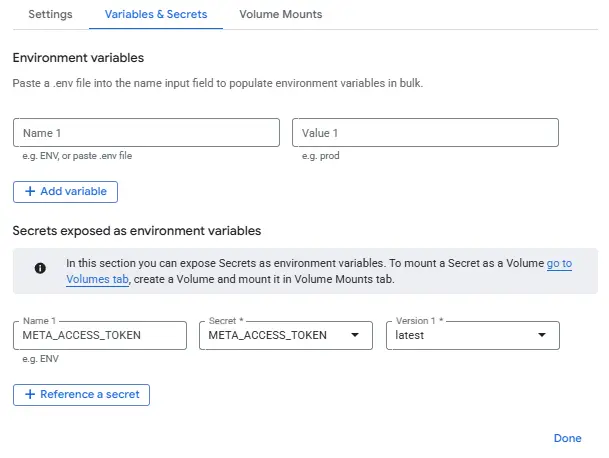
Hit Deploy and the server will run. You should see a green checkmark next to the name in the Revisions tab.
Make sure your Service Account has access to the Secret Token
If you get an error, check that the service email has ‘Secret Key Accessor’ permission. If not, click Grant Access, paste the email and assign the role.
Redeploy the server by editing and clicking Deploy. Once you see a green checkmark, you’re ready to start testing and connecting to ChatGPT.
Step 5: Test the Endpoint (curl) & Connect to ChatGPT
This is the last step of the process to ensure everything is working properly.
Step 5a: Cloud Shell Testing
Start by opening Cloud Shell by clicking ‘Test’ in the top of your screen. From here, click ‘Test in Cloud Shell’ to open a console in Google Cloud.
Paste in the following command and hit enter.
Detailed Command
URL="https://meta-mcp-43118595316.us-central1.run.app"

# Preflight (browser-style)
curl -i -X OPTIONS "$URL/" \
 -H "Origin: https://claude.ai" \
 -H "Access-Control-Request-Method: POST" \
 -H "Access-Control-Request-Headers: content-type,mcp-protocol-version"

# Initialize (browser-style)
curl -i "$URL/" \
 -H "Origin: https://claude.ai" \
 -H "Content-Type: application/json" \
 -H "Mcp-Protocol-Version: 2024-11-05" \
 --data '{"jsonrpc":"2.0","id":1,"method":"initialize","params":{"protocolVersion":"2024-11-05"}}'

# Discovery doc
curl -i "$URL/.well-known/mcp.json" -H "Origin: https://claude.ai"
This should return 200s and your tools listed. If it fails, check Cloud Run logs for a Python traceback. Logs can be found in the service tab under ‘Observability’.
Step 5b: Deploying in ChatGPT
To deploy the app, find the server URL located at the top of your Cloud Run service. It should start with your service name and include the server location.
Open ChatGPT > settings andclick on ‘Connectors’. Click ‘Create’ to build a custom connector. Paste the server URL from Cloud Run into the appropriate field, and set no Authentication.
Once saved, hit the ‘+’ next to your chat bar > hover over ‘more’. Turn on developer mode, and your MCP server should show up.
When this is selected, you’ll be able to use the tool commands to call data directly from Meta Ads.
Step 5c: Test Prompt in ChatGPT
Test the connector to make sure it’s pulling the correct data. Start with your Meta Ads Account ID, and craft a simple language prompt.
Example Prompt: Get campaign insights for account
act_xxxxxxfor the last 7 days.
This should return a table of metric performance.
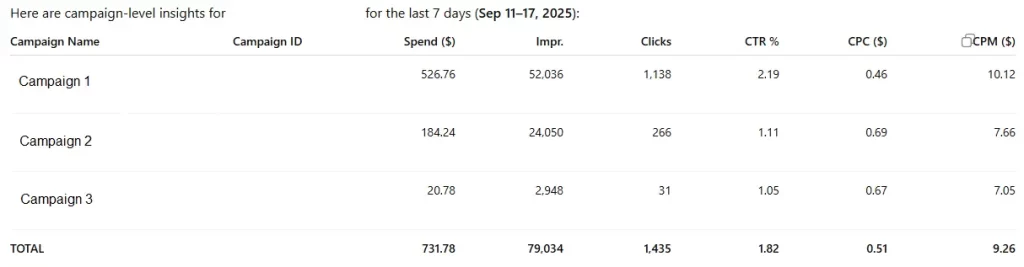
From here, you can dig deeper into the data using ChatGPT’s natural language processing and additional contextual information.
Faster Audits, Fewer Exports, Clearer Reporting
MCP turns your Meta Ads account into a live, queryable data source inside your chat window. With a tiny FastAPI service on Cloud Run, you can list ads, pull creatives and insights, and even run automated audits—no CSV exports, no BI detours.
From here, harden the surface (scoped CORS and an auth header), add paging + retries, and expand tools for the jobs you do weekly (creative wear-out, URL hygiene, time-lag rollups). The result is a faster audit loop, clearer reporting, and fewer swivel-chair tasks between platforms—exactly what MCP was built to deliver.
Appendix: Links & Resources
- MCP 101 for Marketers: What MCP is, why it matters, and real use cases.
- Meta MCP Starter Repo (FastAPI + Cloud Run): Clone, add your token, deploy.
- MCP for Google Tag Manager: Create & Deploy tags using ChatGPT
- Build a Google Ads MCP Server: Streamline insights and reporting
- sGTM Setup (Server-Side GTM): Step-by-step guide to stronger, privacy-safe tracking.
- Meta Conversions API (CAPI): How CAPI fits with sGTM and improves event match rates.