
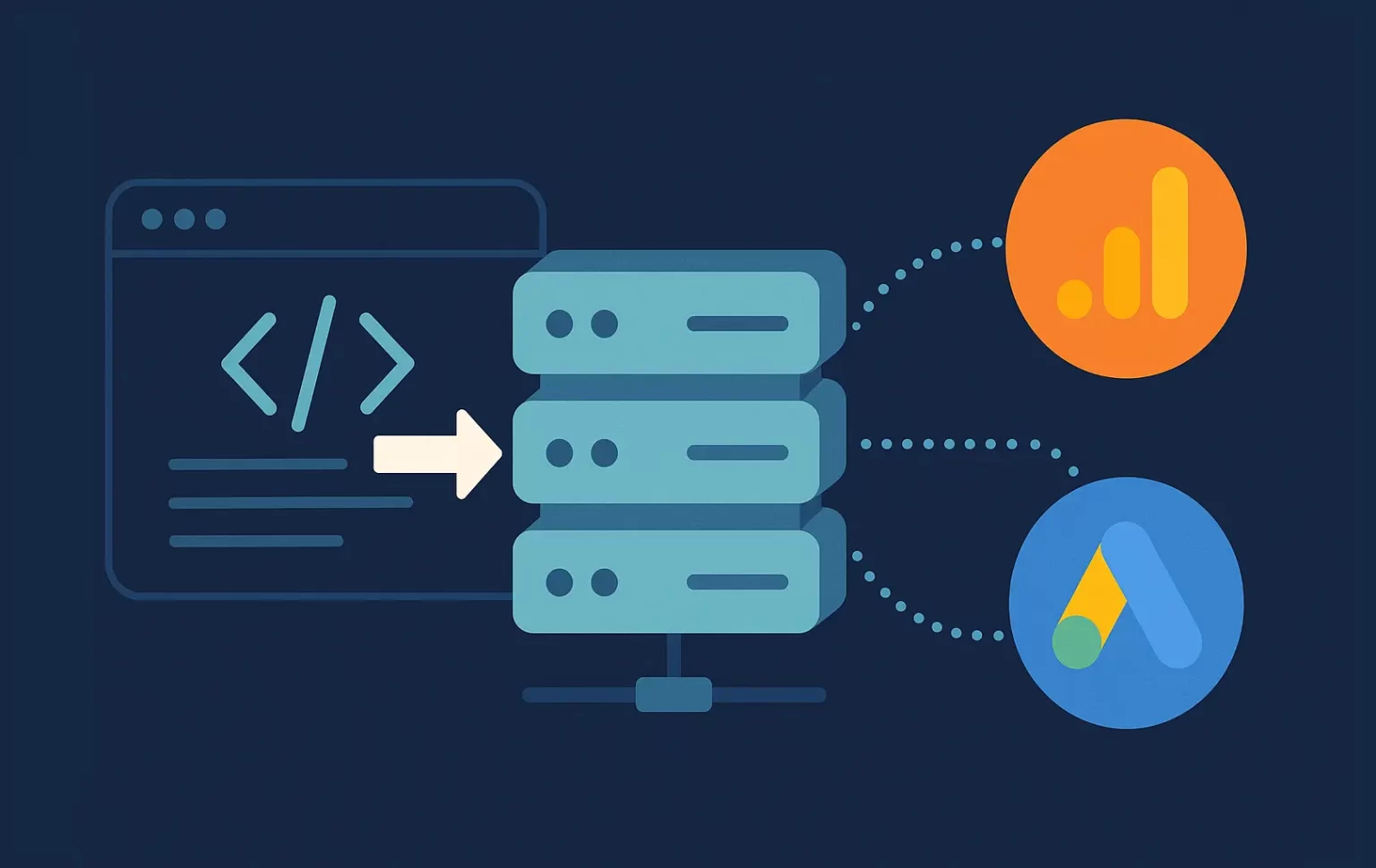
Server-Side Google Tag Manager (sGTM) Setup for GA4: A Complete Guide
Tracking on the web is the only thing that sets apart digital marketing from traditional marketing. It opens up a world of possibilities to analyze data, refine strategy, and deliver a better user experience.
Historically, tracking has all been done in the web browser. However, new privacy-centric browsers and ad blockers limit the ability of browser tracking and therefore the data marketers use to make smart optimizations.
To solve for this, server-side tracking was introduced 5 years ago. This form of tracking sends data directly from a website’s server rather than in the browser, restoring lost data from the aforementioned blockers.
The primary method for server-side tracking is Google Tag Manager, which enables seemless connection of platforms to website servers using existing tag logic. We’ll delve into how to set up a server-side Google Tag Manager account and connections to relevant ad platforms like Google Ads.
Not sure if you should start with full server-side or Google Tag Gateway? Read my side-by-side comparison of Google Tag Gateway vs sGTM.
Skip straight to implementation
TL;DR
Server-side tracking routes your analytics through your own server instead of the browser, helping recover data lost to ad blockers and privacy changes.
Using Server-Side Google Tag Manager (sGTM), you can set up a server container, connect platforms like GA4 and Google Ads, and enrich data before it’s sent.
This article walks you through what server-side tracking is, why it matters, advanced use cases, and a step-by-step guide to setting up sGTM.
What is Server-Side Tracking
Server-side tracking is part of your tracking infrastructure. It changes where collection happens (server vs browser) and what data you can reliably preserve and enrich.
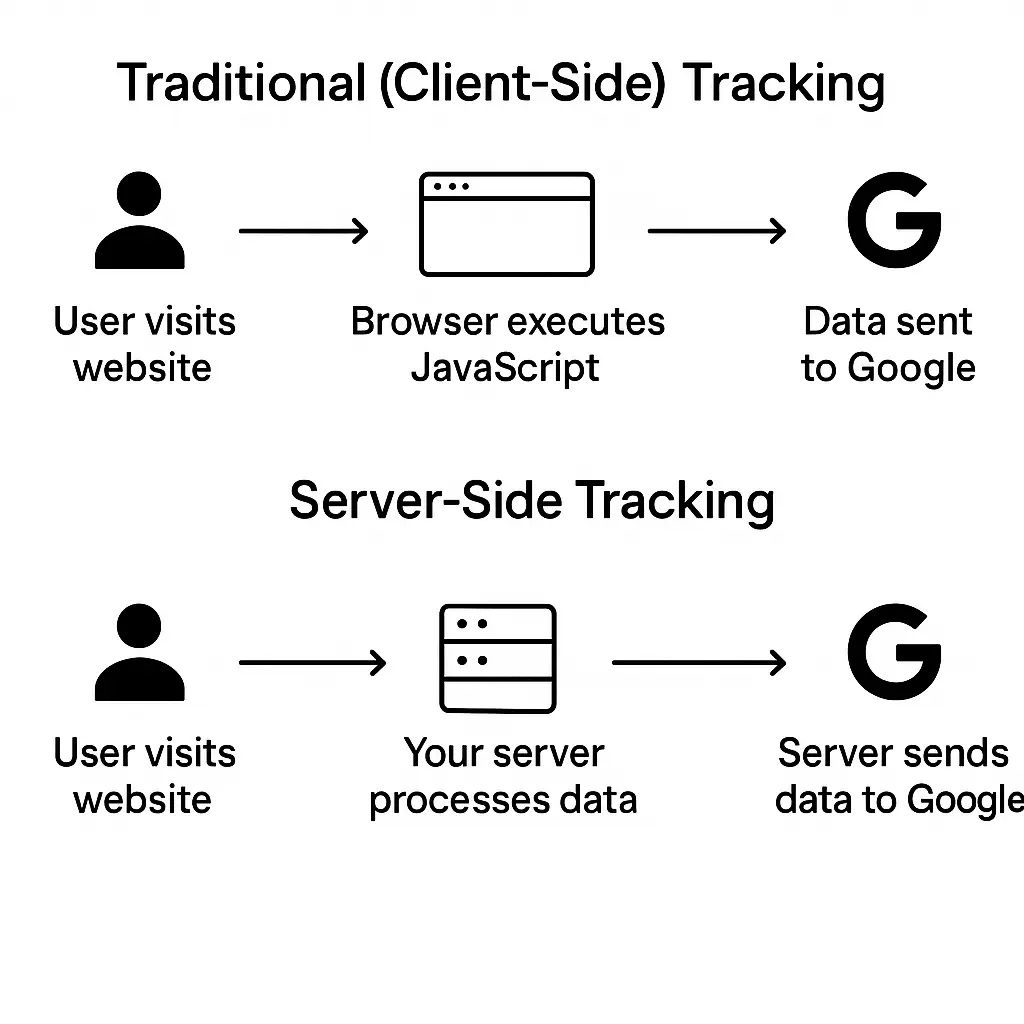
The only difference between the two is where the tracking logic runs and who controls it.
Browser vs Server Tracking: How It Works
In both tracking systems, events are identified on a website. The difference comes from where the tag (which sends data) is run.
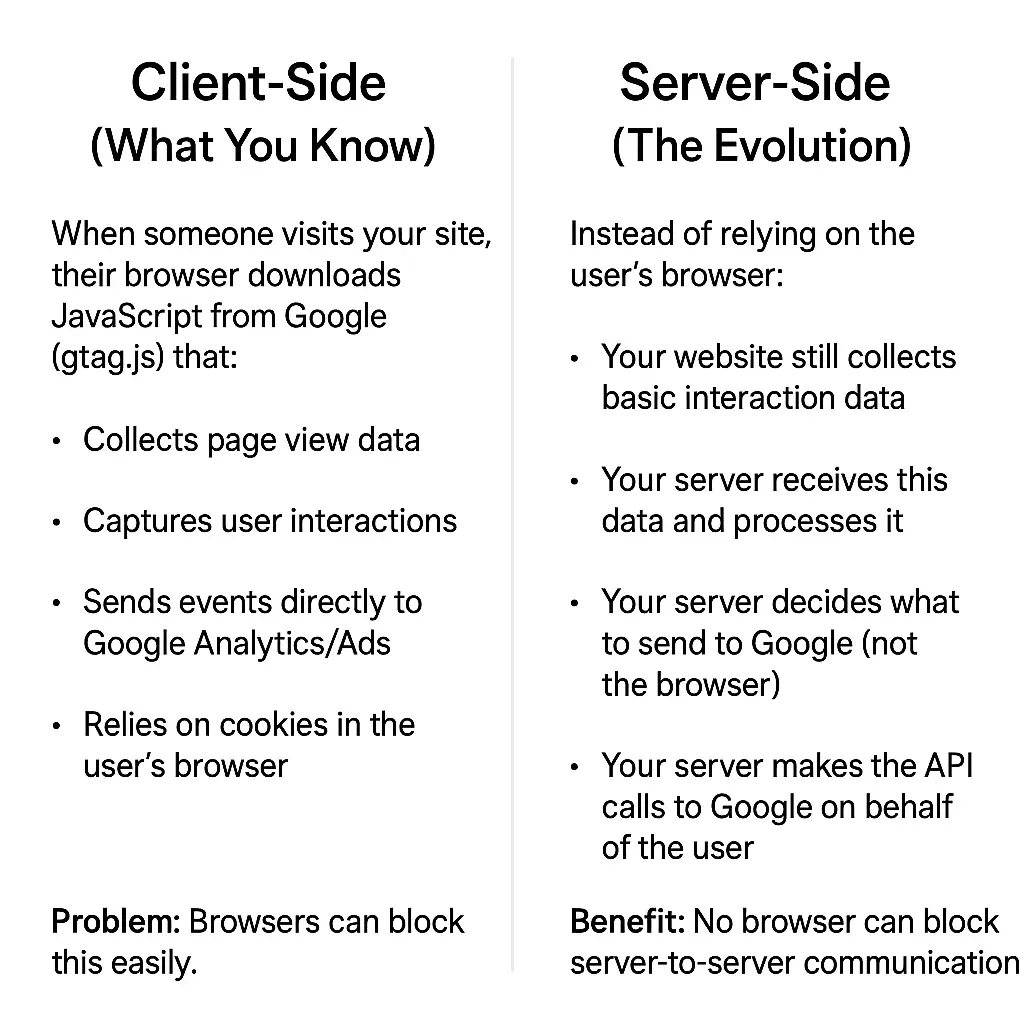
The fundamental difference between browser and server tracking is the reliance on browser cookies.
Website → Browser → Google Analytics
↑ (Ad blockers block here)
Website → Your Server → Google Analytics
↑ (Ad blockers can’t see this)
Instead of using the browser, the server acts as the go-between. This allows for data enrichment before sending it to Google.
For example, a unique user ID and Google Click ID can be stored with any user that visits the site. In a later browsing sessions, this data can be pulled from a first-party cookie and used for attribution back to the first-click source.
Key Takeaway: Server-side tracking works around the web browser avoiding tracking loss from ad blockers and cookieless browsers.
Why Server-Side Tracking Matters
Server-side tracking was first introduced as a response to the deprecation of 3rd party cookies, but Google walked back on that plan at the beginning of this year.
Regardless, privacy-focused browsers and ad blockers still block a significant share of web tags, which means incomplete or inaccurate data for marketers.
This isn’t just a technical upgrade — it improves the quality of your measurement system by restoring signal loss and enabling enrichment.
That unlocks stronger attribution, the ability to optimize for metrics like profit rather than just revenue, and richer audience creation through first-party data.
Google’s latest release, Google Tag Gateway, provides some of this functionality without the complexity of a true server-side setup. For a full comparison, check out my Tag Gateway vs sGTM guide.
Advanced Use Cases for Server-Side Tracking
Beyond ad blockers, there are unique use cases where server-side tracking is particularly effective.
Connecting The User Journey
Tracking touchpoints across many sessions and offline conversions can be managed through a server-side integration.
Capture information like a user ID, email address, phone number, etc. as users follow through your funnel to stitch together a complete path to conversion.
This improves attribution accuracy, and the insights that can be drawn.
Profit Margin Bid Optimization
For e-commerce companies that rely on business metrics like profit, aligning ad optimization with purchases that driving the most profit on ad spend is important.
The server environment can include logic that calculate actual profit using profit margin, inventory cost, shipping cost, and more.
This allows ad platforms to optimize for the most profitable products vs simply those that contribute the most revenue.
Advanced Audience Creation
Data enrichment in the server environment can help with identity resolution. These profiles offer the ability to create enhanced retargeting audiences using 1st party data identifiers.
For example, an audience of customers that have downloaded a guide, but haven’t purchased can be used to push more direct-response messaging that refers to the guide downloaded.
The unique ability of data storage in the server opens up new possibilities that are not possible with traditional browser tracking.
Now let’s walk through exactly how to implement server-side tracking to unlock these capabilities for your business.
Server-Side GTM Implementation Guide
Similar to setting up Facebook’s Conversions API manually, this process involves direct connection to Google Analytics API. However, since it requires you to build out tracking in your server, the process is far more complicated – taking 15-20 hours in total.
What You Need Before You Begin
As server-side integration involves connecting backend platforms, there are a few requirements to consider before beginning.
Access Requirements
- Google Tag Manager Access (Web Property) [Admin Required]
- Google Cloud Run Access (For Server Setup)
- Google Analytics/Ads Access [Admin Required]
- Hosting Provider Access
These will be required to set up the technical connections between the various platforms.
Technical Infrastructure
- Cloud hosting capability
- Ability to configure DNS settings
- HTTPS (required for server-side tracking)
- Ability to create subdomains
These are all standard technical abilities with most hosting providers and should available.
Budget Considerations
Costs can be broken down into two categories:
- Server Hosting: Servers like Google Cloud typically incur anywhere from $10-20/month
- Data Transfer: Small fee incurred based on usage (anything over 100K requests per day)
You can use Google Cloud’s pricing calculator to estimate costs. Select Google Cloud Run as the product and select the estimated number of views your website receives in a month.
The final piece is having the technical understanding.
Technical Understanding
While tag manager simplifies the setup process, there is still a need to involve either IT or a web specialist for knowledge of:
- HTTP/HTTPS
- Basic JSON structure
- API authentication concepts.
Note: This also requires some update to cookie management based on GDPR/CCPA regulations, so involving legal oversight is recommended.
With all this knowledge gathered, you’ll be ready to begin.
Step 1 – Set Up Your GTM Server Container
For this setup, I recommended using Google Cloud Run as the server provider due to it’s native integration into Google products and scalability.
To begin, start by setting up a GTM server container.
GTM Server Container Setup
Log in to Google Tag Manager and navigate to your web container’s GTM account. Create a new container in your account by clicking on the three dots icon.

This will prompt you to create a new container. Select ‘Server’.
There will be two options – automatic or manual provision. We’ll be choosing automatic for this setup.
This will prompt you to create a billing profile in Google Cloud. Google Cloud Run has a free tier for small sites with low monthly traffic volume. For anything greater, there will be a small cost associated.
Once confirmed, Google Tag Manager will automatically create the server in Google Cloud. Confirmation details include…
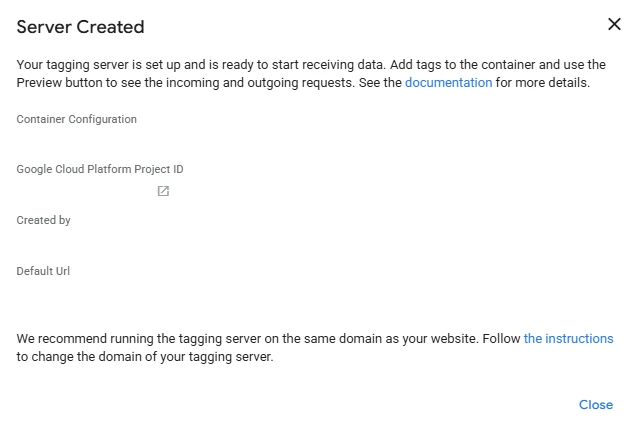
The default server URL can be kept or mapped to your domain.
Server URL Domain Mapping (Optional)
Open Google Cloud using the link in your GTM container settings, and navigate to Cloud Run through the left-hand menu.
Click on ‘Domain Mappings’ → ‘Add mapping’ and create the mapping using your newly built server and subdomain of choice.
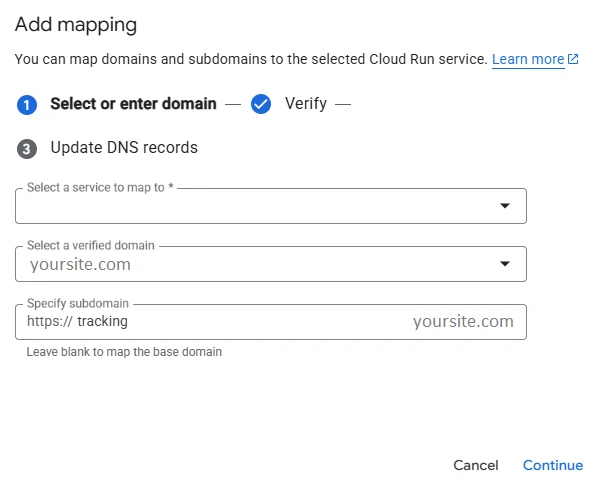
Create the domain mapping and wait for the DNS record to be generated. From here, open up your website hosting portal and find DNS records.
You will be adding a CNAME record using the information provided:
- Name: tracking
- Record: ghs.googlehosted.com
The mapping will take 5-30 minutes to register in Google Cloud, so while that is finishing you can start building out your Server Side GTM container.
Step 2: Configure Your GTM Server Container
Before configuring, make sure the server container URL is updated with your domain mapping in Container settings. Once this is ready, you can begin configuring your client.
Setting Up A Client
The client is what sends data from your server to the platform collecting data. We’ll review how to set up a Google Analytics client using Measurement Protocol.
Note: GA4 (web) Client is set up by default. This will allow you to pass data through your server from existing web tags. However, this is not a true server-server setup.
In the Clients tab, select ‘New’ > Measurement Protocol (GA4) and configure:
- Activation Path: /mp/collect
Next, set up a tag that sends the data to your GA property.
Google Analytics Tag Setup
The Google Analytics tag acts as the method for identifying what GA property to send data. As such, the setup is very simple.
Add a new tag and select GA4. Update the following:
- Measurement ID: Your G-XXXXXXX property ID
- Event Name: Dynamic inserted event name
- Event Properties: Any custom data related to GTM property
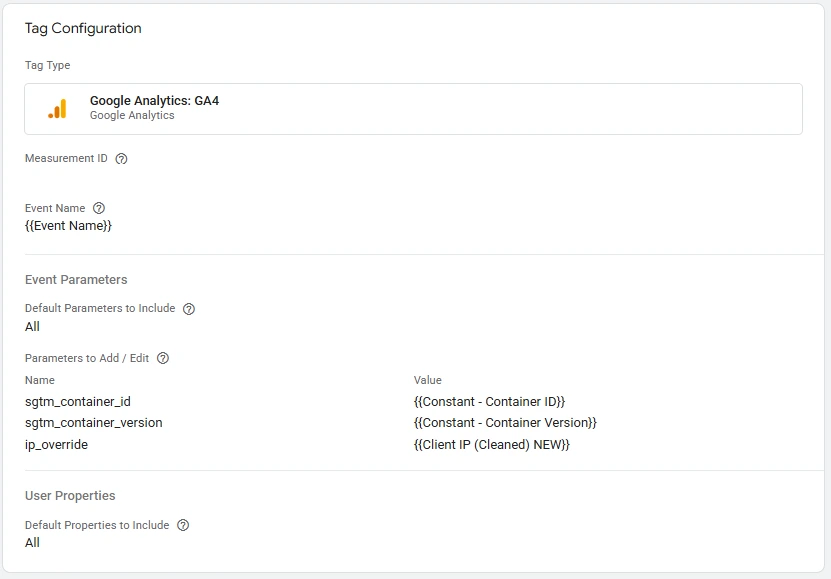
Note: You’ll need to build a variable to capture IP address from the HTTP header. Use a Request Header variable to do this.
The trigger will use the Measurement Protocol client you created earlier. Select New Variable and choose ‘Custom’.
Update the trigger fire to equal the name of your MP Client.
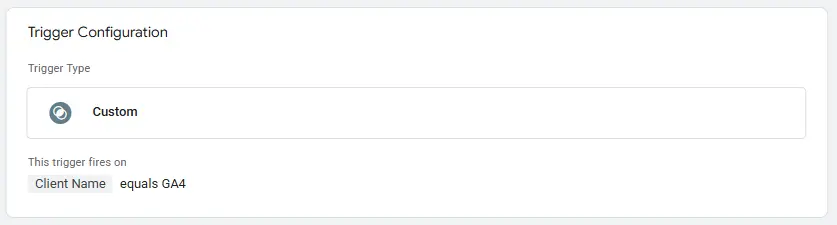
This setup will allow data to flow from your server to Google Analytics using the path you created.
Next, you’ll need to set up event tracking in your server.
Step 3 – Implement Event Tracking in Your Website
There are two main steps to setting up event tracking: creating HTML code for events and script to push events to your server container URL.
Note: This process involves writing custom code and may require developer oversight.
Creating Event Tracking in Website HTML
You can add the tracking code directly into your site’s HTML, or—if you’re using WordPress—set it up as a simple plugin. Let’s walk through the WordPress method:
1. Open your hosting account
Log into your hosting provider and go to cPanel → File Manager.
2. Navigate to your plugins folder
Open the path: public_html → wp-content → plugins.
3. Create a new folder
Click + Folder and name it custom-tracking.
4. Create a new file
Inside that folder, click + File and name it custom-tracking.php.
5. Add your code
Right-click the new file, select Edit, and paste in the tracking code.
See Detailed Plugin Code
<?php
/**
 * Plugin Name: Custom Event Tracking (Hardened GA4 Server-Side)
 * Plugin URI:  Your Domain
 * Description: Server-side event tracking endpoint -> forwards to Server-GTM (GA4 MP) with security and GA4-friendly params.
 * Version:     1.1.0
 * Author:      Your Name
 * License:     GPL v2 or later
 */

if (!defined('ABSPATH')) exit;

final class CET_Custom_Event_Tracking {

    const RL_WINDOW_SEC = 300;    // 5 minutes
    const RL_MAX_HITS   = 120;    // per IP+client_id per window
    private $last_forward_debug = null;

    public function __construct() {
        // REST routes (both /track and /diag-config)
        add_action('rest_api_init', [$this, 'register_rest_routes']);

        // AJAX fallbacks
        add_action('wp_ajax_track_event',        [$this, 'handle']);
        add_action('wp_ajax_nopriv_track_event', [$this, 'handle']);

        // SVT cookie
        add_action('init', [$this, 'ensure_validation_cookie'], 0);

        // Force browser hits to proxy via transport_url
        // Disable with: define('CET_DISABLE_FRONTEND_TRANSPORT', true);
        add_action('wp_head', [$this, 'inject_transport_url'], 20);

        // ✅ whitelist our REST namespace before other plugins block it
        add_filter('rest_authentication_errors', [$this, 'whitelist_rest_namespace'], 1);
    } // <-- CLOSE the constructor

    /** Register all REST routes for this plugin */
    public function register_rest_routes() {
        // /wp-json/tracking/v1/track
        register_rest_route('tracking/v1', '/track', [
            'methods'             => ['POST', 'GET'],
            'callback'            => [$this, 'handle'],
            'permission_callback' => '__return_true',
            'args' => [
                'event_name' => ['required' => false, 'type' => 'string'],
                'client_id'  => ['required' => false, 'type' => 'string'],
            ],
        ]);

         register_rest_route('tracking/v1', '/diag-config', [
          'methods'  => 'GET',
          'callback' => [$this, 'diag_config'],
            'permission_callback' => function(){ return current_user_can('manage_options'); },
        ]);
        }
        public function whitelist_rest_namespace( $result ) {
      // If a plugin returned a WP_Error (e.g., “REST disabled”), allow our namespace anyway
      if ( is_wp_error( $result ) ) {
        $uri = isset($_SERVER['REQUEST_URI']) ? $_SERVER['REQUEST_URI'] : '';
        if ( strpos($uri, '/wp-json/tracking/v1/') !== false ) {
          return null; // clear the block and continue to our permission_callback
        }
      }
      return $result;
    }

        public function whoami( $request ) {
      $u = wp_get_current_user();
      nocache_headers();
      return [
        'is_user_logged_in' => is_user_logged_in(),
        'user_login'        => $u && $u->ID ? $u->user_login : null,
        'caps'              => $u ? array_keys((array)$u->allcaps) : [],
        'route_host'        => isset($_SERVER['HTTP_HOST']) ? $_SERVER['HTTP_HOST'] : null,
      ];
    }


    /** Admin-only: show what the plugin is reading at runtime */
    public function diag_config() {
        $mask = function($s){
            return $s ? substr($s,0,4) . str_repeat('•', max(0, strlen($s)-6)) . substr($s,-2) : '';
        };

        $computed = $this->build_sgtm_url();
        if ($computed) {
            // mask api_secret in computed_url
            $computed = preg_replace('/(api_secret=)[^&]+/', '$1•••', $computed);
        }

        return [
            'CET_SGTM_BASE'      => defined('CET_SGTM_BASE') ? CET_SGTM_BASE : '(not defined)',
            'CET_SGTM_S2S_BASE'  => defined('CET_SGTM_S2S_BASE') ? CET_SGTM_S2S_BASE : '(not defined)',
            'GA4_MEASUREMENT_ID' => defined('CET_GA4_MEASUREMENT_ID') ? CET_GA4_MEASUREMENT_ID : '(not defined)',
            'GA4_API_SECRET'     => $mask(defined('CET_GA4_API_SECRET') ? CET_GA4_API_SECRET : ''),
            'computed_url'       => $computed,
        ];
    }

    /** -----------------------------
     *  Main handler
     *  ---------------------------- */
       public function handle($request) {

      // Simple GET probe
      if ($request instanceof WP_REST_Request && $request->get_method() === 'GET') {
        return [
          'status'          => 'ok',
          'message'         => 'Tracking endpoint alive. POST JSON to record events.',
          'endpoint'        => '/wp-json/tracking/v1/track',
          'required_fields' => ['event_name','client_id'] // legacy shape; MP is also accepted
        ];
      }

      try {
        // Parse JSON (robustly)
        if ($request instanceof WP_REST_Request) {
          $raw_body = $request->get_body();
          $event    = json_decode($raw_body ?: '{}', true);
          if (empty($event)) $event = $request->get_json_params();
          if (empty($event)) $event = $request->get_params();
        } else {
          $raw_body = file_get_contents('php://input');
          $event    = json_decode($raw_body ?: '{}', true);
        }
        if (!is_array($event)) $event = [];

        // Detect MP shapes
        $has_embedded_mp = isset($event['__ga4_mp__']) && is_array($event['__ga4_mp__']);
        $looks_like_mp   = isset($event['events']) && is_array($event['events']) && isset($event['client_id']);

        // Determine client_id for rate limiting / logging
        $client_id = $event['client_id'] ?? ($has_embedded_mp ? ($event['__ga4_mp__']['client_id'] ?? null) : null);

        // Legacy validation only if NOT MP
        if (!$has_embedded_mp && !$looks_like_mp) {
          if (empty($event['event_name']) || empty($event['client_id'])) {
            return new WP_Error('missing_fields','Missing required fields: event_name and client_id',['status'=>400]);
          }
        }

        // --- User-Agent / IP (for forwarding headers & filters)
        $ua = $_SERVER['HTTP_USER_AGENT'] ?? '';
        if (empty($event['user_agent'])) {
          $event['user_agent'] = $ua ?: 'WordPress-CET/1.0';
        }

        // === IP EXCLUDE (edit as needed)
        $client_ip = $this->get_client_ip();
        //$excluded_ips = ['YOUR IP HERE'];
        if (in_array($client_ip, $excluded_ips, true)) {
          if (WP_DEBUG) error_log('CET: Filtered IP address: ' . $client_ip);
          return [
            'status'  => 'filtered',
            'message' => 'IP address excluded from tracking',
            'ip'      => WP_DEBUG ? $client_ip : 'hidden',
          ];
        }

        // --- User-Agent bot filter (keep allowlist)
        $allowUAs = ['Chrome-Lighthouse'];
        $isAllowlisted = false;
        foreach ($allowUAs as $allow) {
          if ($ua !== '' && stripos($ua, $allow) !== false) { $isAllowlisted = true; break; }
        }
        $botRegex = '/\b(googlebot|adsbot-google|google-inspectiontool|bingbot|baiduspider|yandex(bot)?|duckduck(bot)?|ahrefs(bot)?|semrush(bot)?|mj12bot|crawler|spider|scrapy|go-http-client|python-requests|java\/\d|curl|wget|uptime|statuscake|pingdom|newrelic|datadog|healthcheck)\b/i';
        if (!$isAllowlisted && (trim($ua) === '' || preg_match($botRegex, $ua))) {
          if (WP_DEBUG) error_log('CET: Bot UA filtered: ' . $ua);
          return [ 'status' => 'filtered', 'message' => 'Bot-like user agent filtered' ];
        }

        // --- Require validation cookie ---
        $svt = $_COOKIE['svt'] ?? null;
        if (!$this->verify_svt($svt, $ua)) {
          if (WP_DEBUG) error_log('CET: Missing/invalid SVT cookie');
          return new WP_Error('forbidden','Missing or invalid validation cookie',['status'=>403]);
        }

        // --- Optional HMAC signature ---
        if ($this->hmac_required()) {
          $sig = $this->get_header('X-Track-Signature');
          if (!$this->verify_hmac($raw_body ?? '', $sig)) {
            return new WP_Error('bad_signature','Invalid signature',['status'=>401]);
          }
        }

        // Rate limiting (prefer MP’s client_id if present)
        $rl_id = $client_id ?? 'anon';
        if (!$this->rate_limit((string)$rl_id)) {
          return new WP_Error('rate_limited','Too many requests',['status'=>429]);
        }

        // Enrich + sanitize (safe — we still forward MP payload untouched later)
        $event = $this->enhance($event);
        $event = $this->strip_pii($event);

        // Forward to sGTM / GA4
        $ok = $this->forward($event);

        // Pick an event name for response
        $evtname = $event['event_name']
          ?? ($event['__ga4_mp__']['events'][0]['name'] ?? ($event['events'][0]['name'] ?? 'unknown'));

        if (WP_DEBUG) error_log('CET tracked: '.$evtname.' (ok='.($ok?'1':'0').')');

        $out = [
          'status'    => $ok ? 'success' : 'error',
          'message'   => $ok ? 'Event forwarded' : 'Forwarding failed',
          'event'     => $evtname,
          'forwarded' => (bool)$ok,
        ];
        if (defined('WP_DEBUG') && WP_DEBUG && !$ok && $this->last_forward_debug) {
          $out['debug'] = $this->last_forward_debug;
        }
        return $out;

      } catch (\Throwable $e) {
        error_log('CET error: '.$e->getMessage());
        return new WP_Error('server_error','Tracking failed',['status'=>500]);
      }
    }

    /** -----------------------------
     *  Enrichment (server-side)
     *  ---------------------------- */
    private function enhance(array $e): array {
        $e['server_timestamp'] = time();
        $e['server_time_iso']  = date('c');
        $e['ip_address']       = $this->get_client_ip();
        if (empty($e['user_agent'])) {
            $e['user_agent'] = isset($_SERVER['HTTP_USER_AGENT']) ? sanitize_text_field($_SERVER['HTTP_USER_AGENT']) : '';
        }

        if (is_user_logged_in()) {
            $u = wp_get_current_user();
            $e['user_id']   = (int)$u->ID;
            $e['user_role'] = implode(',', array_map('sanitize_key', (array)$u->roles));
        } else {
            $e['user_id']   = null;
            $e['user_role'] = 'guest';
        }

        $e['site_url']   = get_site_url();
        $e['wp_version'] = get_bloginfo('version');

        // Ensure timestamp exists (ms)
        if (empty($e['timestamp'])) {
            $e['timestamp'] = (int) round(microtime(true) * 1000);
        }

        return $e;
    }

    /** -----------------------------
     *  Basic PII stripping
     *  ---------------------------- */
    private function strip_pii(array $e): array {
        $bad_keys = ['email','e-mail','phone','first_name','last_name','full_name','address','ssn'];
        foreach ($bad_keys as $k) { if (isset($e[$k])) unset($e[$k]); }
        return $e;
    }

    /** -----------------------------
     *  Rate limiting (IP + client)
     *  ---------------------------- */
    private function rate_limit(string $client_id): bool {
        $ip  = $this->get_client_ip();
        $key = 'cet_rl_' . md5($ip . '|' . $client_id);
        $hits = (int) get_transient($key);
        if ($hits > self::RL_MAX_HITS) return false;
        set_transient($key, $hits + 1, self::RL_WINDOW_SEC);
        return true;
    }

    /** -----------------------------
     *  Forward to sGTM GA4 MP via proxy Worker
     *  ---------------------------- */
        private function forward(array $event): bool {
  $this->last_forward_debug = null;

  $url = $this->build_sgtm_url();
  if (!$url) {
    $this->last_forward_debug = ['error' => 'No sGTM URL. Check CET_SGTM_BASE / CET_GA4_* constants.'];
    return false;
  }

  // Build (or pass through) GA4 MP body
  $payload = $this->to_ga4($event);

  // Prepare headers (preserve UA & IP for GA4 attribution)
  $headers = [
    'Content-Type' => 'application/json',
    'User-Agent'   => $event['user_agent'] ?? ($_SERVER['HTTP_USER_AGENT'] ?? 'WordPress-CET/1.0'),
  ];
  if (!empty($event['ip_address'])) $headers['X-Forwarded-For'] = $event['ip_address'];
  if (!empty($_COOKIE['svt']))      $headers['X-SVT']           = $_COOKIE['svt'];

  $resp = wp_remote_post($url, [
    'headers'     => $headers,
    'body'        => wp_json_encode($payload),
    'timeout'     => 10,
    'sslverify'   => true,
    'redirection' => 0,
  ]);

  // Helper to mask api_secret when echoing URL
  $mask_url = function($u) {
    $p = wp_parse_url($u);
    if (!isset($p['query'])) return $u;
    parse_str($p['query'], $q);
    if (!empty($q['api_secret'])) {
      $s = (string)$q['api_secret'];
      $q['api_secret'] = substr($s, 0, 4) . str_repeat('•', max(0, strlen($s)-6)) . substr($s, -2);
      $p['query'] = http_build_query($q, '', '&', PHP_QUERY_RFC3986);
      $u = (isset($p['scheme'])?$p['scheme'].'://':'') . ($p['host']??'') . (isset($p['path'])?$p['path']:'') . '?' . $p['query'];
    }
    return $u;
  };

  if (is_wp_error($resp)) {
    $this->last_forward_debug = [
      'url'   => $mask_url($url),
      'error' => $resp->get_error_message(),
    ];
    return false;
  }

  $code = (int) wp_remote_retrieve_response_code($resp);
  $body = (string) wp_remote_retrieve_body($resp);

  if ($code >= 200 && $code < 300) return true;

  $this->last_forward_debug = [
    'url'  => $mask_url($url),
    'code' => $code,
    'body' => $body,
  ];
  return false;
}
    /** -----------------------------
     *  Build sGTM MP URL on proxy host
     *  ---------------------------- */
        private function build_sgtm_url(): string {
            // Prefer S2S base for server calls; fall back to browser base
            $base = defined('CET_SGTM_S2S_BASE') && CET_SGTM_S2S_BASE ? CET_SGTM_S2S_BASE
                  : (defined('CET_SGTM_BASE') ? CET_SGTM_BASE : apply_filters('cet_sgtm_base', ''));

            $mid  = defined('CET_GA4_MEASUREMENT_ID') ? CET_GA4_MEASUREMENT_ID : '';
            $sec  = defined('CET_GA4_API_SECRET')      ? CET_GA4_API_SECRET      : '';
            if (!$base || !$mid || !$sec) return '';

            $base = rtrim($base, '/');
            $qs   = http_build_query(['measurement_id'=>$mid,'api_secret'=>$sec], '', '&', PHP_QUERY_RFC3986);
            return $base . '/mp/collect?' . $qs;
        }

    /** -----------------------------
     *  Convert to GA4 MP JSON
     *  ---------------------------- */
    private function to_ga4(array $e): array {
        $mid = defined('CET_GA4_MEASUREMENT_ID') ? CET_GA4_MEASUREMENT_ID : '';
        $sec = defined('CET_GA4_API_SECRET')      ? CET_GA4_API_SECRET      : '';

        $timestamp_micros = isset($e['timestamp'])
            ? ((int)$e['timestamp']) * 1000
            : (int) (microtime(true) * 1e6);

        $ga_session_id     = isset($e['ga_session_id']) ? $e['ga_session_id'] : (isset($e['session_id']) ? $e['session_id'] : '');
        $ga_session_number = isset($e['ga_session_number']) ? (int)$e['ga_session_number'] : null;

        $params = [
            'page_location'     => isset($e['page_url'])          ? $e['page_url']          : '',
            'page_title'        => isset($e['page_title'])        ? $e['page_title']        : '',
            'page_referrer'     => isset($e['referrer'])          ? $e['referrer']          : '',
            'language'          => isset($e['language'])          ? $e['language']          : '',
            'screen_resolution' => isset($e['screen_resolution']) ? $e['screen_resolution'] : '',
            'ga_session_id'     => $ga_session_id,
        ];
        if (!empty($ga_session_number)) $params['ga_session_number'] = $ga_session_number;

        // Campaign fields
        if (!empty($e['source']))   $params['campaign_source']   = $e['source'];
        if (!empty($e['medium']))   $params['campaign_medium']   = $e['medium'];
        if (!empty($e['campaign'])) $params['campaign_name']     = $e['campaign'];
        if (!empty($e['term']))     $params['campaign_term']     = $e['term'];
        if (!empty($e['content']))  $params['campaign_content']  = $e['content'];

        foreach (['gclid','dclid','gbraid','wbraid','fbclid'] as $cidKey) {
            if (!empty($e[$cidKey])) $params[$cidKey] = $e[$cidKey];
        }

        if (!empty($e['landing_page']))     $params['landing_page']     = $e['landing_page'];
        if (!empty($e['landing_referrer'])) $params['landing_referrer'] = $e['landing_referrer'];

        switch (isset($e['event_name']) ? $e['event_name'] : '') {
            case 'file_download':
                if (!empty($e['file_extension'])) $params['file_extension'] = $e['file_extension'];
                if (!empty($e['file_name']))      $params['file_name']      = $e['file_name'];
                if (!empty($e['download_url']))   $params['download_url']   = $e['download_url'];
                if (!empty($e['click_url']))      $params['link_url']       = $e['click_url'];
                break;

            case 'outbound_click':
                if (!empty($e['destination_domain'])) $params['link_domain'] = $e['destination_domain'];
                if (!empty($e['click_url']))          $params['link_url']    = $e['click_url'];
                if (!empty($e['element_text']))       $params['link_text']   = $e['element_text'];
                break;

            case 'scroll':
                if (isset($e['scroll_depth'])) $params['scroll_depth'] = (int)$e['scroll_depth'];
                break;

            case 'click':
                if (!empty($e['element_class'])) $params['link_classes'] = $e['element_class'];
                if (!empty($e['element_id']))    $params['link_id']      = $e['element_id'];
                if (!empty($e['element_text']))  $params['link_text']    = $e['element_text'];
                if (!empty($e['click_url']))     $params['link_url']     = $e['click_url'];
                if (!empty($e['track_id']))      $params['custom_track_id'] = $e['track_id'];
                break;

            case 'page_unload':
                if (isset($e['time_on_page'])) $params['time_on_page_ms'] = max(0, (int)$e['time_on_page']);
                break;

            case 'user_engagement':
                $et = isset($e['engagement_time_msec']) ? (int)$e['engagement_time_msec'] : 10000;
                $params['engagement_time_msec'] = max(1, $et);
                break;

            case 'purchase':
                $params['currency']       = !empty($e['currency']) ? $e['currency'] : 'USD';
                $params['value']          = isset($e['value']) ? (float)$e['value'] : 0.0;
                if (!empty($e['transaction_id'])) $params['transaction_id'] = $e['transaction_id'];
                if (isset($e['tax']))      $params['tax']      = (float)$e['tax'];
                if (isset($e['shipping'])) $params['shipping'] = (float)$e['shipping'];
                if (!empty($e['items']) && is_array($e['items'])) $params['items'] = $e['items'];
                break;

            case 'add_to_cart':
            case 'remove_from_cart':
            case 'begin_checkout':
            case 'view_item':
                $params['currency'] = !empty($e['currency']) ? $e['currency'] : 'USD';
                if (isset($e['value'])) $params['value'] = (float)$e['value'];
                if (!empty($e['item_id']))       $params['item_id']       = $e['item_id'];
                if (!empty($e['item_name']))     $params['item_name']     = $e['item_name'];
                if (!empty($e['item_category'])) $params['item_category'] = $e['item_category'];
                if (!empty($e['items']) && is_array($e['items'])) $params['items'] = $e['items'];
                break;
        }

        // Remove empty strings / nulls
        $params = array_filter($params, function($v) { return $v !== '' && $v !== null; });

        $payload = [
            'measurement_id'   => $mid,
            'api_secret'       => $sec,
            'client_id'        => isset($e['client_id']) ? $e['client_id'] : '',
            'timestamp_micros' => $timestamp_micros,
            'events' => [[
                'name'   => isset($e['event_name']) ? $e['event_name'] : 'event',
                'params' => $params,
            ]],
        ];

        // Consent Mode v2 (optional)
        $consent = [];
        if (!empty($e['ad_user_data']))       $consent['ad_user_data']       = $e['ad_user_data'];
        if (!empty($e['ad_personalization'])) $consent['ad_personalization'] = $e['ad_personalization'];
        if ($consent) $payload['consent'] = $consent;

        return $payload;
    }

    /** -----------------------------
     *  Front-end injector (transport_url)
     *  ---------------------------- */
    public function inject_transport_url() {
        if (defined('CET_DISABLE_FRONTEND_TRANSPORT') && CET_DISABLE_FRONTEND_TRANSPORT) return;
        if (is_admin()) return;

        $base = defined('CET_SGTM_BASE') ? CET_SGTM_BASE : apply_filters('cet_sgtm_base', '');
        $mid  = defined('CET_GA4_MEASUREMENT_ID') ? CET_GA4_MEASUREMENT_ID : '';
        if (!$base || !$mid) return;

        $transport = esc_url_raw(rtrim($base, '/')); // e.g. https://trackproxy.fiveninestrategy.com
        $mid_js    = esc_js($mid);

        // Load gtag.js unless disabled
        $emit_loader = !defined('CET_EMIT_GTAG_LOADER') || CET_EMIT_GTAG_LOADER;
        ?>
        <?php if ($emit_loader): ?>
        <script async src="https://www.googletagmanager.com/gtag/js?id=<?php echo $mid_js; ?>"></script>
        <?php endif; ?>
        <script>
          window.dataLayer = window.dataLayer || [];
          function gtag(){dataLayer.push(arguments);}
          gtag('js', new Date());
          // Force all browser hits through the Cloudflare Worker proxy (→ /g/collect)
         gtag('config', '<?php echo $mid_js; ?>', {
          transport_url: '<?php echo $transport; ?>',
          send_page_view: false
        });
        </script>
        <?php
    }

    /** -----------------------------
     *  SVT cookie mint/verify
     *  ---------------------------- */
    public function ensure_validation_cookie() {
        if (is_admin() || php_sapi_name() === 'cli') return;
        if (defined('REST_REQUEST') && REST_REQUEST) return;
        if (headers_sent()) return;

        $ua = isset($_SERVER['HTTP_USER_AGENT']) ? $_SERVER['HTTP_USER_AGENT'] : '';
        if (empty($_COOKIE['svt']) || !$this->verify_svt($_COOKIE['svt'], $ua)) {
            $svt = $this->mint_svt($ua);
            @setcookie('svt', $svt, [
                'expires'  => time() + 30 * DAY_IN_SECONDS,
                'path'     => defined('COOKIEPATH') ? COOKIEPATH : '/',
                'domain'   => defined('COOKIE_DOMAIN') ? COOKIE_DOMAIN : '',
                'secure'   => is_ssl(),
                'httponly' => true,
                'samesite' => 'Lax',
            ]);
            $_COOKIE['svt'] = $svt;
        }
    }

    private function mint_svt(string $ua): string {
        // Set in wp-config.php: define('CET_SVT_SECRET', 'long_random_string_here');
        $secret = defined('CET_SVT_SECRET') ? CET_SVT_SECRET : '';
        $nonce  = bin2hex(random_bytes(8));
        $day    = (string) floor(time() / DAY_IN_SECONDS); // rotates daily
        $base   = $nonce . '.' . $day;
        $hmac   = $secret ? hash_hmac('sha256', $base . '|' . substr($ua, 0, 120), $secret) : '';
        return $base . '.' . $hmac;
    }

    private function verify_svt(?string $svt, ?string $ua = ''): bool {
        if (!$svt) return false;
        $parts = explode('.', $svt);
        if (count($parts) !== 3) return false;
        list($nonce, $day, $hmac) = $parts;

        $secret = defined('CET_SVT_SECRET') ? CET_SVT_SECRET : '';
        if (!$secret) return true; // if not configured, don't break prod

        $ua = (string) $ua;
        for ($d = (int)$day - 1; $d <= (int)$day + 1; $d++) {
            $expected = hash_hmac('sha256', $nonce . '.' . $d . '|' . substr($ua, 0, 120), $secret);
            if (hash_equals($expected, $hmac)) return true;
        }
        return false;
    }

    /** -----------------------------
     *  Utility: IP & headers & HMAC
     *  ---------------------------- */
    private function get_client_ip(): string {
        $keys = ['HTTP_X_FORWARDED_FOR','HTTP_X_REAL_IP','HTTP_CLIENT_IP','REMOTE_ADDR'];
        foreach ($keys as $k) {
            if (!empty($_SERVER[$k])) {
                $ip = $_SERVER[$k];
                if (strpos($ip, ',') !== false) $ip = trim(explode(',', $ip)[0]);
                if (filter_var($ip, FILTER_VALIDATE_IP)) return $ip;
            }
        }
        return isset($_SERVER['REMOTE_ADDR']) ? sanitize_text_field($_SERVER['REMOTE_ADDR']) : '';
    }

    private function get_header(string $name): ?string {
        $key = 'HTTP_' . strtoupper(str_replace('-', '_', $name));
        return isset($_SERVER[$key]) ? sanitize_text_field($_SERVER[$key]) : null;
    }

    private function hmac_required(): bool {
        // Enable by defining CET_HMAC_SECRET or filter
        $secret = defined('CET_HMAC_SECRET') ? CET_HMAC_SECRET : apply_filters('cet_hmac_secret', '');
        return !empty($secret);
    }

    private function verify_hmac(string $body, ?string $sig): bool {
        $secret = defined('CET_HMAC_SECRET') ? CET_HMAC_SECRET : apply_filters('cet_hmac_secret', '');
        if (!$secret) return true; // disabled
        if (!$sig)    return false;
        $calc = hash_hmac('sha256', $body, $secret);
        $sig  = preg_replace('/^sha256=/', '', $sig);
        return hash_equals($calc, $sig);
    }
}

// Bootstrap
new CET_Custom_Event_Tracking();

// Flush rewrite on activation/deactivation
register_activation_hook(__FILE__, function(){ flush_rewrite_rules(); });
register_deactivation_hook(__FILE__, function(){ flush_rewrite_rules(); });
To properly connect the server to your Google Analytics account and sGTM, you need to build constants for the following in your wp.config
- X-SVT Cookie Key
- GA Measurement ID
- GA Secret Key
- Server Container URL
Building Constants for Measurement Keys
To keep your secret key and server container URL secure (and out of your visible code), you’ll store them as constants inside your wp-config.php file.
1. Open your hosting file manager
Go to public_html in your hosting panel.
2. Locate wp-config.php
Find the file named wp-config.php in the root directory of your WordPress install.
3. Edit the file
Right-click on wp-config.php and select Edit.
4. Add your constants
Paste the following code snippet near the bottom of the file, just above the line that says /* That's all, stop editing! Happy blogging. */.
See WP.Config Code
define('CET_SVT_SECRET', '64-bit hex code'); // for cookie HMAC
define('CET_SGTM_BASE', 'https://sgtm.yourdomain.com/mp/collect');
define('CET_GA4_MEASUREMENT_ID', 'G-XXXXXXX'); // your GA4 web stream ID
define('CET_GA4_API_SECRET', 'YOUR_API_SECRET'); // GA4 MP secret (used by GA4 client)
Replace the SVT_Secret with a randomly generated 64 hexcode and the other three fields with the appropriate variables from your server side and GA4 environment.
This will automatically pull those constants when sending POSTs to your sGTM and GA4 properties. Next, you’ll need to create a front end script to pass the events captured in your server to GA4.
Frontend Script to Send Events
The script will capture all standard GA4 events and parameters including active engagement time on site, new vs returning users, and scroll depth.
Simply place the below script in the header on all pages of your website.
See Detailed Script
<script>
(function () {
  'use strict';

  /* =========================
   * CONFIG
   * ========================= */
  const TRACKING_ENDPOINT = '/wp-json/tracking/v1/track';
  const FILE_EXTENSIONS = ['pdf','doc','docx','xls','xlsx','ppt','pptx','zip','rar','txt','csv','mp3','mp4','avi','mov'];

  // Single UE threshold for engaged session (once per session)
  const FIRST_HEARTBEAT_MS = 10000; // 10s

  // Timing anchor for dwell (non-GA metric)
  const scriptStartNow = (typeof performance !== 'undefined' && performance.now) ? performance.now() : 0;

  // Flag to subtract 10s on the page that fired the once-per-session UE
  let sessionUEFiredOnThisPage = false;

  /* =========================
   * SHARED SESSION (seed early)
   * ========================= */
  const SESSION_TTL_MS = 30 * 60 * 1000; // 30 minutes GA-style

	function sharedSessionId() {
	  const now = Date.now();
	  let sid  = localStorage.getItem('ga_sid');
	  let last = parseInt(localStorage.getItem('ga_sid_last') || '0', 10);
	  const newSession = (!sid || (now - last) > SESSION_TTL_MS);

	  if (newSession) {
		sid = String(Math.floor(now / 1000));
		// ✅ make sure session_start fires once per new SID
		sessionStorage.setItem('session_start_needed_' + sid, '1');
	  }

	  localStorage.setItem('ga_sid', sid);
	  localStorage.setItem('ga_sid_last', String(now));
	  sessionStorage.setItem('ga_session_id', sid);
	  return sid;
	}
  // Seed once before anything else fires
  sharedSessionId();

  /* =========================
   * UTIL: IDs & Session
   * ========================= */
  function gaStyleClientId() {
    let cid = localStorage.getItem('clientId');
    if (!cid) {
      cid = Math.floor(Date.now() / 1000) + '.' + Math.floor(Math.random() * 1e10);
      localStorage.setItem('clientId', cid);
      localStorage.setItem('clientId_created_at', String(Date.now()));
      sessionStorage.setItem('needs_first_visit', '1');
    }
    return cid;
  }

  function gaSessionId() {
    let sid = sessionStorage.getItem('ga_session_id');
    if (!sid) {
      sid = String(Math.floor(Date.now() / 1000));
      sessionStorage.setItem('ga_session_id', sid);
      sessionStorage.setItem('session_start_needed_' + sid, '1');
    }
    return sid;
  }

  function gaSessionNumber() {
    const key = 'ga_session_number';
    const dayKey = 'ga_session_number_day';
    const today = new Date().toISOString().slice(0,10);
    let n = parseInt(localStorage.getItem(key) || '0', 10);
    const lastDay = localStorage.getItem(dayKey);
    if (lastDay !== today) {
      n = n + 1;
      localStorage.setItem(key, String(n));
      localStorage.setItem(dayKey, today);
    }
    return n || 1;
  }

  // ---------- CONSENT HELPER ----------
  function currentConsent() {
    return {
      ad_user_data:       'granted',
      ad_personalization: 'granted'
    };
  }

  /* =========================
   * UTIL: Campaign capture (UTM / click IDs)
   * ========================= */
  function classifyReferrer(refHost) {
    if (!refHost) return null;
    const rules = [
      {re: /(^|\.)google\./i,         source: 'google'},
      {re: /(^|\.)bing\./i,           source: 'bing'},
      {re: /(^|\.)yahoo\./i,          source: 'yahoo'},
      {re: /(^|\.)duckduckgo\.com$/i, source: 'duckduckgo'},
      {re: /(^|\.)ecosia\.org$/i,     source: 'ecosia'},
      {re: /(^|\.)baidu\.com$/i,      source: 'baidu'},
      {re: /(^|\.)yandex\./i,         source: 'yandex'},
      {re: /(^|\.)naver\.com$/i,      source: 'naver'},
      {re: /(^|\.)ask\.com$/i,        source: 'ask'},
      {re: /(^|\.)aol\./i,            source: 'aol'}
    ];
    for (const r of rules) {
      if (r.re.test(refHost)) return { utm_source: r.source, utm_medium: 'organic' };
    }
    return null;
  }

  function captureAndPersistCampaignParams() {
    const url = new URL(window.location.href), q = url.searchParams;
    const keys = ['utm_source','utm_medium','utm_campaign','utm_term','utm_content','gclid','dclid','gbraid','wbraid','fbclid'];
    const found = {};
    keys.forEach(k => { const v = q.get(k); if (v) found[k] = v; });

    if (!Object.keys(found).length && document.referrer) {
      try {
        const refHost = new URL(document.referrer).hostname;
        if (refHost && refHost !== window.location.hostname) {
          const organic = classifyReferrer(refHost);
          if (organic) {
            found.utm_source = organic.utm_source;
            found.utm_medium = organic.utm_medium;
          } else {
            found.utm_source = refHost.replace(/^www\./,'').toLowerCase();
            found.utm_medium = 'referral';
          }
        }
      } catch (_) {}
    }

    if (Object.keys(found).length) {
      sessionStorage.setItem('campaign_params', JSON.stringify(found));
      sessionStorage.setItem('landing_page', window.location.href);
      sessionStorage.setItem('landing_referrer', document.referrer || '');
    }
  }

  function getCampaignParamsMapped() {
    let raw = {};
    try { raw = JSON.parse(sessionStorage.getItem('campaign_params') || '{}'); } catch (_) {}
    const mapped = {};
    if (raw.utm_source)   mapped.source   = raw.utm_source;
    if (raw.utm_medium)   mapped.medium   = raw.utm_medium;
    if (raw.utm_campaign) mapped.campaign = raw.utm_campaign;
    if (raw.utm_term)     mapped.term     = raw.utm_term;
    if (raw.utm_content)  mapped.content  = raw.utm_content;

    ['gclid','dclid','gbraid','wbraid','fbclid'].forEach(k => { if (raw[k]) mapped[k] = raw[k]; });

    const lp = sessionStorage.getItem('landing_page');
    const lr = sessionStorage.getItem('landing_referrer');
    if (lp) mapped.landing_page = lp;
    if (lr) mapped.landing_referrer = lr;

    if (!mapped.source || !mapped.medium) {
      if (document.referrer) {
        try {
          const refHost = new URL(document.referrer).hostname;
          if (refHost && refHost !== window.location.hostname) {
            mapped.source = mapped.source || refHost.replace(/^www\./,'').toLowerCase();
            mapped.medium = mapped.medium || 'referral';
          }
        } catch (_) {}
      }
      mapped.source   = mapped.source   || '(direct)';
      mapped.medium   = mapped.medium   || '(none)';
      mapped.campaign = mapped.campaign || '(not set)';
    }
    return mapped;
  }

  // Call once on load
  captureAndPersistCampaignParams();

  /* =========================
   * UTIL: MP helpers
   * ========================= */
  function nowMicros() { return Math.floor(Date.now() * 1000); }

  function makeEventId() {
    if (window.crypto && crypto.randomUUID) return crypto.randomUUID();
    return Date.now() + '-' + Math.random().toString(16).slice(2);
  }

  function buildTrafficSource(ts) {
    const out = { };
    if (ts.source)   out.source = ts.source;
    if (ts.medium)   out.medium = ts.medium;
    if (ts.campaign) out.name   = ts.campaign; // GA4 MP expects `name` for campaign
    return out;
  }

  /* =========================
   * CORE TRACK — emits EXACT GA4 MP shape
   * ========================= */
  function track(eventName, params = {}) {
    if (navigator.doNotTrack === '1') return;

    const ts = getCampaignParamsMapped();
    const consent = currentConsent();
    const nonPersonalized = !(consent.ad_user_data === 'granted' && consent.ad_personalization === 'granted');

    // Event params per GA4 naming
    const eventParams = Object.assign({
      page_location: window.location.href,
      page_referrer: document.referrer || '',
      page_title: document.title,
      ga_session_id: Number(gaSessionId()),
      ga_session_number: gaSessionNumber(),
      language: navigator.language,
      screen_resolution: screen.width + 'x' + screen.height,
      viewport_size: window.innerWidth + 'x' + window.innerHeight,
      event_id: makeEventId()
    }, params || {});

    // Clean undefined/null
    Object.keys(eventParams).forEach(k => (eventParams[k] == null) && delete eventParams[k]);

    const payload = {
      client_id: gaStyleClientId(),
      timestamp_micros: nowMicros(),
      non_personalized_ads: !!nonPersonalized,
      events: [ { name: eventName, params: eventParams } ]
    };

    const traffic = buildTrafficSource(ts);
    if (Object.keys(traffic).length) payload.traffic_source = traffic;
    if (ts.gclid)  payload.gclid  = ts.gclid;
    if (ts.wbraid) payload.wbraid = ts.wbraid;
    if (ts.gbraid) payload.gbraid = ts.gbraid;
    // Note: GA4 ignores fbclid/dclid on MP; omit from top-level

    // Optional: attach user_properties for consent flags (not required)
    payload.user_properties = {
      ad_user_data:       { value: consent.ad_user_data },
      ad_personalization: { value: consent.ad_personalization }
    };

    const body = JSON.stringify(payload);

    try {
      return fetch(TRACKING_ENDPOINT, {
        method: 'POST',
        headers: { 'Content-Type': 'application/json', 'Accept': 'application/json' },
        body,
        keepalive: true,
        credentials: 'same-origin'
      }).catch(() => {});
    } catch (_) {
      if (navigator.sendBeacon) {
        try { navigator.sendBeacon(TRACKING_ENDPOINT, new Blob([body], {type: 'application/json'})); } catch (_) {}
      }
    }
  }

  // expose early
  window.trackEvent = track;

  /* =========================
   * LIFECYCLE EVENTS (GA4 names)
   * ========================= */
  (function sendLifecycleEvents() {
    gaStyleClientId(); // ensure CID exists
    const sid = gaSessionId(); // ensure SID exists

    // first_visit (once per user)
    if (sessionStorage.getItem('needs_first_visit') === '1') {
      track('first_visit');
      sessionStorage.removeItem('needs_first_visit');
      localStorage.setItem('first_visit_sent', '1');
    } else if (!localStorage.getItem('first_visit_sent')) {
      track('first_visit');
      localStorage.setItem('first_visit_sent', '1');
    }

    // session_start (per session id)
    const sessionKey = 'session_start_needed_' + sid;
    if (sessionStorage.getItem(sessionKey) === '1') {
      track('session_start');
      sessionStorage.setItem(sessionKey, '0');
    }
  })();

  // page_view (initial load)
  if (document.readyState === 'loading') {
    document.addEventListener('DOMContentLoaded', () => track('page_view'));
  } else {
    track('page_view');
  }

  // SPA/History changes → send page_view with new URL
  (function patchHistory(){
    const push = history.pushState; const replace = history.replaceState;
    function emit(){ track('page_view'); }
    history.pushState = function(){ const r = push.apply(this, arguments); setTimeout(emit, 0); return r; };
    history.replaceState = function(){ const r = replace.apply(this, arguments); setTimeout(emit, 0); return r; };
    window.addEventListener('popstate', emit);
  })();

  /* =========================
   * AUTO EVENTS (GA4 param conventions)
   * ========================= */
  document.addEventListener('click', (e) => {
    const el = e.target.closest('a, button, [data-track]');
    if (!el) return;

    const href = el.getAttribute('href') || el.href || null;
    const baseProps = {
      element_type: el.tagName.toLowerCase(),
      link_text: (el.innerText || '').trim().slice(0, 100),
      link_id: el.id || undefined,
      link_classes: (el.className || undefined),
      link_url: href || undefined
    };

    if (href && isFileDownload(href)) {
      track('file_download', Object.assign({}, baseProps, {
        file_extension: getFileExtension(href),
        file_name: (href.split('/').pop() || 'unknown')
      }));
      return;
    }

    const trackId = el.getAttribute('data-track');
    if (trackId) {
      track('click', Object.assign({}, baseProps, { track_id: trackId }));
      return;
    }

    if (href && el.tagName.toLowerCase() === 'a') {
      try {
        const linkDomain = new URL(href, window.location.origin).hostname;
        const currentDomain = window.location.hostname;
        if (linkDomain && linkDomain !== currentDomain) {
          track('click', Object.assign({}, baseProps, { link_domain: linkDomain, outbound: true }));
        }
      } catch (_) {}
    }
  });

  // Scroll depth (25% increments, debounced)
  let maxScrollDepth = 0, scrollTimer;
  window.addEventListener('scroll', () => {
    clearTimeout(scrollTimer);
    scrollTimer = setTimeout(() => {
      const denom = (document.documentElement.scrollHeight - window.innerHeight);
      if (denom <= 0) return;
      const pct = Math.round((window.scrollY / denom) * 100);
      if (pct > maxScrollDepth && pct % 25 === 0) {
        maxScrollDepth = pct;
        track('scroll', { percent_scrolled: pct });
      }
    }, 100);
  });

  /* =========================
   * UNLOAD (dwell only; not GA4 engagement)
   * ========================= */
  let sentUnload = false;
  function sendUnload() {
    if (sentUnload) return;
    sentUnload = true;

    const now = (typeof performance !== 'undefined' && performance.now) ? performance.now() : 0;
    const timeOnPage = now && scriptStartNow
      ? Math.max(0, Math.round(now - scriptStartNow))
      : Math.max(0, Date.now() - ((performance.timing && performance.timing.navigationStart) || Date.now()));

    const params = {
      time_on_page: timeOnPage
    };

    const body = JSON.stringify({
      client_id: gaStyleClientId(),
      timestamp_micros: nowMicros(),
      non_personalized_ads: false,
      events: [ { name: 'page_unload', params } ]
    });

    if (navigator.sendBeacon) {
      try { navigator.sendBeacon(TRACKING_ENDPOINT, new Blob([body], {type: 'application/json'})); return; } catch (_) {}
    }
    try { fetch(TRACKING_ENDPOINT, { method: 'POST', headers: {'Content-Type':'application/json'}, body, keepalive: true }); } catch (_) {}
  }
  window.addEventListener('pagehide', sendUnload);
  window.addEventListener('beforeunload', sendUnload);

  /* =========================
   * VISIBLE TIME ACCUMULATOR (for UE remainder)
   * ========================= */
  let visStart = null;
  let visibleMs = 0;

  function onVisible() { visStart = Date.now(); }
  function onHidden()  { if (visStart) { visibleMs += Date.now() - visStart; visStart = null; } }

  document.addEventListener('visibilitychange', () => {
    if (document.visibilityState === 'visible') onVisible();
    else onHidden();
  });
  if (document.visibilityState === 'visible') onVisible();

  /* =========================
   * USER_ENGAGEMENT — ONCE PER SESSION (10s) ACROSS TABS
   * ========================= */
  const UE_SENT_KEY = `ue_sent_${sharedSessionId()}`;
  let ueTimer = null;

  // keep the shared session fresh while visible
  document.addEventListener('visibilitychange', () => {
    if (document.visibilityState === 'visible') {
      localStorage.setItem('ga_sid_last', String(Date.now()));
    }
  });

  function fireUEOnce() {
    track('user_engagement', { engagement_time_msec: FIRST_HEARTBEAT_MS });
    localStorage.setItem(UE_SENT_KEY, '1'); // share across tabs
    sessionUEFiredOnThisPage = true;
  }

  function startUEOncePerSession() {
    if (localStorage.getItem(UE_SENT_KEY) === '1') return; // already sent this session
    if (document.visibilityState !== 'visible') return;     // only when visible
    if (ueTimer) return;                                    // avoid duplicates

    ueTimer = setTimeout(() => {
      fireUEOnce();
      clearTimeout(ueTimer);
      ueTimer = null;
    }, FIRST_HEARTBEAT_MS);
  }

  function cancelUEIfHidden() {
    if (ueTimer) { clearTimeout(ueTimer); ueTimer = null; }
  }

  document.addEventListener('visibilitychange', () => {
    if (document.visibilityState === 'visible') startUEOncePerSession();
    else cancelUEIfHidden();
  });

  if (document.visibilityState === 'visible') {
    if (document.readyState === 'loading') {
      document.addEventListener('DOMContentLoaded', startUEOncePerSession);
    } else {
      startUEOncePerSession();
    }
  }

  /* =========================
   * USER_ENGAGEMENT — REMAINDER ON PAGE EXIT
   * (one extra UE per page at most)
   * ========================= */
  let sentUERemainder = false;
  function sendUERemainderOnce() {
    if (sentUERemainder) return;
    sentUERemainder = true;

    onHidden(); // finalize any in-progress visible span

    const totalMs = Math.max(0, Math.round(visibleMs));
    const remainderMs = Math.max(
      0,
      totalMs - (sessionUEFiredOnThisPage ? FIRST_HEARTBEAT_MS : 0)
    );

    if (remainderMs >= 1000) {
      track('user_engagement', { engagement_time_msec: remainderMs });
    }
  }
  window.addEventListener('pagehide', sendUERemainderOnce);
  window.addEventListener('beforeunload', sendUERemainderOnce);

})();
</script>
Ecommerce events can be added to this script as needed, and should always follow Google’s standard event naming protocol.
Now, the last step is to test your events are passing through to Google Analytics.
Step 4 – Test and Validate in GA4 & SGTM
There are two key places to test your server side setup: Google Analytics and your server-side GTM.
Since your sGTM container has built in preview mode, we’ll start there.
Testing With sGTM
In your server-side Google Tag Manager account, find the Preview button in the top right corner. Press it to open a new preview window.
In the top right corner, there are three dots. Find the field named X-Gtm-Server-Preview HTTP header and copy the contents.
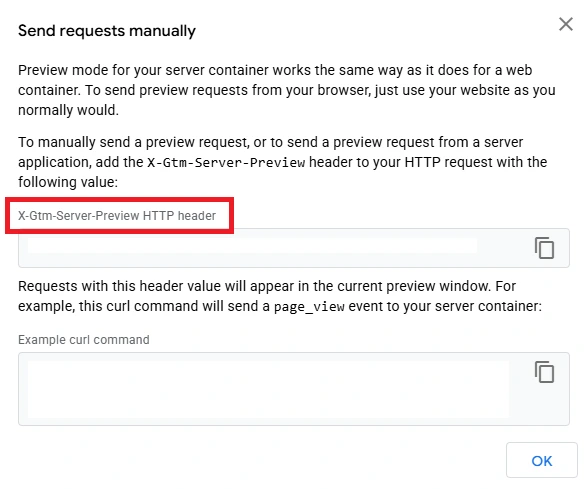
In your PHP file (HTTP code), find the section named ‘X-Gtm-Server-Preview’ => ‘xxxxxx’ // Your preview ID
Update the ‘xxxxx’ with the string from your sGTM preview.
Save the code and load your website. You should start to see events come through.
If you don’t see anything come through, three areas to check are:
- Measurement ID
- GA4 Secret Key
- Server Container URL
Once you’ve confirmed test events are showing in sGTM, you can test in Google Analytics.
Testing in Google Analytics
There are two areas to test in Google Analytics. First, add a debug mode variable to your Google Analytics tag in sGTM.
- Name: debug_mode
- Value: 1
Publish this and load up your site. You should start to see events populate in the debug view in Google Analytics (find it in the Admin tab).
You can also view Real Time Reports to see what active users and events are passing through from your site.
Scroll through your website and visit several pages to see if events match the actions your taking.
With this confirmed, you’re all set.
Adding Custom Events (Optional)
As you go along, you might want to add additional events to track specific parts of your site. Fortunately, the HTML is very scalable.
Using HTML Data Attributes
Adding new events is as simple as adding a data-track attribute into the HTML element.
<button class="btn-primary" data-track="signup_button">
 Sign Up
</button>
In a block editor like Elementor, you can simply add the data track attribute to the Attributes section in ‘Custom Attributes’.
This will pass through as a new event in GA4 whenever someone engages with the button.
Final Considerations and Best Practices
Server-side tracking isn’t just a workaround for ad blockers — it’s a long-term foundation for resilient, privacy-conscious data collection. By moving logic from the browser into your own server, you gain control, enrich your data, and open up opportunities that aren’t possible with traditional client-side tags.
For marketers, this means more accurate attribution, better audience building, and the ability to align advertising decisions with real business outcomes like profit margins. For developers, it means cleaner, more secure infrastructure that scales with the future of digital privacy.
Once you get sGTM set up, it opens a world of possibilities. Google Ads API can ingest conversions directly from your CRM and CDP using signals from sGTM to enhance campaign optimization.
The upfront setup may take some planning, but once in place, server-side GTM gives you both durability and flexibility in your measurement strategy. As the tracking landscape continues to evolve, businesses that adopt server-side now will be better positioned to adapt — and to keep making smart, data-driven decisions.