Three Ways to Track Store Visits (and Prove Real-World ROI)
In digital marketing, attribution is everything. Knowing which ad, audience, or campaign drove a conversion is what allows marketers to scale with confidence.
But for brands with physical locations, attribution gets messy – especially when online engagement leads to offline sales. Tracking how someone interacts with your ad before visiting your store requires bridging digital signals with real-world behavior — which is ultimately a measurement problem, not a channel problem.
The payoff is worth it. Store visit tracking reveals the true impact of your campaigns, giving upper-funnel and brand-building channels the credit they often miss. In this guide, you’ll learn three ways to measure in-store impact using Google, Meta, and programmatic campaigns — plus how to interpret the results to drive better performance across every channel.
TL;DR
Store visit tracking connects online ads to in-store actions – closing the loop between digital spend and real-world ROI.
You’ll learn:
- How Google tracks store visits through location extensions and Performance Max campaigns
- How Meta models in-store traffic with Store Traffic and Offline Conversions campaigns
- How programmatic platforms like GroundTruth use location data for foot traffic attribution
The Benefits of Store Visit Tracking
Store visit tracking opens up a world of possibilities, particularly with upper funnel channels that aren’t typically attributed conversions.
Video Placement Attribution
Ad formats like CTV and Youtube are notoriously bad at attribution. That’s why I often recommend using micro-conversions to measure performance – smaller actions that signal quality engagement.
Store visits are one of the strongest micro-conversions because they occur close to an actual purchase event.
Understanding which video creatives or sequences drive more in-store visits gives you actionable insight into both creative and audience performance.
Case Study: Testing Video Sequence Performance
I ran a video sequence campaign and noticed the second video (a long-format, story-based creative) was driving a 2× lower cost per store visit than the introductory spot.
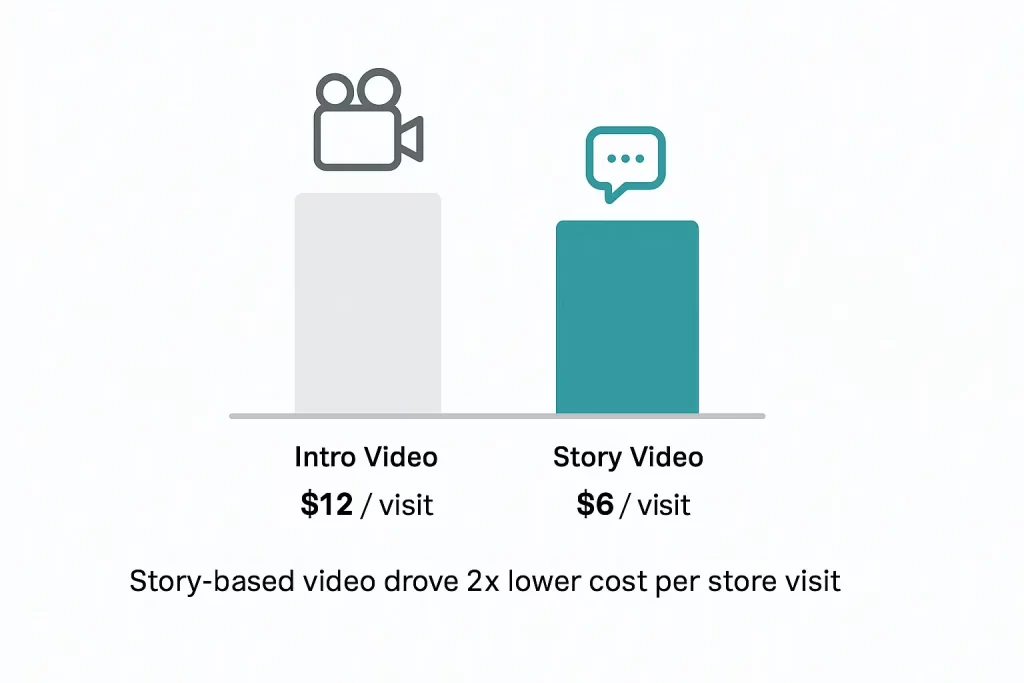
After isolating that creative in a standalone test, performance remained strong — leading us to drop the intro entirely. The lesson: not all “intro” content earns its place in the funnel.
Supercharge Display Insights
Display ads are notoriously bad at driving incremental conversions — largely due to over-attribution from view-through conversions.
Click-through conversions usually make up less than 10% of display’s total reported results, which leaves most marketers guessing at true effectiveness.
Store visit metrics change that. They provide a second layer of insight that tells you not just who clicked, but who showed up.
Case Study
In one display test, I compared evergreen and seasonal creatives. CTR and CPC were nearly identical — but the seasonal ads drove store visits at 40% lower cost.
That insight reshaped future creative strategy: more seasonal focus, less evergreen filler.
Measure Campaign Performance Without Direct Sales
In industries like flooring marketing, tracking online activity against in-store sales is notoriously difficult. The average buying journey can stretch over six months, and data sharing between retailers and manufacturers is often limited – making accurate attribution nearly impossible.
One effective workaround is store visit tracking, which acts as a bridge between online engagement and offline outcomes. By assigning an estimated revenue value per store visit, marketers can measure campaign ROI even when direct sales data isn’t available.
This challenge extends well beyond flooring. Restaurants, automotive dealers, and home improvement brands all rely heavily on in-person interactions, making offline attribution an essential skill for performance marketers.
How Foot Traffic Attribution Works
The principle of foot traffic attribution is actually quite similar to traditional online attribution.
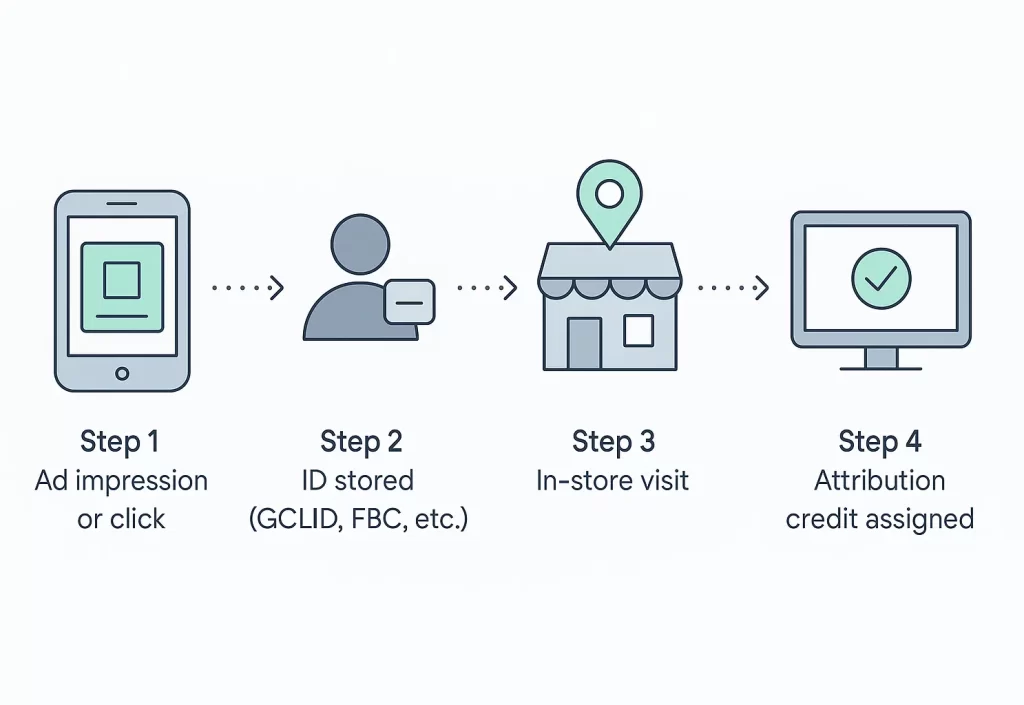
- Step 1: You see or click on an ad
- Step 2: A unique ID is saved against your profile tracking that event
- Step 3: You visit a store in real life with location services enabled
- Step 4: A store visit is attributed to the campaign that drove the impression or click
That “unique ID saved against your profile” step is the fragile part — getting it right comes down to tracking infrastructure (durable identifiers, first-party storage, and clean event design)
Most foot traffic attribution uses a last-click attribution model, so plan carefully when using retargeting campaigns (they might steal all the credit)
Method 1: Tracking Store Visits in Google
Google offers store visit tracking to all advertisers as long as they meet certain thresholds. While there is no exact number of visits needed to receive store visit conversions, accounts I’ve managed drive upwards of 1,000 interactions with the locations card per week.
To start, set up a location extension or affiliate location extension.
| Asset | Purpose | How to set up |
|---|---|---|
| Location | Track visits to your own stores | Link your Google Business Profile to your Google Ads account. Make sure your addresses are up to date. |
| Affiliate Location | Track visits to affiliate stores | Choose from the list of pre-approved vendors that sell your products. |
Once this is set up, Google will begin to collect impressions and clicks from your audience, and match to users visiting your store.
Google doesn’t state the amount of foot traffic needed to pass their privacy threshold, but you should aim for at least 1,000 visitors in a 2 weeks time frame.
When combined with Google’s Performance Max campaign, store visit tracking significantly prioritizes Maps placements to the tune of 85%+ of the campaign spend.
Method 2: Tracking Store Visits in Meta
Store visit tracking in Meta is controlled by a specific campaign type: Store Traffic
While not a default campaign type, it can be enabled by following steps that set up business locations within your ad manager.
Note: A Meta Rep is needed to enable the setting manually
Modeled Store Visit Tracking
In your Ads Manager, navigate to Store Locations and add at least the address of your stores (you can include more info, but address is necessary to attribute store visits).
Once this list is set up, you’ll be able to create an Awareness campaign with Store Locations setting (in the ad set options)
With this setting enabled, your campaigns will start to track against a ‘Business Locations’ dimension.
Ask your Meta Rep to whitelist your business account for the Store Traffic metric – it needs to now be manually applied to each verified business.
With this, you’ll be able to see estimated visitation using Meta’s first-party data. Keep in mind, the campaign must optimize for reach – no objective exists to optimize directly for modeled store visits.
Offline Store Sales Tracking
The alternative route is an offline dataset that uses your 1st party data to track in-store purchases. Meta requires you to upload several pieces of data to match these events.
- Email (recommended)
- Phone Number (recommended)
- Event Name (required)
- Event Timestamp (required)
- Value (recommended)
Note: personal IDs must be SHA-256 hashed before sending to Meta.
Once set up, this event can be used as an optimization goal in Sales campaigns, making it much more powerful than reach optimization.
How To Capture Point of Sale First-Party Data
The tricky part with this process is collecting user information at the point of sale. Various methods can aid in this.
Common First-Party Data Capture Methods
- Digital/email receipts
- Loyalty/rewards programs
- Online ordering
- Reservation
- Post-visit surveys
Similar to offline conversion tracking in Meta, this process can be automated with Meta API, or completed manually using a csv file.
For more on how to implement this setup, follow Meta’s step-by-step instruction.
Method 3: Programmatic Store Visit Tracking
Tracking store visits outside of major channels like Google and Meta requires integrating a 3rd party vendor.
Top foot traffic attribution partners:
These partners will allow you to not only track foot traffic in programmatic DSP, but also in certain cases enrich your own data.
Let’s look at GroundTruth’s offering as an example of this model.
GroundTruth Foot Traffic Attribution
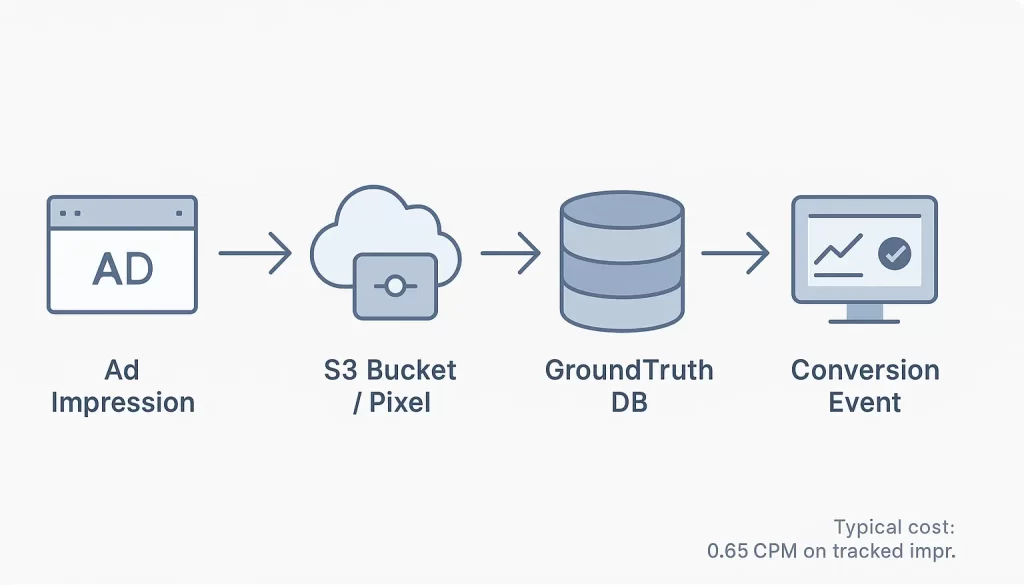
GroundTruth’s technology works similarly to Google or Meta in the sense that they capture an ad event (impression) and use their network of 3rd-party location data providers to track the impression device.
Their offering includes two standard ways of collecting ad impression data:
- S3 bucket: used most in The TradeDesk
- Pixel: used most broadly across DSPs
How the S3 Bucket Works
Oversimplified, an S3 Bucket is essentially a storage container where data is stored and referenced.
GroundTruth sets up an S3 bucket to primarily capture impression time stamp and device ID. These are then imported into their data warehouse where they can be matched to device IDs in their network of location data.
When there’s a match between the target location and the device, an event is set back to the platform to count a conversion for the ad that served the impression.
How the Pixel Works
The pixel works in a very similar way, except instead of using a S3 bucket, a pixel captures the timestamp and device ID and sends it directly to GroundTruth’s server.
Once there they are able to match it against their data and provide back a conversion event fire.
Setting both of these methods up is as easy as working with their technical team or dropping a script on your website.
Pricing is typically based on a CPM fee – GroundTruth, for example, charges a $0.65 CPM fee on impressions it tracks.
While this adds cost, it’s well worth it to spend ad dollars more effectively against tactics that are proven performers.
Key Considerations For Foot Traffic Attribution
Privacy and Data Thresholds
Platforms like Google and Meta use modeled data that only appears after a minimum number of visits. Always verify that your locations meet the required traffic volume before troubleshooting missing store-visit metrics.
Attribution Overlap
Offline visits can be double-counted across multiple ad channels. Validate true incremental lift with synthetic control tests or geo-based holdouts rather than relying on last-click reporting.
Data Freshness
Store-visit metrics often lag 24–72 hours. Avoid making optimization decisions on same-day data. Trends are more reliable over multi-day windows.
Compliance and Privacy
When uploading customer data for offline conversions, always use SHA-256 hashing to ensure privacy-safe matching and stay compliant with platform policies.
Bridging Online and Offline Performance
Store visit tracking bridges the gap between online engagement and offline outcomes, giving you visibility into the full customer journey. Whether through Google’s location extensions, Meta’s modeled data, or third-party foot-traffic partners, the ability to connect digital ads to real-world action turns “brand awareness” into measurable ROI.
For any business that relies on in-person sales, this isn’t a nice-to-have – it’s a must-have. With it, connecting the dots in the customer journey becomes a reality and makes every channel more accountable.