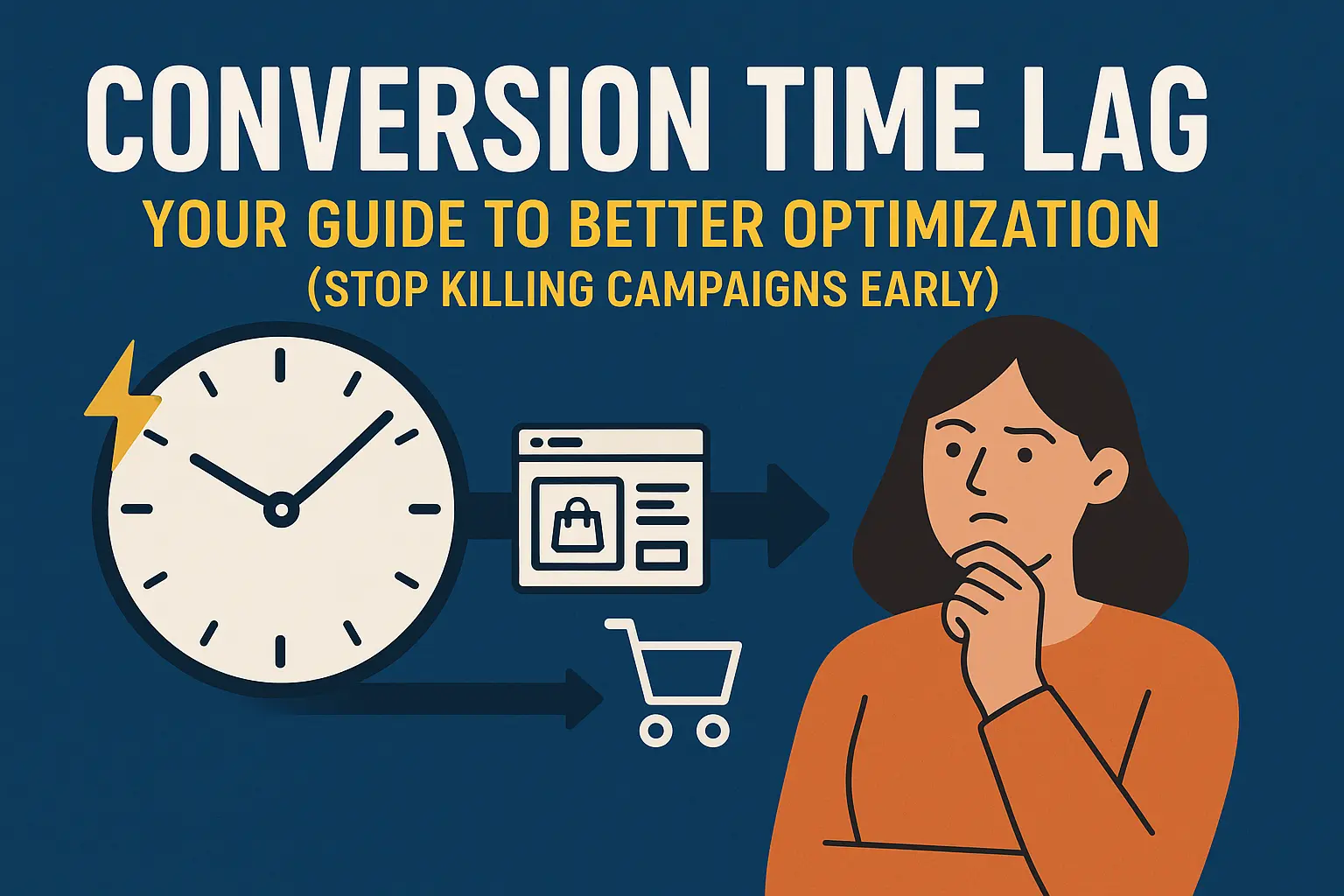
Conversion Time Lag: Your Guide to Better Optimization (Stop Killing Campaigns Early)
Here’s what most advertisers get wrong: people don’t buy because they saw your ad. They buy because they have a need, and your ad happened to offer a solution at the right time.
Conversions rarely happen immediately after ad exposure, hence conversion lag. Conversion lag exposes how humans actually buy — a core challenge in making decisions under uncertainty.
The purchase timeline varies dramatically by industry. Flooring customers might consider for months while impulse purchases happen in minutes. Understanding your specific timeline changes everything about how you optimize campaigns.
In advertising, this delay between engagement and conversion (the purcahse or final action) is known as conversion time lag or attribution lag. It measures the amount of time between product discovery, consideration, and ultimately conversion.
Useful for not only understanding how long customers are considering a purchase, time lag can inform:
- Better budget scaling optimization
- Future performance estimates
- Messaging optimization
Before we look at the use cases, let’s review how time lag works.
TL;DR
Conversion time lag or the delay between ad exposure and purchase varies dramatically by channel and product. YouTube ads might take 90 days to convert while Google Search converts in 15 days.
Understanding these timelines prevents premature budget cuts, sets realistic stakeholder expectations, and reveals where each channel fits in your marketing funnel.
Use Google’s attribution reports to track time lag at the campaign level, then optimize messaging and budget allocation based on actual conversion patterns, not assumptions.
How Conversion Time Lag Works
You’re shopping for a new car. You Google “best mid-sized SUV” and see ads for Toyota, Mazda, and Honda. You don’t click anything—just browse comparison sites and think it over for a week.
Week 2, you search “Toyota” directly, click their branded ad, and fill out a form to order a custom build.
What you experienced: One interaction with Toyota’s website.
What Google tracked: Two touchpoints spanning 7 days, starting with that first impression you barely noticed.
This 7-day gap is your conversion time lag.
Types of Time Lag Measurement
Key Takeaway: Most platforms can’t track impressions across channels, making click-based measurement the only practical option for cross-platform attribution analysis.
Time lag can be tracked from two starting points:
Impressions: Track from the first time someone sees your ad. Better for understanding the complete journey, but harder to measure across platforms since each ad platform only tracks its own impressions.
Clicks: Track from the first time someone clicks your ad. More practical for cross-platform tracking thanks to website pixels, and better indicators of actual intent.
For most marketers, click-based tracking provides more actionable insights.
Limitations of Cross-Platform Tracking
While it would be particularly useful to track the first impression a user sees on CTV and follow them through Facebook and Google to the point of conversion, this is not realistic in most cases.
This is because impressions are harder to track across channels. Each ad platform tracks impressions to their users, but this is not shared between platforms.
Clicks on the other hand provide a much better form of tracking thanks to website pixels.
See how to compare Google’s conversion lag to attribution lag in Meta Ads
How Click Measurement Solves Cross-Platform Tracking
While most ad platforms don’t explicitly report on time lag, there are tools that can track the full online journey using a combination of UTMs and browser pixels.
This method can measure the path to purchase from different ad channels and provide key insight into where each channel lives in the funnel.
For example, I’ve seen variability in the channels like so:
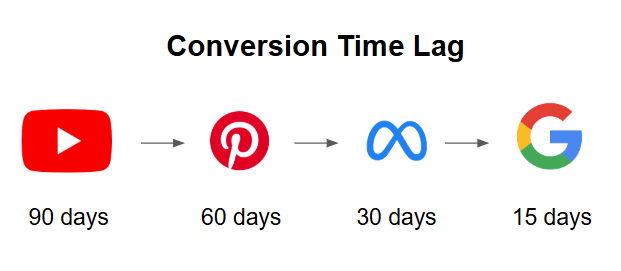
This may not come as a surprise given why people use each platform, but it provides context for how to the most immediate return.
Google’s attribution model has one of the most sophisticated time lag measurements due in part to it’s broad ecosystem across the web.
Google’s Time Lag Attribution Tools
Google offers the most comprehensive time lag tracking because it can follow users across its entire ecosystem, from YouTube videos to search ads to display banners.
Unlike other platforms that only see their piece of the journey, Google connects the dots across multiple touchpoints.
Finding Time Lag Reports in Google Ads
Google Ads has an entire section dedicated to attribution located in the ‘Goals’ tab, under Measurement. There are several pages in the attribution each with different information on the campaign interactions.
A quick and useful chart comes from the path analysis tile on the overview page:
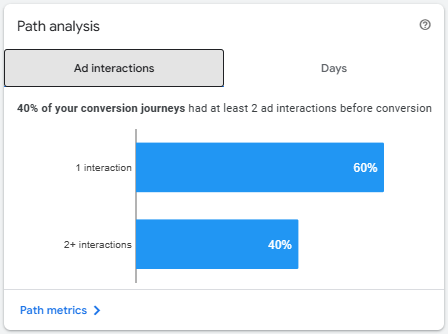
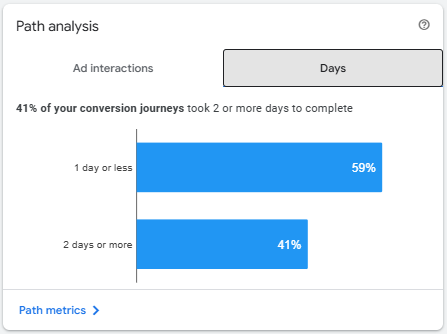
Most interactions occur within 1 interaction or 1 day most likely because of Branded search campaigns capturing bottom of funnel intent.
A full reporting of this by day count can be found in the path metrics report.
Understanding Path Metrics Reports
The path metrics report shows two views of your customer journey:
First Interaction Time Lag
First Interaction: Measures from the very beginning of someone’s journey. Shows longer time lags (30-90 days) and highlights top-funnel channels like YouTube and display ads.
Use first interaction data to understand your full funnel.
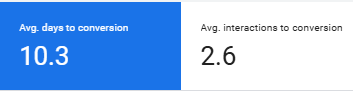
Last Interaction Time Lag
Last Interaction: Measures from the final touchpoint before conversion. Shows shorter time lags (1-15 days) and highlights bottom-funnel channels like branded search and retargeting.
Use last interaction data to optimize final conversion steps.
See the difference in average time lag for last interaction:
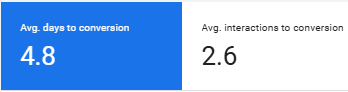
Another important setting to keep in mind is lookback window. You have three options to choose from: 30-day, 60-day, and 90-day windows.
Setting Your Lookback Window
Key Takeaway: Use 90-day attribution windows for most businesses to capture the full customer journey; shorter windows miss early consideration phases and underestimate true time lag.
The lookback window determines how far back Google searches for the start of a customer’s journey. Your options:
- 30 days: Shows more recent interactions
- 60 days: Captures most consideration periods
- 90 days: Reveals full journey tracked by Google
Note: 90 days is the longest attribution window Google allows due to the deprecation of the Google Click ID after 90 days (a privacy-centric feature of click ID tracking).
Lookback Window Example
Here’s the difference between a 30-day lookback window and 90-day lookback window in the ‘first interaction’ example from above:
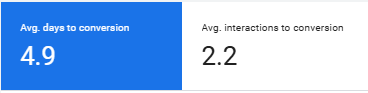
Changing between a 30-day and 90-day window doesn’t impact the shorter paths (less than 7 days). However, it does have a large impact on paths longer than 12 days for obvious reasons.
Excluding some of those longer paths significantly reduces the average. This can be useful for removing outliers, but will also miss those considering for longer.
These insights are all very useful, but will overprioritize brand campaigns if they are driving the bulk of conversions. For a better campaign-specific view, Google provides time lag at a campaign level for conversion-optimized campaigns.
Campaign-Level Time Lag Analysis
Key Takeaway: Campaigns with shorter time lags (like branded search at 15 days) serve bottom-funnel intent, while longer time lags (like display at 45+ days) indicate top-funnel awareness activities.
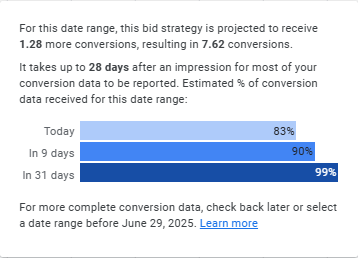
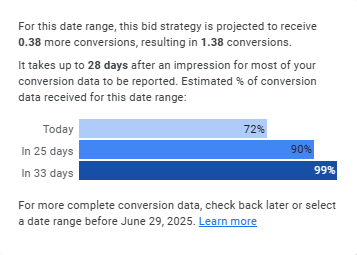
Google includes time lag data at the campaign level, but you have to know where to look. In any conversion-optimized campaign, hover over the “conversions” metric to see:
- How many conversions are still being reported
- Average time from first impression to conversion
- When the campaign will show 100% of its conversions
This data reveals which campaigns serve different funnel stages. For example, the difference between Non-Brand and Performance Max shows how performance max does more retargeting.
- Non-Brand Search: 28 days
- Performance Max: 17 days
Pay special attention to the date range filter – longer date ranges will report a higher % of conversions attributed. For example, the same campaign with a 7-day date range filter looks like:
Understanding when conversions happen is only useful if you act on it. Here’s how to apply time lag insights to four critical areas of your marketing strategy.
Strategic Applications of Time Lag Data
Applying conversion lag to marketing strategy is ultimately about optimizing and setting expectations for performance. The opportunity however expands beyond just advertising channels into all functions of a marketing strategy.
Budget Scaling Strategy
Key Takeaway: Time lag data prevents the #1 scaling mistake: cutting budgets too early when delayed conversions haven’t appeared yet.
Conversion time lag data prevents costly scaling mistakes. If your campaigns typically convert after 21 days, don’t panic when a budget increase from $100 to $1,000 per day shows poor performance in week one.
Wait for your full attribution window before judging results. Set stakeholder expectations upfront that performance will look slow initially, then improve as delayed conversions get attributed.
Setting Performance Expectations
Key Takeaway: Communicate time lag expectations to stakeholders upfront—explaining that performance will look poor initially prevents panic-driven budget cuts during the attribution window.
Most CMOs or Marketing Directors only care about the bottom line results. How many sales, how many conversions, at what cost?
Knowing your performance will miss target for the first 14 days of the campaign scale, setting expectations is crucial. This means planning to look at performance from the campaign only starting after 21 days. A challenge no doubt, especially when it looks like things aren’t working.
This helps set realistic expectations with stakeholders and prevents knee-jerk reactions to temporary performance dips.
Channel-Specific Messaging Optimization
Key Takeaway: Tailor creative to each channel’s conversion timeline—educational content for long time lag channels (YouTube), direct response offers for short time lag channels (Google Search).
Knowing what creative and messaging users will respond to best is key. The challenge with this is that ideal message varies as the user progresses through their journey. That’s why Meta urges advertisers to diversify creative for stronger results. Learn more about Meta’s latest update that prioritizes diverse creative sets.
Tailor messaging based on where users are in the attribution window. Using the time lag numbers provided previously, this could look something like:
- Youtube: Highly educational (top of funnel)
- Pinterest: Product options (early consideration)
- Meta: Comparisons, Testimonials (late consideration)
- Google: Direct response, offers (decision)
Don’t run the same “Buy Now” message everywhere. Tailor your approach to where users are in their journey.
Building Your Marketing Funnel
Key Takeaway: Your actual funnel hierarchy might be backwards—use time lag data to discover which channels really drive awareness vs conversion.
Time lag reveals where each channel actually fits in your funnel:
- Long time lag (60+ days): Top-funnel channels for awareness
- Medium time lag (15-60 days): Mid-funnel channels for consideration
- Short time lag (1-15 days): Bottom-funnel channels for conversion
Don’t assume Google is always bottom-funnel or Facebook is always top-funnel. Let your data determine the hierarchy, then allocate budget based on business needs and seasonality.
Putting Conversion Lag Data to Work
Conversion lag plays an important role in advertising due to the reality that purchase decisions take time. Understanding this delay between engagement and conversion is essential for making smarter strategic decisions.
Time lag fuels key insights like how best to scale budgets, realistic performance expectation setting, and where each channel fits into the marketing funnel. Campaigns without this insight are prone to making premature optimizations
Start with the built in time lag tracking in Google Ads and use it to inform strategy on Google’s marketing channels. Comparing the time lag in Google to attribution lag in Meta provides unique insights into your customer journey. Consider a multi-touch attribution tool that can track time lag across different platforms.
Use the data to inform your channel mix and messaging strategy, and most importantly, communicate these timelines to stakeholders. This way proper expectations are set when performance doesn’t look like it’s going to hit targets.
Remember, advertising success isn’t just about driving conversions. When teams internalize time lag, strategy shifts from reactive optimization to patient system design.