
Google Ads Reporting, Pacing, and QA in ChatGPT
Most Google Ads analysis still requires jumping between campaign reports, search terms, keywords, landing pages, assets, and conversion actions. The result is slower optimization and less confidence when performance shifts.
Google Ads Management Simplified
Google Ads teams do not just need another report. They need faster ways to answer operational questions: what changed, what is underpacing, what budget change is safe, what needs QA, and what action should happen next.
Search Terms Buried in Reports
High- and low-intent queries are often hidden inside search term exports, making it harder to separate useful demand from wasted spend.
Conversion Actions Are Messy
Primary, secondary, imported, and account-level conversion actions can blur what performance is actually optimizing toward.
Pacing Is Hard to Diagnose
Pacing issues often live across spend data, media plans, campaign maps, and budget sheets. The MCP server can connect those inputs and flag where action is needed.
See the Google Ads MCP Server in Action
Watch how the Google Ads MCP server turns search term data into an optimization workflow. Instead of exporting a report and manually classifying queries, the server can pull recent search term performance, classify intent, flag negative keyword candidates, identify keyword expansion opportunities, and summarize the next actions.
Built for Google Ads Management Workflows
The Google Ads MCP server can support the recurring work that sits between dashboards and platform changes: pulling data, diagnosing issues, checking pacing, validating proposed updates, and summarizing what needs attention.
Campaign Performance Pulls
Pull campaign, ad group, keyword, search term, device, asset, or conversion performance by date range.
Search Term Analysis
Identify wasted spend, query themes, negative keyword opportunities, and keyword expansion ideas from search term data.
Conversion Action Audits
Review conversion actions, primary and secondary settings, zero-conversion rows, and goal alignment issues.
Landing Page Diagnostics
Connect ad performance to landing page behavior, CTA clicks, lead actions, or conversion path drop-off.
PMax Asset Group Reporting
Analyze asset group performance, audience signals, creative assets, listing groups, and conversion contribution.
Budget Pacing & Preflights
Compare spend against plan, flag pacing gaps, and preview budget changes before anything is applied.
From PMAX Asset Groups to Optimization Decisions
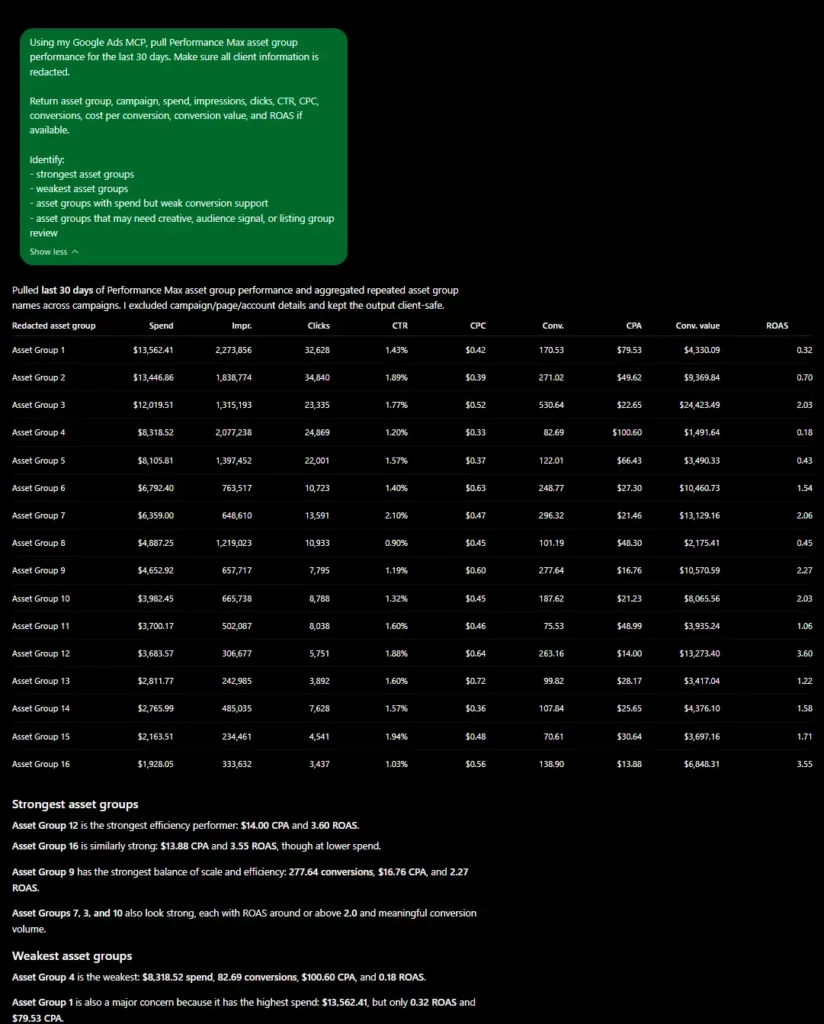
Performance Max can be difficult to diagnose when reporting stays at the campaign level. The Google Ads MCP server can pull asset group performance, aggregate repeated asset group names across campaigns, and compare spend, traffic, conversions, CPA, conversion value, and ROAS in one structured view.
Custom Diagnostics Built Into the Workflow
The Google Ads MCP server does more than pull default platform metrics. It can apply custom diagnostic frameworks that turn raw account data into management-ready decisions.
Pacing Risk Score
A diagnostic score that compares current spend, planned budget, remaining days, and recent delivery velocity to flag campaigns at risk of underdelivery or overspend.
Built into pacing workflows
Search Intent Quality
A query-level framework that evaluates whether spend is going toward relevant, high-intent searches or drifting into low-quality, waste-prone terms.
Built into search term analysis
Related Paid Media Systems
Google Ads Dashboard Buildout
Marketing Reporting & Analysis
Meta Ads MCP Server
Want a Custom Google Ads Management Assistant?
I can build a custom Google Ads MCP server tailored to your account structure, campaign map, pacing workflow, conversion actions, and recurring management checks.