Why Meta QA Is Essential in a Workflow
Meta Ads launch QA is one of those tasks that sounds simple until it has to be managed across dozens of campaigns, ad sets, ads, creative variations, URLs, UTMs, placements, statuses, and approval steps.
On paper, the process is straightforward.
A manual launch process usually looks like a clean checklist at first:
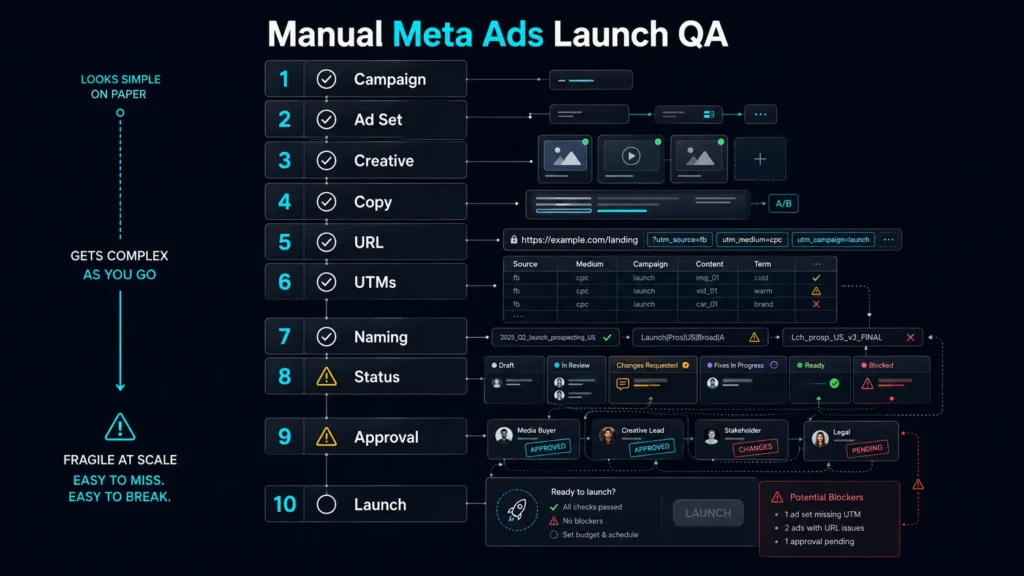
Easy enough. Except that is not how real paid media operations work.
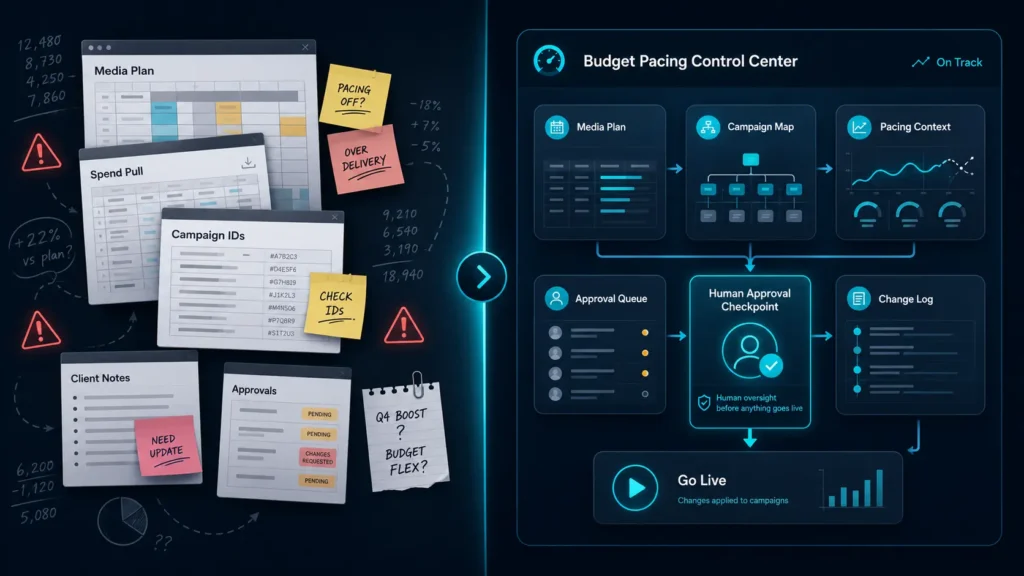
In a real account, launch QA usually happens at the intersection of a media plan, a creative brief, a spreadsheet, an asset folder, a naming convention, a QA checklist, and the actual platform state inside Meta Ads Manager.
That means mistakes can come from anywhere.
The wrong creative can be attached to the right ad. The right creative can be attached to the wrong ad set. A URL can be missing UTMs. A campaign can be active before the ad is ready. A paused ad can look ready in a spreadsheet but have a missing image hash in-platform. A naming convention can look close enough to a human but fail the structured taxonomy needed for reporting later.
This kind of operational mess does not always show up as a catastrophic launch failure.
Sometimes the ad still goes live. That is the problem.
A bad Meta Ads launch does not always break loudly. It often breaks quietly through messy data, inconsistent naming, broken attribution, incorrect creative routing, and lost confidence in reporting.
That is why Meta Ads QA and ad build workflows are a strong use case for MCP.
- Not because the media buyer should be removed.
- Not because campaign management should be fully automated.
- Not because an AI system should blindly create ads.
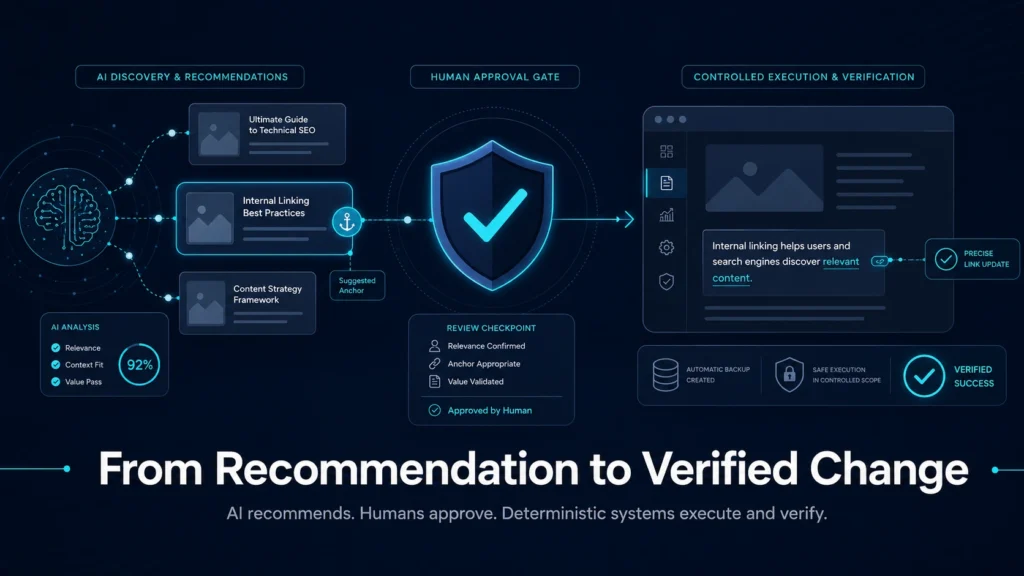
The opportunity is much more practical: automate the repetitive checks, standardize the launch workflow, preview what will happen before anything is built, and keep human approval in control of the final action.
TL;DR
Meta Ads QA is not just a launch checklist. It is the control layer that keeps creative, copy, URLs, UTMs, naming, approvals, and platform builds from drifting out of sync.
The real opportunity with MCP is not to let AI blindly launch ads. It is to create a safer workflow that validates rows, previews builds, catches blockers, and only creates paused ads after the plan is approved.
That means fewer launch mistakes, cleaner reporting, and faster execution without removing the human from the process.
The Problem With Manual Meta Ads QA
Most Meta Ads QA workflows are held together by some combination of spreadsheets, memory, screenshots, naming conventions, and platform spot checks.
That can work when a launch is small.
It starts to break down when the account has multiple campaigns, markets, creative concepts, asset formats, offer types, landing pages, and approval layers.
The common failure points are predictable:
- Naming does not match the reporting taxonomy.
- Creative variants are labeled inconsistently.
- URLs are missing UTMs or use the wrong campaign parameters.
- Ad copy does not match the approved copy matrix.
- Ad status does not match the intended launch status.
- Campaigns or ad sets are assumed to exist but are not correctly mapped.
- Assets are ready in a folder but not yet resolved to platform-ready IDs.
- The spreadsheet says the ad is ready, but Meta does not.
The issue is not that media buyers do not know how to QA ads.
The issue is that the process relies too heavily on manual comparison across too many surfaces.
Humans are good at judgment. They are not great at repeatedly comparing dozens of structured fields across spreadsheets, asset libraries, URLs, naming rules, and platform objects without missing something eventually.
That is especially true when launch QA happens under deadline pressure.
What the MCP Workflow Needed to Do
A useful Meta Ads workflow should not simply say “create ads from a spreadsheet.”
That is too blunt.
A good launch system needs to separate several jobs that are often bundled together:
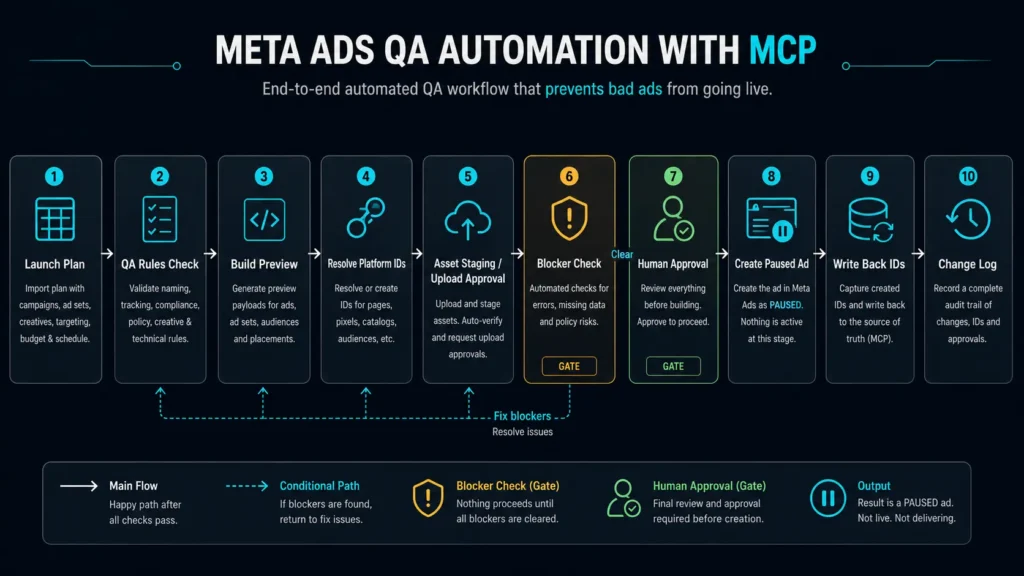
When all of those steps are collapsed into one “build ads” button, the system becomes risky. The team either has to trust the automation completely or avoid using it altogether.
The better model is the opposite.
Each step should be visible, reviewable, and constrained.
A preview should not mutate anything. A QA audit should not upload assets. An asset upload should not create ads. A build tool should not create campaigns or ad sets unless that capability has been explicitly designed, tested, and approved.
For this kind of workflow, the safest model is controlled execution:
- Use existing campaigns.
- Use existing ad sets.
- Validate the row first.
- Resolve delivery IDs before mutation.
- Create one paused ad at a time.
- Require explicit confirmation before live execution.
- Write back only the final platform IDs and build status.
This turns the workflow into an approval system, not a black box.
The QA Layer: Catch Problems Before They Become Platform Problems
The first layer of the system is launch QA.
This is the part of the workflow that checks whether the ad plan is structurally sound before anything gets built.
The QA tool can compare the planned launch against rules like:
- Does the ad have the required campaign and ad set mapping?
- Does the creative type match the expected asset?
- Is the destination URL present?
- Are UTMs structured correctly?
- Does the ad copy match the approved copy matrix?
- Is the naming convention valid?
- Is the planned status appropriate?
- Are there missing approvals?
- Are there blockers that should prevent launch?
This is useful because it turns QA from a subjective checklist into a structured validation process.
Instead of asking, “Did someone check the ads?” the better question becomes:
“Which rows are launch-ready, which rows have blockers, and what specifically needs to be fixed?”
That distinction is important.
A human still makes the final judgment. But the system handles the repetitive comparison work and flags the issues that are easiest to miss.
The Preview Layer: Show the Build Before the Build
The next layer is the build preview.
This is where the workflow becomes much more useful than a normal spreadsheet checklist.
A preview tool answers a simple question:
“If this row were built, what would the Meta payload look like?”
That means the system can show the planned campaign ID, ad set ID, creative object, destination URL, asset reference, ad name, and intended status before anything is sent to Meta.
This matters because it creates a reviewable intermediate step.
Without a preview layer, the workflow jumps from spreadsheet data to platform mutation. That is too much trust to place in a single step.
With a preview layer, the media buyer can review the exact shape of the planned build and catch issues before they become live platform changes.
For example, a preview can identify:
- The campaign exists, but the ad set mapping is missing.
- The ad set ID is present, but it does not match the expected campaign.
- The creative is planned, but the image hash is blank.
- The copy exists, but the destination URL is missing.
- The row is approved, but the build status indicates a previous attempt.
- The system would create a creative, but not an ad.
- The system would create a paused ad, but not activate delivery.
That level of clarity is valuable because it makes automation reviewable.
The goal is not to make the system autonomous.
The goal is to make the system legible.
The Asset Layer: Separate Asset Readiness From Ad Creation
One of the trickier parts of Meta Ads automation is asset handling.
In a manual workflow, assets often live in Google Drive, Airtable, a creative export folder, or a direct URL. But Meta does not build ads from “the asset in the folder.” It needs platform-ready references like image hashes or video IDs.
That creates a gap between creative approval and ad build readiness.
A creative can be approved from a marketing perspective but still not be ready to build in Meta.
That is why asset staging and asset upload should be separated from the ad build itself.
The asset workflow should answer:
- Is there an asset source?
- Is the file type supported?
- Does the file name match expectations?
- Has the asset been staged?
- Has the asset been uploaded to Meta?
- Has the image hash or video ID been written back?
- Is the row now eligible for build preview?
This prevents the build workflow from trying to solve too many problems at once.
The build tool should not be downloading assets, validating file types, uploading images, resolving IDs, creating creatives, and creating ads all in one opaque action.
Each step should have its own validation and approval layer.
That is what makes the workflow safer.
The Build Layer: Controlled Execution, Not Blind Automation
The live build layer is where the most caution is needed. It is also where a lot of “AI ad automation” narratives get too aggressive.
Most advertisers do not need an AI system that can freely create campaigns, restructure accounts, and launch active ads.
At least not without very serious controls.
A safer live build tool should be intentionally narrow. In this workflow, the controlled use case is specific:
Build from a validated control center.
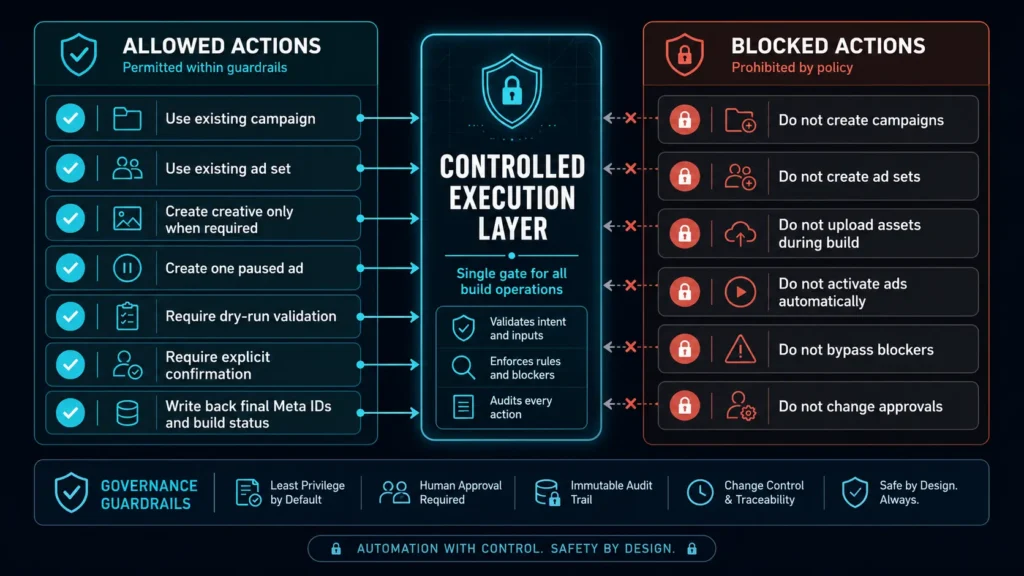
That narrowness is a feature, not a limitation.
Most operational errors in paid media do not happen because someone lacked a button that could do everything.
They happen because too many things can happen at once without enough review. A safer build workflow reduces ambiguity.
It should be very clear what the system can and cannot do.
Why Paused Ads Matter
One of the most important design choices is that the build tool creates paused ads.
That may sound minor, but it is a critical governance control.
Creating an ad and launching an ad are not the same action.
A paused ad gives the team a chance to inspect the final platform object inside Meta before delivery begins. That means the workflow can handle repetitive build mechanics while still preserving the final human checkpoint.
This is especially important for agencies, multi-location brands, regulated categories, and any team with multiple approval layers.
The MCP workflow can build the shell, attach the right creative, populate the right copy, and write back the platform IDs.
The media buyer still decides when the ad should go live.
That is the right division of labor.
Better QA Creates Better Reporting
The immediate value of this workflow is fewer launch mistakes.
The longer-term value is better reporting.
Meta Ads reporting is only as useful as the structure behind it. If naming conventions are inconsistent, creative topics are mislabeled, URLs are messy, and ad variants are not tracked cleanly, performance analysis becomes much harder.
This is where launch QA and reporting strategy overlap.
A good QA process does not just prevent broken ads. It protects the data model.
When ads are named consistently, mapped to the right campaign structure, tagged with the right creative topic, and routed through the right URL parameters, reporting becomes much more useful.
You can analyze performance by:
- Creative concept
- Creative format
- Offer
- Audience segment
- Market
- Funnel stage
- Campaign role
- Landing page
- Test variant
That level of reporting is hard to create after the fact.
It has to be enforced at launch.
This is one of the biggest reasons I think QA belongs inside the paid media operating system, not just at the end of the launch process.
Where MCP Fits Into the Workflow
MCP is useful here because it gives the AI assistant access to structured tools instead of forcing it to operate only through conversation.
A normal AI chat can help review a naming convention or summarize a launch plan. But it cannot reliably inspect the actual workbook, validate rows, resolve IDs, preview build payloads, or run controlled tool actions unless those capabilities are exposed through a system.
That is where an MCP server becomes useful.
The MCP server can act as a controlled interface between the assistant and the paid media workflow.
The assistant can interpret the request, but the tool defines what is actually allowed to happen.
That distinction matters.
The model should not be trusted simply because it sounds confident. The system should be designed so the available actions are specific, gated, and auditable.
For Meta Ads QA and build workflows, that means tools like:
- Audit launch QA from a spreadsheet.
- Preview a Meta ad build from a row.
- Stage assets from approved sources.
- Resolve uploaded asset IDs.
- Resolve delivery IDs.
- Build one paused ad from a validated row.
- Return blockers instead of guessing.
This is much more useful than asking an AI assistant to “check my ads” in a generic way.
The value comes from giving the assistant the right operating rails.
What This Changes for Paid Media Teams
The biggest operational change is that launch readiness becomes easier to see.
Instead of relying on scattered notes, the team can work from a control center where each row has a clear state:
- Not ready
- Missing asset
- Missing delivery mapping
- Missing approval
- Preview-ready
- Build-ready
- Built
- Blocked
This helps everyone involved.
Media buyers know what needs attention.
Creative teams know which assets are blocking launch.
Strategists know whether the campaign structure matches the plan.
Clients or stakeholders can review approval status without digging through Ads Manager.
And the person responsible for launch is not forced to manually reconcile every field across every system.
The workflow does not eliminate human judgment.
It preserves human judgment for the parts where it matters most.
What Should Not Be Automated Yet
There are still parts of Meta Ads management I would not fully automate. It should not:
- Create new campaigns or ad sets without a clear governance model.
- Activate ads automatically without human review.
- Make strategic budget decisions based only on in-platform performance.
- Rewrite approved ad copy during the build process.
Those are judgment-heavy actions.
They require context that may not be fully represented in the workbook or platform data.
The safer approach is to automate the mechanics around a human-approved plan.
That includes validation, QA, previewing, staging, resolving, and controlled build execution.
In other words: automate the workflow, not the strategy.
The Bigger Shift: Paid Media Needs Operating Systems
This project started with Meta Ads QA, but the broader idea applies across paid media.
Modern media buying has become too operationally complex to manage with disconnected spreadsheets and manual platform checks forever.
Campaigns now require clean data models, naming conventions, approval queues, asset workflows, tracking rules, creative taxonomies, performance reporting, and platform-specific build logic.
That is more than campaign management. It is a paid media operating system.
The best teams are going to be the ones that can connect strategy, execution, QA, and reporting into a workflow that is structured enough to scale but flexible enough for human decision-making.
That is the role MCP can play. Not as an AI replacement for paid media work, as a better system for doing the work.
Final Takeaway
Meta Ads QA is not just an administrative step before launch.
It is one of the most important controls in the entire paid media workflow.
When QA is weak, launches get messy, reporting gets less reliable, and teams lose confidence in the data. When QA is structured, the entire system improves: fewer errors, cleaner builds, better naming, stronger reporting, and faster execution.
The real opportunity with MCP is not simply that AI can help manage ads.
The opportunity is that paid media teams can build safer, more structured workflows around the work they are already doing.
That means using MCP to validate launch plans, preview ad builds, resolve blockers, and create controlled paused ads only after the system has confirmed the row is ready.
That is the kind of automation worth trusting.
Not automation that removes the human from the process — automation that gives the human a better process to manage.