How to Automate Google Ads Budget Pacing Without Losing Control
Google Ads budget pacing looks simple until you have to manage it across multiple clients, campaign types, budget periods, and approval layers.
The math is easy.
- You have a planned budget.
- You have spend to date.
- You have days remaining.
- You calculate the gap.
- You adjust the daily budget.
But that is not how pacing works in a real account.
A campaign may be underpacing because demand is low, the bid strategy is constrained, the launch started late, budget shifted between initiatives, or the media plan does not follow a clean calendar month.
Even when the math is right, the recommendation can still be wrong.
That is why I do not think Google Ads budget pacing should be fully automated. For more on that distinction, I’ve written about what to automate in campaign management and what should stay human.
The better model is to automate the context, standardize the decision, and keep human approval in the loop.
Read the step-by-step process, or skip straight to the Resource Hub to download my pacing automation workbook.
TL;DR
Google Ads budget pacing breaks when budget logic is scattered across media plans, platform data, spreadsheets, approvals, and Slack threads.
Automation should not replace the strategist. It should prepare the decision by pulling spend, calculating variance, and recommending budget changes.
The safer workflow is simple: compare spend against the approved plan, route proposed changes into an approval queue, and log what changed after approval.
Automation without governance is just a faster way to make mistakes.
Why Google Ads Budget Pacing Gets Messy
Most budget pacing workflows start in a spreadsheet.
That is not the problem.
Spreadsheets are flexible, easy to review, and familiar to media teams. The problem is that the spreadsheet often becomes the only place where budget logic exists.
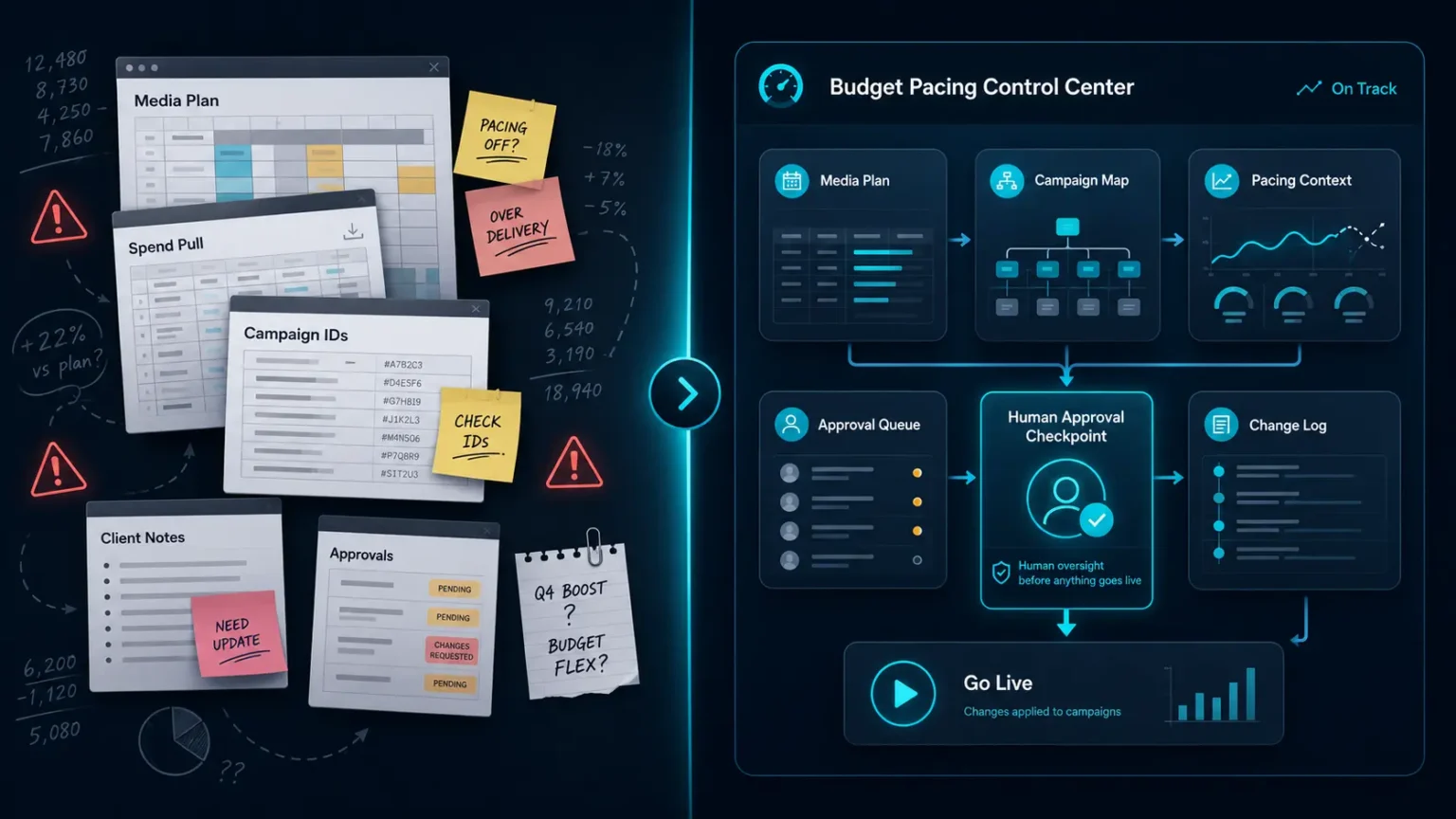
The media plan lives in one tab. Campaign IDs live in another. Spend to date gets pasted somewhere else. Proposed budget changes are tracked manually. Then Google Ads has the live daily budget, which may or may not match what the sheet says.
This is the same problem that shows up in reporting. A Google Ads dashboard is only useful if it helps organize decisions, not just display metrics.
The process works when there are only a few campaigns.
It breaks when you are managing different clients, budget periods, campaign flights, promotional windows, market allocations, approval requirements, and naming conventions.
At that point, pacing is no longer just a math problem.
It is an operating system problem.
The question is not just: What should the daily budget be?
The better questions are:
What budget period are we in?
Which campaigns belong to this plan?
How much has each campaign spent?
How much budget is left?
Has someone approved the change?
Did the change actually go live?
Can we audit the decision later?
That is the difference between budget calculation and budget governance.
Most teams have some version of the calculation.
Very few have the governance.
The Problem With Fully Automated Budget Changes
Google Ads already has plenty of automation.
Automated bidding, Performance Max, recommendations, budget alerts, scripts, and third-party tools can all change how budgets are managed.
That is not the problem. The problem is that Google Ads does not understand the media plan.
It does not know that one campaign supports a seasonal LTO. It does not know that one market matters more than another. It does not know that a client uses 4-4-5 budget periods. It does not know that one campaign is allowed to overspend while another needs to hold budget for next week’s launch.
It only sees what is happening inside Google Ads. That context is useful.
It is not enough. A campaign can be:
- Underpacing and still not deserve more budget.
- Overpacing and still be worth protecting.
- Efficient in-platform while failing to support the broader business goal.
That is why I am cautious with fully automated budget changes.
The better automation layer sits between the media plan and the platform.
It prepares the decision. It does not make the decision by default.
The Better Model: Automate Context, Not Judgment
The workflow I built follows a simple principle. Let the system do the repetitive work. Let the strategist make the judgment call.
That means the system is responsible for gathering and organizing the information needed to make a pacing decision.
The strategist is responsible for deciding whether the recommendation makes sense.
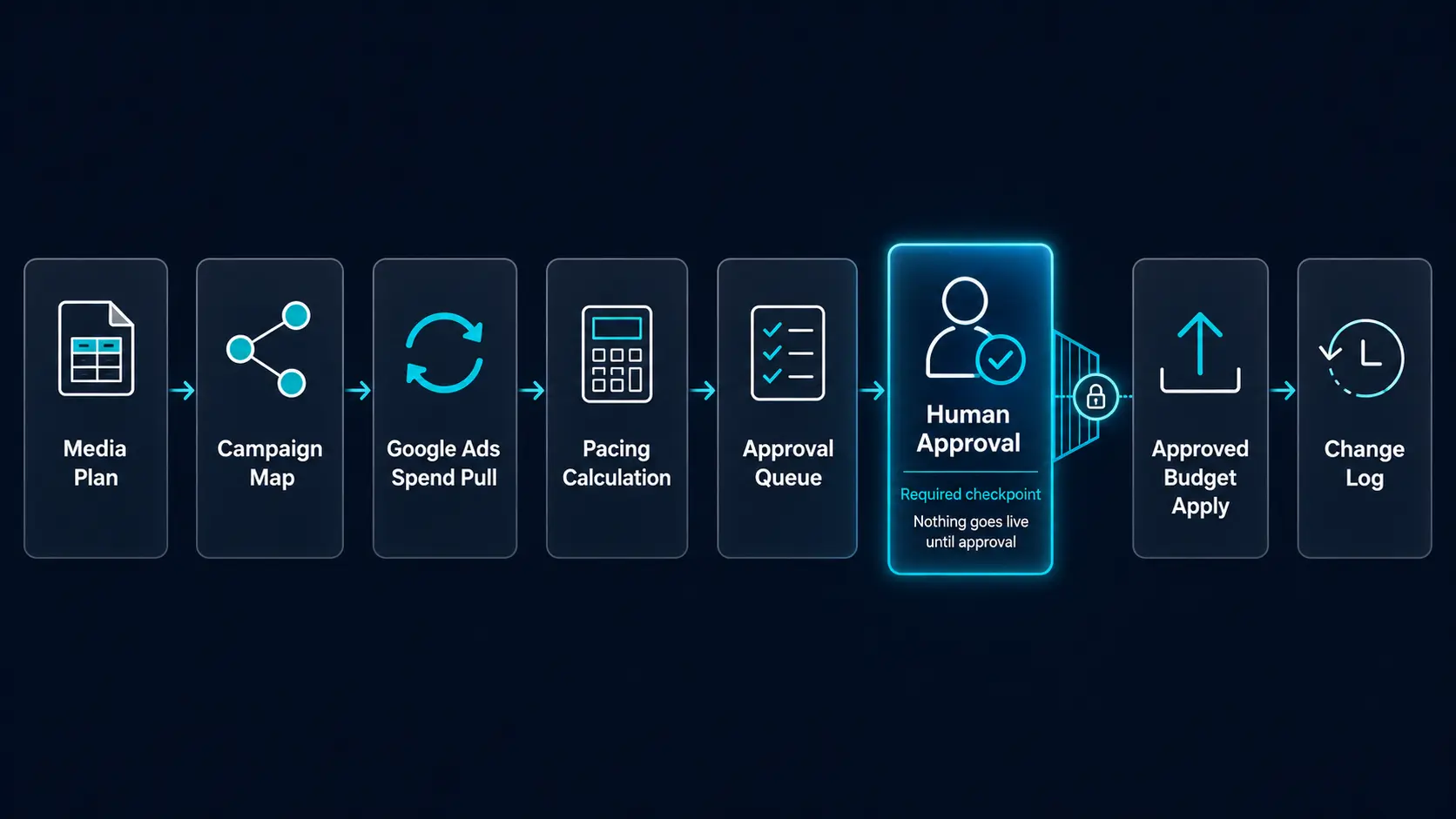
In practice, the workflow looks like this:
- Start with an approved media plan
- Map Google Ads campaigns to planned budgets
- Pull current campaign spend
- Calculate pacing status and remaining budget
- Generate proposed daily budget changes
- Push those recommendations into an approval queue
- Review, approve, or reject the changes
- Apply only the approved updates
- Log the result for future reference
That structure gives you the benefit of automation without turning budget management into a black box.
The system can say: This campaign has $3,000 left to spend and 10 days remaining, so the proposed daily budget is $300.
But the strategist still has room to say:
- This campaign is constrained, so increasing budget will not help.
- Performance is weak, so let’s reallocate instead.
- This campaign supports a priority initiative, so we are comfortable overpacing.
That review layer is where the actual strategy lives.
What a Strong Pacing Workflow Needs
A useful budget pacing workflow needs more than a formula. It needs structure around the full decision path.
1. A Source of Truth for Planned Budget
Everything starts with the media plan.
This should define the approved budget by client, channel, campaign, initiative, period, or whatever structure the account uses.
The exact format can vary. Some accounts are planned monthly. Others use custom periods, promotional windows, market-level allocations, or campaign flights.
This is especially important when the media plan has to account for markets, initiatives, seasonality, or different levels of opportunity. I covered a similar planning problem in my breakdown of how to build a media plan that scales.
The important part is consistency.
If the pacing system cannot reliably determine what each campaign is supposed to spend, the rest of the workflow becomes unreliable.
The media plan needs to be structured enough for a system to read, but not so rigid that nobody wants to maintain it.
A pacing sheet nobody wants to update will eventually become useless.
2. A Campaign Map
The next requirement is a clean campaign map.
This connects the planned budget to the live Google Ads campaign.
At minimum, this usually includes:
- client
- platform
- campaign name
- campaign ID
- budget period
- planned budget
- campaign status
- objective or initiative
- notes for manual review
This is where naming conventions become important.
If campaign names are inconsistent, the system has to rely on manual mapping. That can work, but it increases the chance of errors.
A clear naming convention makes it easier to classify campaigns by objective, market, initiative, or business line.
That matters because budget decisions are rarely made campaign by campaign in isolation.
They are usually made by category.
You may want to know whether Search is overpacing while Performance Max is underpacing. Or whether one market tier is spending faster than another. Or whether evergreen budget is being crowded out by promotional spend.
A clean campaign map also makes it easier to connect budget decisions back to demand signals. For search campaigns, this often starts with reviewing Google Ads search term reports to understand where demand is actually coming from.
3. Current Spend and Pacing Context
Once the plan and campaign map are in place, the system needs to pull current performance from Google Ads.
For pacing, the important fields are usually:
- spend to date
- current daily budget
- period start date
- period end date
- days elapsed
- days remaining
- planned budget
- remaining budget
- expected spend to date
- variance to plan
- proposed daily budget
This is the part most teams already do manually.
The issue is not that the math is difficult.
The issue is that the process is repetitive and easy to mess up.
A stale spend pull can make a campaign look underpaced when it is not. A formula copied into the wrong row can create a recommendation that looks precise but is completely wrong. A single copy/paste error can lead to the wrong budget being applied.
Automation is very good at this part.
It can pull the same fields the same way every time, write them into the right columns, and avoid changing anything outside the intended context fields.
That kind of narrow automation is not flashy.
It is just useful.
4. A Proposed Daily Budget Calculation
Once the system knows what is left to spend and how much time remains, it can calculate a proposed daily budget.
The basic formula is:
Remaining budget ÷ remaining days = proposed daily budget
That is a good starting point.
It should not be treated as the final decision.
There are plenty of cases where the formula needs interpretation:
- the campaign cannot spend its current budget
- search volume is too low
- performance has deteriorated
- the campaign is limited by bid strategy
- a promotion ends before the budget period does
- budget should be reallocated across campaigns instead
- the planned budget itself is outdated
This is where many pacing systems go wrong.
They assume the mathematically correct budget is the strategically correct budget. It often is not.
This is where pacing starts to overlap with forecasting. I use a similar logic in ad performance forecasting, where the goal is not to predict the future perfectly, but to create a baseline that makes decisions easier.
A better workflow presents the proposed daily budget as a recommendation, not a command.
5. An Approval Queue
This is the most important part of the workflow.
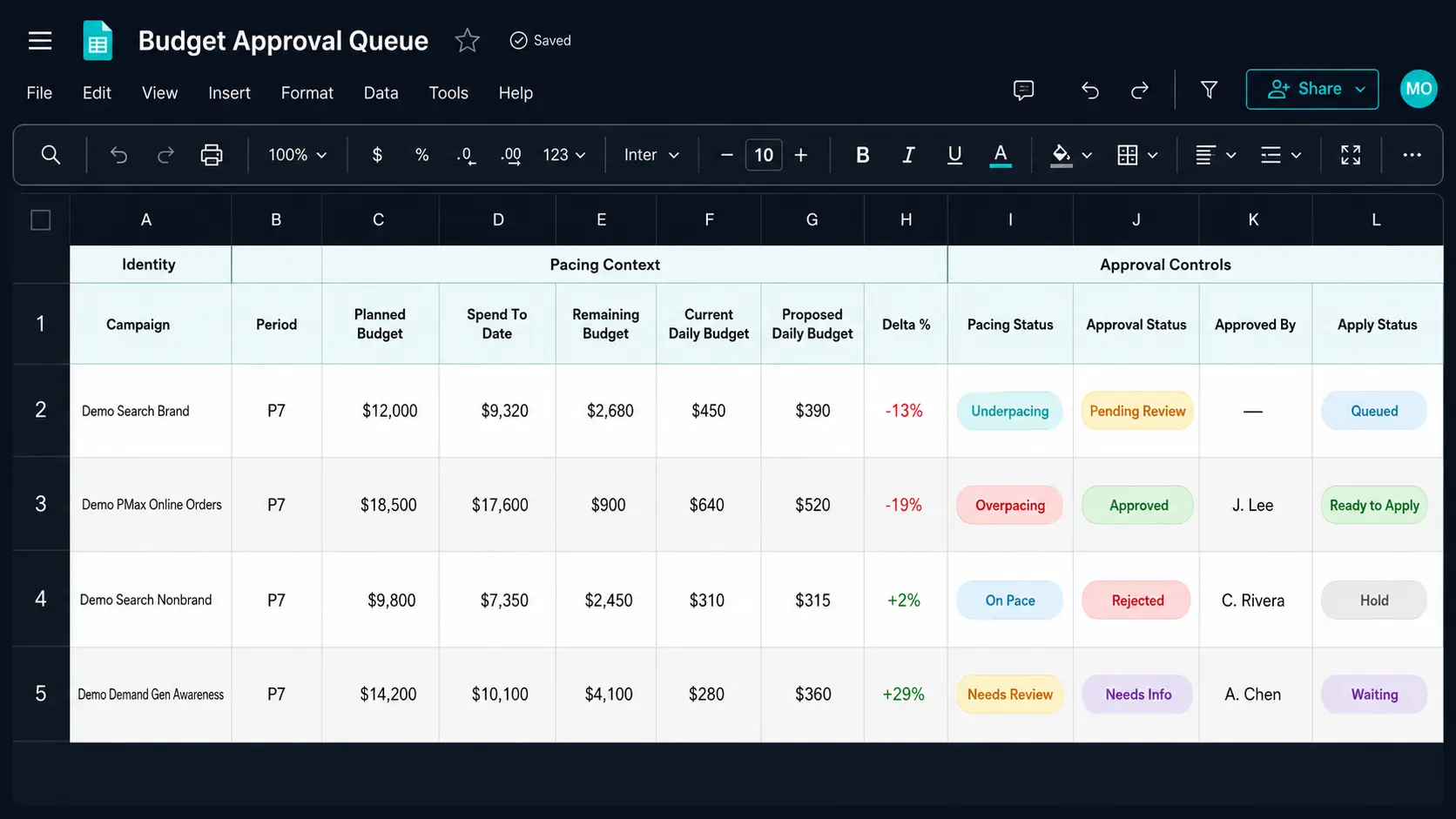
Instead of pushing budget changes live immediately, recommendations should move into an approval queue.
The approval queue gives the strategist one place to review:
- current daily budget
- proposed daily budget
- dollar change
- percent change
- spend to date
- remaining budget
- days remaining
- pacing status
- notes or warnings
- approval status
- approved by
- applied at
- result or request ID
This creates a clean separation between calculation and action.
The system prepares the change.
The strategist approves the change.
Only then does the system apply the change.
That might sound like extra friction, but it is what makes the automation safe enough to use.
The key guardrail is simple: never confuse recommendation with approval.
A recommendation says the math supports a budget change. An approval says a human reviewed the context and agrees the change should go live.
Those are different steps, and they should stay separate.
Without an approval queue, the team has to trust that every recommendation is correct.
With an approval queue, the team only has to trust that the system prepared the context accurately.
That is a much better risk tradeoff.
Work Sample: Google Ads Budget Pacing Sheet
To make this more concrete, I created a sanitized version of the Google Ads pacing workflow as a work sample.
It is not meant to be a universal template. The point is to show the operating model.
At a high level, the sheet connects:
- the approved media plan
- the live campaign map
- current spend and pacing context
- proposed daily budget changes
- approval status
- budget change history
The most important piece is the approval queue.
That is where the workflow separates a budget recommendation from a budget decision.
A formula can calculate the proposed daily budget needed to stay on pace. It cannot decide whether increasing or decreasing that budget is actually the right move.
That review layer is where strategy still matters.
View the Google Ads Budget Pacing Work Sample
6. A Change Log
Every live budget change should be logged.
Not because it is nice to have.
Because budget changes are business decisions.
A strong change log should answer:
- What campaign changed?
- What was the old budget?
- What was the new budget?
- Who approved it?
- When was it applied?
- Did the platform accept the change?
- Was there an error?
- What was the reason for the change?
This becomes especially important when clients ask why spend moved the way it did.
Instead of digging through old emails, Slack messages, and spreadsheet versions, you can point to a record of the decision.
That is the difference between a pacing spreadsheet and a pacing system.
Where AI and MCP Fit Into This
The reason I started thinking about this workflow through an MCP server is because the work naturally sits between tools.
Google Ads has the live campaign data.
Google Sheets has the media plan, approval workflow, and change log.
The strategist has the business context.
The MCP server acts as the connective tissue.
The role of the MCP is not to “manage Google Ads” in some vague autonomous sense.
I do not want an AI agent deciding to move budgets around because it thinks a campaign should scale.
That is not the point.
The better use case is much more specific:
- read the approved media plan
- read live Google Ads campaign data
- match campaigns to planned budgets
- pull current spend and daily budgets
- calculate pacing context
- write recommendations into an approval queue
- wait for explicit human approval
- apply only approved budget changes
- log the outcome
That specificity is what makes the workflow useful.
The MCP does not replace the strategist.
It removes the manual work around preparing the pacing decision.
Instead of exporting campaign data, pasting spend into a spreadsheet, checking formulas, calculating remaining budget, and manually updating Google Ads, the MCP can prepare the context and wait for approval.
The strategist still owns the decision.
The system just makes the decision easier to make, safer to apply, and easier to audit later.
That is the difference between useful automation and blind automation.
Useful automation gives you leverage.
Blind automation gives you liability.
This is the logic behind the Google Ads MCP server I built: use AI to query and organize campaign data, but keep the actual decision framework constrained and reviewable.
For a practical example of how this works, visit my Resource Hub for the Google Ads MCP budget pacing workflow.
Never Confuse Recommendation With Approval
The biggest risk in any automated pacing workflow is collapsing recommendation and approval into the same step.
Those should stay separate.
A recommendation says: Based on the plan and current spend, this campaign needs a new daily budget.
An approval says: A human reviewed the context and agrees this change should go live.
That distinction matters because the recommendation can be mathematically correct and still strategically wrong.
For example, a campaign may be underpacing by $5,000. The formula may recommend a large daily budget increase.
But if the campaign has poor conversion quality, limited search volume, or weak business relevance, increasing the budget may be the wrong move.
In that case, the right decision might be to reallocate budget somewhere else.
A system can flag the issue – a strategist should make the call.
What This Changes About Paid Media Management
The biggest benefit of this workflow is consistency.
Without a system, pacing depends on how much time the strategist has that day.
If they are busy, pacing may get a quick glance. If the client asks a question, the team may scramble to pull the latest numbers. If budgets are updated manually, the approval trail may be incomplete.
With a system, the same process happens every time.
- Spend gets pulled.
- Variance gets calculated.
- Recommendations are prepared.
- Approvals are tracked.
- Changes are logged.
That makes the strategist more valuable, not less.
Instead of copying spend into a spreadsheet, they can focus on whether the budget change actually makes sense.
That is where the real leverage is.
What I Would Not Automate
There are still parts of budget pacing I would avoid fully automating. For example, avoid:
- Increase budgets just because a campaign is underpacing.
- Decrease budgets just because a campaign is overpacing.
- Reallocate between campaigns without a defined approval framework.
- Let platform recommendations override the media plan.
- Apply budget changes without a log.
- Build a system where nobody can explain why a budget changed.
The goal is not to create a machine that “optimizes” spend in a vacuum.
The goal is to create a workflow that makes budget decisions easier, faster, more consistent, and more accountable.
Building A Better Pacing System
Google Ads budget pacing is usually treated like a spreadsheet task.
It should be treated like an operating system.
The formulas matter. The spreadsheet still has a role. But the real value comes from the workflow around it: how campaign data gets pulled, how recommendations are calculated, who approves changes, how updates go live, and where decisions are logged.
That is the difference between checking pacing and managing budget governance.
Automation can help, but only if it is designed around the way paid media decisions actually happen.
The best version does not remove the strategist.
It gives the strategist better context, fewer manual tasks, cleaner approvals, and a stronger audit trail.
That is where I think paid media automation is heading – not toward fully autonomous media buying.
Toward better systems for making better decisions.
If your Google Ads pacing process still lives across disconnected spreadsheets, manual exports, approval notes, and platform checks, this is exactly the type of workflow I help teams systemize through my Google Ads MCP workflow.