How I Built a Controlled Internal Linking System for WordPress
Internal linking is easy to understand and surprisingly difficult to maintain.
When an article mentions a topic covered elsewhere on the site, the relevant phrase should link to that deeper resource. Those links help readers navigate related content, clarify how pages connect, and prevent valuable posts from becoming isolated.
The challenge is finding those opportunities consistently—especially as a site grows.
This site now has nearly 100 articles spanning paid media, measurement, strategy, and automation. New posts were usually linked to older content as they were published, but older articles were rarely revisited when new resources went live.
I wanted a faster way to uncover those gaps without giving an AI model unrestricted access to WordPress.
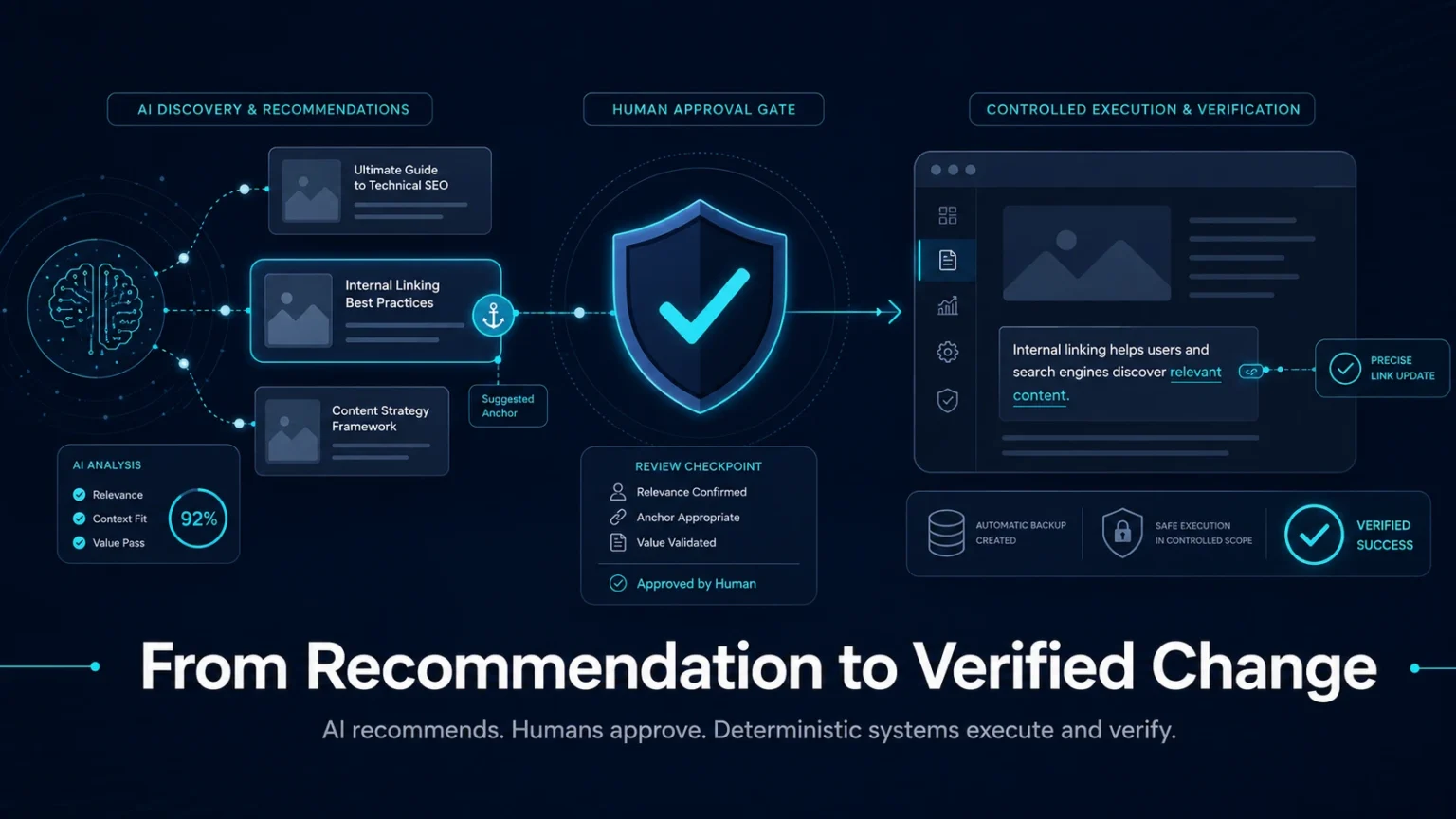
So I built a controlled internal-linking system that identifies opportunities, evaluates anchor quality, requires approval, and verifies every change before it is considered complete.
The goal was not just to save time. It was to create a more reliable way to strengthen the connections across the site without sacrificing editorial control.
TL;DR
AI can improve internal linking without receiving unrestricted access to WordPress. I built a controlled system that uses a language model to evaluate anchor quality, then relies on deterministic validation, human approval, backups, and post-write verification before anything goes live. The result is a faster, more consistent workflow that can still refuse weak or unsafe changes.
Why internal linking gets harder as a site grows
Internal linking feels manageable when a website has 10 or 20 pages.
It gets harder once the site contains dozens of articles covering overlapping subjects, different levels of technical depth, and multiple stages of the customer journey.
New articles are easy to link back to existing posts. Older articles however require constant auditing to link forward to new posts.
Service pages that serve broad objectives might be relevant to dozens of articles but receive very few internal links because it was created after most of them.
Over time, a few predictable problems appear:
- New articles link to whatever the writer remembers.
- Older articles rarely get revisited.
- Some posts accumulate links while others remain isolated.
- Anchor text becomes generic or inconsistent.
- Opportunities are identified during audits but never implemented.
- Nobody is completely certain that an automated edit changed only what it was supposed to change.
That’s an SEO and content audit problem rolled into one.
Why not let AI edit WordPress directly
The fastest version of this tool would have been to:
- Send an article to a language model
- Ask it to insert relevant internal links
- Push those links live in the WordPress article.
However, that would’ve been a risk long-term venture. A good system needs checks and balances that prevent AI from making the wrong decisions.
What if it instead:
- Changed more than the approved anchor
- Created many links that were tedious to revert
- Matched content incorrectly
- Didn’t keep a record of past changes, making auditing even harder
Those problems needed to be solved before the tool was put into action.
AI is incredibly powerful at optimizing workflows – reducing tedious manual work that requires some level of reasoning.
That doesn’t mean the model should not receive broad production access just because it is capable of generating a plausible result.
It should operate inside a narrow workflow with observable inputs, deterministic actions and explicit approval.
The Architecture: Separate recommendations from execution
The workflow was split into two parts. The first is a read-only internal-link advisor aimed at
- Inspecting published WordPress content
- Mapping existing links
- Identifying potential destinations
- Scoring recommendations
- Generating localized previews
It doesn’t modify WordPress. Just reads and recommends.
The second is a change-control system. It stages a recommendation for approval applies the change automatically to the live article.
It doesn’t
- Create the recommendation
- Choose a different anchor
- Substitute another destination
- Act without explicit approval
The full workflow has three primary steps.
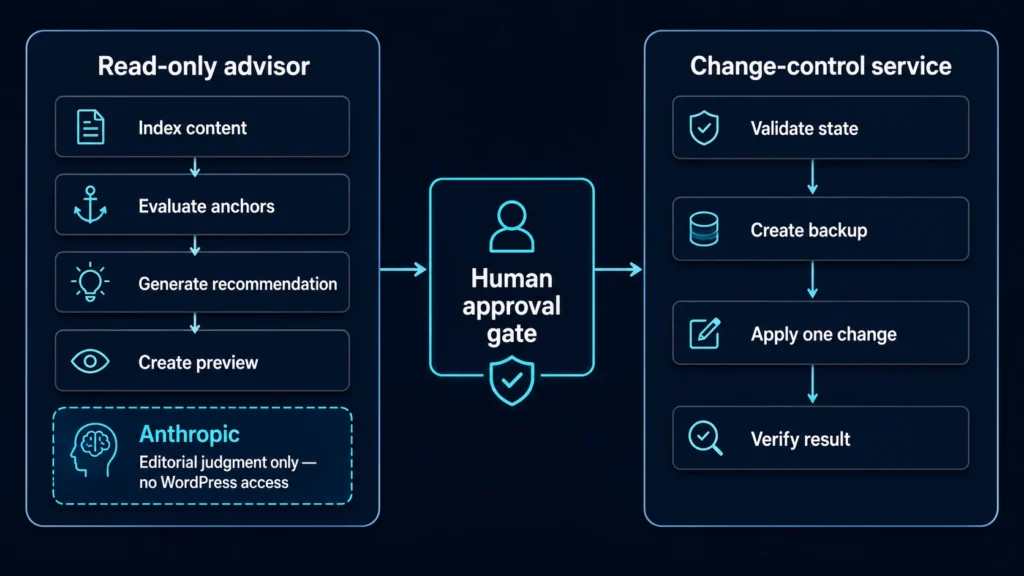
Each step serves a specific purpose.
The Workflow: From recommendation to verified change
The system workflow contains four main steps.
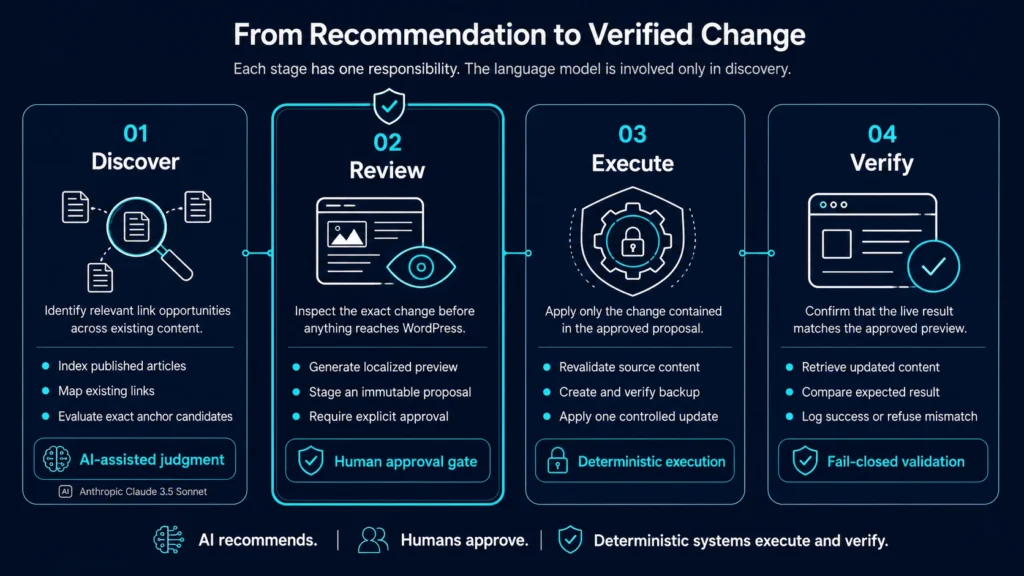
Each stage has a clear responsibility, and the model is only involved in the first.
1. Discover relevant link opportunities
The read-only advisor indexes published WordPress content, including:
- Titles and URLs
- Existing internal links
- Anchor text
- Source and destination relationships
It then identifies phrases that already exist in an article and could naturally link to another page.
The system does not rewrite the surrounding copy to force a link. It only recommends exact phrases that are already present.
Each recommendation includes the source article, target article, proposed anchor, paragraph location, and an overall quality score.
That score helps prioritize review, but it does not authorize publication.
2. Review and approve the exact proposal
Before anything can be published, the system generates a localized before-and-after preview.
Only the proposed anchor changes. The rest of the paragraph remains untouched.
Once reviewed, the recommendation is staged as an immutable proposal containing the exact:
- Source article
- Destination
- Anchor text
- Content state
- Recommendation and proposal IDs
The proposal is then recorded in a Google Sheet and remains pending until explicitly approved.
At this point, nothing has been written to WordPress.
3. Back up and apply one controlled change
Before execution, the system confirms that:
- The proposal is approved
- The article has not changed
- The recommendation is still valid
- The change has not already been applied
It then creates and verifies a backup of the current WordPress content.
Only after those checks pass can the system apply the approved link.
The execution tool cannot accept a new anchor, destination, or replacement article body. Every detail must come from the approved proposal.
4. Verify the result or refuse the change
After the update, the system retrieves the live WordPress content and confirms that it matches the approved preview.
It records the before-and-after content state, backup status, execution record, and final verification result.
If the article changed after approval, the backup failed, or the final content does not match the proposal, the system refuses or fails the operation rather than continuing.
That refusal behavior is as important as the successful writes. The system is designed not only to apply valid changes, but to stop when the approved state no longer matches production.
A real test: fixing an orphaned Meta Ads QA article
I tested the complete workflow on an article I wrote titled How to QA Meta Ads Creative Before Launch.
At the time, the site index contained:
- 97 published posts
- More than 650 existing internal links
But the Meta Ads QA article had:
- Zero outgoing internal links
- Zero incoming internal links
It was genuinely orphaned.
The advisor found four existing phrases that could link naturally to deeper articles:
- “Creative brief”
- “Campaign structure”
- “Campaign management”
- “Landing pages”
The first linked to an article about building better creative briefs.
The second linked to an article about structuring Meta campaigns without over-retargeting.
The third linked to an article about what should and should not be automated in campaign management.
The fourth linked to an article about evaluating landing-page performance beyond conversion rate.
Every recommendation received a localized preview. Each was staged, approved, backed up, applied, and verified.
The article went from zero outgoing internal links to four.
We’re they perfect links? No, but they were technically relevant. The goal with these links was not necessarily to provide perfect contextual relevance, rather give the reader some additional content to consider.
This is why human review is important – technical and editorial relevance are not the same.
The next high impact updates
The current workflow is better at improving outgoing links than generating new incoming links.
It can inspect a source article, find an existing phrase, and connect it to a relevant destination.
Creating inbound links to an orphaned page is harder because older articles may not contain a natural anchor phrase.
Instead of automatically rewriting old content, the system could recommend:
- The article that should reference the orphaned page
- The paragraph where the reference belongs
- A proposed sentence or sentence-level edit
- The strategic reason for creating the connection
That type of proposal would need a stricter editorial review because it changes the writing rather than simply wrapping an existing phrase.
Beyond updating links, another high impact update would be incorporating performance data into link analysis. This could better serve:
- Service-page link recommendations
- Business-value prioritization
- Content-cluster visualization
The ultimate goal of the tool moves beyond just inserting more internal links. It’s better understanding of how the website interconnects and shares authority.
Especially with larger websites, it’s hard to keep up with old content. This tool limits the manual work needed to keep new pages up to date with old content.
If you think your website could benefit from this, get in touch with me – I can build custom tools for websites regardless of CMS.
The broader lesson for marketing automation
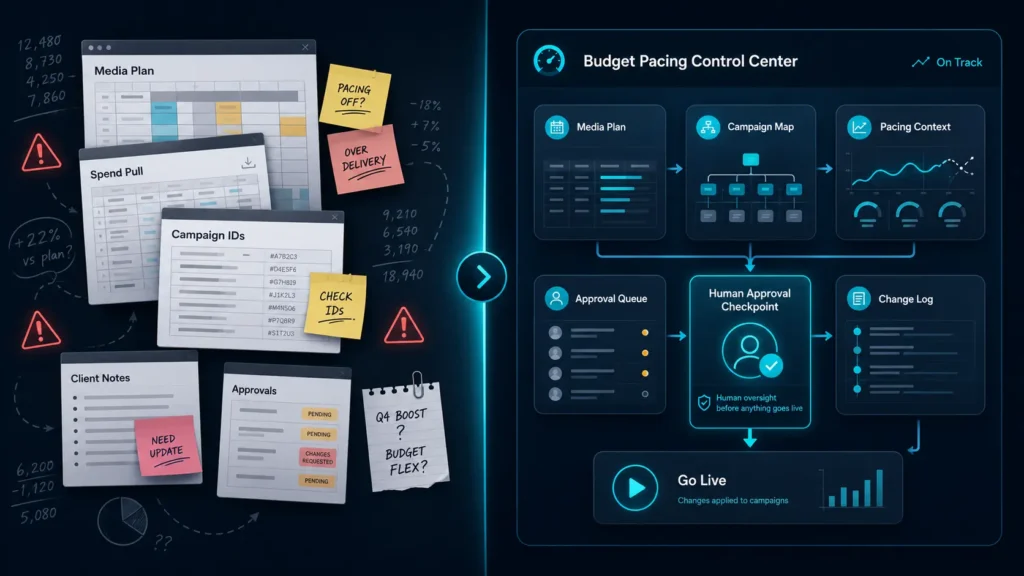
This project started with internal links, but the same principles apply to social media ad builds, budget changes, analytics implementations, reporting workflows, and other marketing operations. The same principles can also be applied to analyzing competitor ads across Meta and Google with AI.
The first question is: do I have my platforms connected?
That means having standardized data across dimensions like:
- Internal sheets
- Content management systems
- External platforms (like ChatGPT or Claude)
Connecting these sources is the unlock. Once that is established, the need moves to a repeatable workflow.
- What actions it can take
- How should output be reviewed
- Where to record approval
- How to optimize model use
A capable model inside an unrestricted workflow creates operational risk.
The same model inside a narrow, observable, fail-closed system becomes genuinely useful.
That’s how automation works best. Not when control is given up, rather when a process is well-defined to solve a singular goal.
These are the systems that save time because they work every time.
Final thoughts
Internal linking is not the most glamorous part of content strategy.
It is, however, a good example of where structured automation and modern language models can add real value.
The task is repetitive enough for software to handle. It is contextual enough for AI-assisted analysis to improve the output. And it is consequential enough that unrestricted publishing is a bad idea.
The system does not eliminate human judgment entirely. Instead, it reduces the amount of judgment required by narrowing the decision to a small set of validated, clearly previewed recommendations.
Building the underlying infrastructure takes time. But once it is in place, the long-term payoff extends beyond hours saved. The system can review more content, apply the same standards consistently, and surface opportunities that would be difficult to find through a manual audit.
That is ultimately what makes this type of automation useful: not replacing people, but giving them a more reliable system for making and executing better decisions.
If your website could benefit from a similar workflow, get in touch. I build custom content and marketing automation tools across WordPress and other content management systems.