How to Automate Competitor Ad Analysis With AI
Competitive analysis is an essential part of every strong go-to-market strategy. Ignore it and you can miss valuable insights from similar businesses facing many of the same challenges.
Oftentimes, significant effort and investment go into uncovering insights that a simple competitive analysis can surface. The concept is simple – if a competitor does something over a long period of time, it’s most likely because it’s working.
The process of completing competitive analysis usually includes large amounts of manual work, sifting through competitor websites, search results, public ads, conversion funnels, and nurture journeys.
However, these analyses take a noteworthy amount of time and only yield good results when conducted in depth and synthesized to understand how the broader system operates.
This is especially true with ad libraries like Meta Ad Library or Google’s Ads Transparency Center. These repositories catalog hundreds of ads from advertisers on their platforms, making them excellent sources of information but tedious to manually review.
For anyone who conducts competitive research frequently, automating this process is crucial. I built a competitive audit tracker that collects ads from Meta’s Ad Library and Google’s Ads Transparency Center, analyzes the copy and creative with Anthropic, and groups the ads into recurring strategic themes.
This article will break down how I conduct competitive ad analysis and my methodology for building the tracker. But first, a quick refresher on how competitive audits work.
TL;DR
Competitive ad analysis is valuable, but manually reviewing hundreds of ads across Meta and Google doesn’t scale. I built a competitive audit tracker that automatically collects ads, validates advertisers, analyzes creative and messaging with AI, caches existing results, and organizes everything into a structured dataset. The result is a repeatable system for tracking competitor products, audiences, offers, creative themes, and messaging over time.
The Problem With Ad Library Research
Analyzing competitor ads in an ad library is a good practice that every advertiser should follow. But it doesn’t come without its share of pitfalls.
Ads Are Point-in-Time Snapshots
Without the context of how strategy changes over time, ad libraries simply showcase everything advertisers are doing to message to their audiences.
Only over time do persistent ads and themes start to become noticeable.
There Are No Metrics Tied to Live Ads
Along a similar vein, there’s no way to tell which ads are top performers versus the ones that simply didn’t resonate.
That can lead us to assume that the ads we like the most must be the best-performing ads—this is often not the case.
Ads are also often evaluated individually. This misses important context.
Ad Libraries Don’t Sort by Topic or Message
While looking at ads one by one will eventually reveal a bigger picture, the work is tedious and boring.
The real value comes from categorizing ads based on their imagery or copy. Building a catalog of ads based on topic, hook, format, or offer is how creative strategies are built.
This is also how competitive audits begin to answer questions about strategy, messaging, and what to do next.
What a Competitive Audit Should Answer
Competitive ad analysis can answer many questions about how an industry is shaped, including which players dominate and which have carved out distinct niches.
Its core value is centered in two areas:
- Business insights
- Marketing insights
Business Insights
Competitive audits can provide valuable insight into the business priorities other companies are making.
This includes:
- What products or services they are prioritizing
- Where the real product innovation is
- How often value propositions are recycled across similar products
These are quintessential insights that inform go-to-market advertising strategy. Without a clear direction around what products are driving growth, what offers real customers are responding to, and how to differentiate from competitors, advertising is rarely effective.
Competitive audits also provide deep insight into marketing strategy, mainly because publicly available information is what companies want you to hear.
Marketing Insights
Competitive ad analysis is particularly useful for understanding everything related to creative and messaging strategy.
This includes:
- Which audiences are addressed
- What problems or benefits recur
- Which formats dominate
- How messaging varies by platform
- Which themes appear repeatedly
Before a single creative brief is put together, competitive analysis can help determine:
- A creative topic and format mix
- Key target audiences
- Where competitors are leaving opportunities open
- How to differentiate offers and value propositions
These findings guide initial creative strategy and can even inform ongoing creative development. To do this effectively, regular analysis is necessary—hence the need for a repeatable framework.
Competitive Ad Analysis Workflow
Traditionally, competitive ad analysis starts with a manual pull of active or recently observed ads from Meta or Google.
This process of data collection is time-consuming, but the work doesn’t stop there.
To make the data actually useful, the next step involves normalizing it—storing the platform, copy, creative, format, and other key attributes consistently.
Next, ads need to be interpreted and grouped to uncover insights like:
- How many ads are for a certain product?
- What is the most common format?
- What CTA is used most frequently?
Only from here is it possible to run an analysis on the aggregate data. This, in turn, drives insights and strategy.
Automating this process is what turns a tedious, detail-oriented task into something significantly more powerful.
Automating the Workflow
As we’ve covered before, automation is most effective when a workflow is defined and repeatable.
Building automation into competitive analysis requires a standardized way to store the data collected—in this case, ad images, copy, landing pages, and other elements.
Like many automated processes, the first place to start is Google Sheets.
Start by creating a set of standardized column labels. Think fields like:
- Image URL
- Image Screenshot
- Headline
- Primary Text / Description
- Landing Page URL
These are the core elements of ad collection. From there, create additional columns for ad analysis:
- Ad Topic
- Call to Action
- Product
- Brand
- Message / Meaning
Once the Sheet is created—one tab for Google and one for Meta—populate the fields with some initial analysis.
Quick-and-Dirty Automation
The easiest way to partially automate the process is by saving screenshots of each ad and uploading them to ChatGPT or Claude, 20 at a time.
Use the Google Drive connector to have the LLM automatically update fields with copy and analysis.
The downside is that this is still a heavily manual process, requiring individual screenshots of ads from the ad libraries.
Fully Automated Competitive Audit
The fully automated version requires a bit more backend setup, but the workflow is similar to the process above.
At a high level, it looks like this:
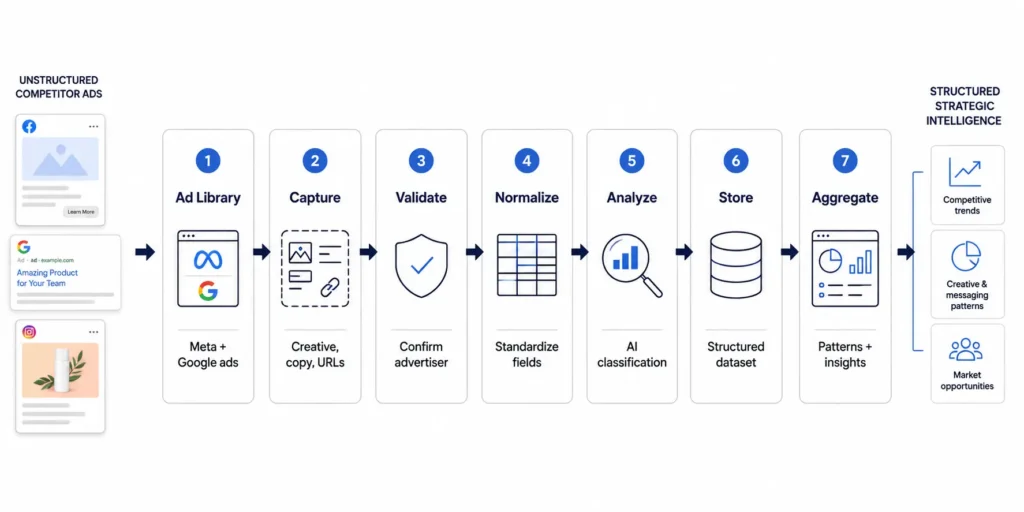
With these steps defined, every ad that’s collected runs through the same process.
Collect the Ads
The first step is capturing active ads from Google’s Ads Transparency Center and Meta Ad Library. Unlike the manual process, a script automatically crawls through the pages, opens each ad instance, takes screenshots, and saves them to a folder.
In tandem, the script pulls available headlines, descriptions, primary text, landing page URLs, and CTAs from the ad units in the ad library.
The goal is to have a standardized folder of assets for each platform, along with any visible copy and landing-page information saved in a Google Sheet.
Validate the Data
The script separately matches all collected information against a set of checks, such as Page ID or Facebook handle, to ensure the screenshots actually belong to the advertiser we intended to analyze.
This might seem unnecessary, but in my experience, roughly 5–10% of ads collected can actually come from the wrong advertiser.
Normalize Everything
Once everything is stored in its respective folders, the Google Sheet becomes immensely important. Before any data runs through AI, it’s necessary to create a compact package of the relevant information.
Otherwise, AI costs can balloon when the model is asked to analyze hundreds of images and text strings separately.
The most important pieces to package are the source image, ad copy, and landing-page text. These inputs are then used to classify information such as:
- Product / Service
- Audience
- Funnel Stage
- Primary Message
- Hook
- Proof Type
- Offer
Typically, these attributes need to be inferred by a human. But with tightly packaged data and a consistent framework, AI can do it as well—and significantly faster.
Analyze in Batches
Once ads are captured and new data is sent to Anthropic for classification and analysis, the real value becomes visible.
Analyzing individual ads may provide interesting detail, but the real power comes from analyzing hundreds of competitor ads. Patterns across categories can provide valuable insight into strategy.
Batch processing also makes large analyses much more economical. In my own testing, optimizing the evidence sent to the model and processing requests in batches reduced estimated image-token usage by roughly 75% in one test.
Don’t Analyze the Same Ad Twice
Caching helps prevent the system from analyzing the same ad twice, while also helping preserve a history of when ads were observed.
It also helps reduce AI model costs.
Images and videos can be assigned hashes that act as unique identifiers. If the system encounters a hash that has already been analyzed, it can skip over it.
Write Results Back to the Dataset
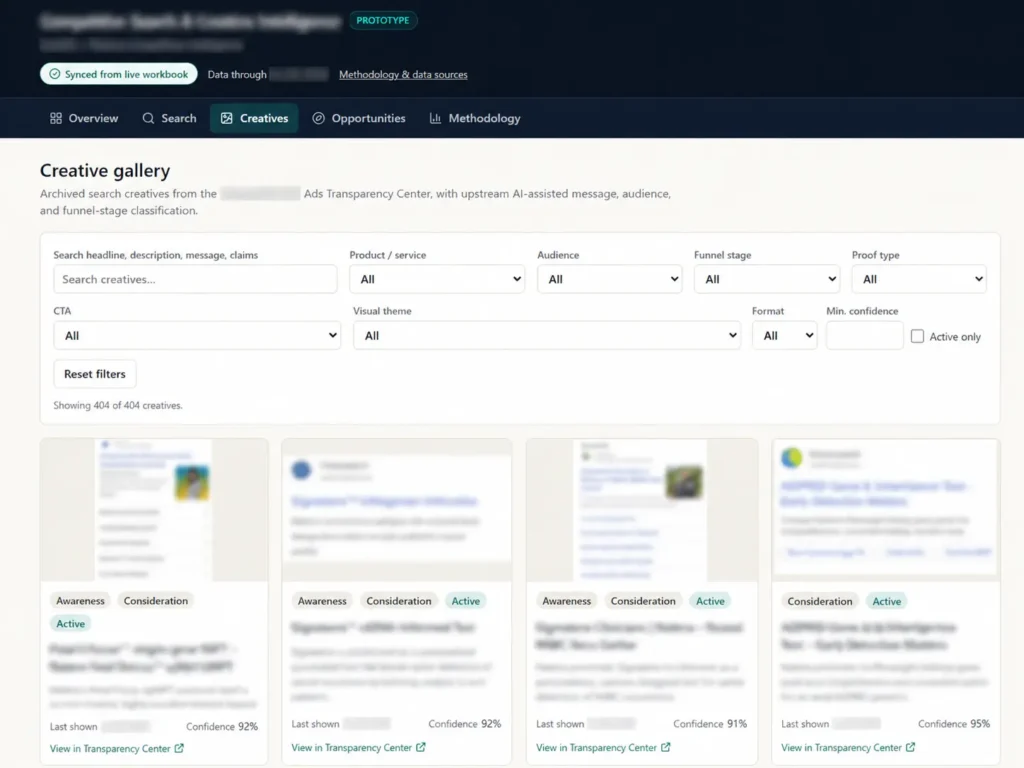
After analysis is complete, the structured results are added to the Google Sheet, and real, insightful analysis becomes possible.
It can answer questions like:
- What percentage of a competitor’s ads focus on each product?
- Which audiences are they speaking to most frequently?
- Which problems appear most often?
- How heavily do they rely on testimonials or other proof?
- Which offers keep appearing?
Those are much closer to the questions a strategist actually cares about.
As a bonus, the data is easy to transform into a dashboard for visual analysis.
Running It Repeatedly
The biggest benefit of automating competitive analysis isn’t actually saving the time required to do the first audit.
It’s making the second, third, and twentieth audits almost free from a labor perspective.
That’s because the tracker can easily distinguish between:
- Creative that appeared once
- Messaging that persists for months
- New product pushes
- Changes in positioning
- New offers
- Shifts in creative format
- Themes that competitors repeatedly return to
Persistence doesn’t mean success, but it’s a useful signal. If a company continues producing variations of the same message, product, hook, or offer over an extended period, that’s an indication that it’s a focus for them – successful or not.
The real objective of the tracker is more than simply using AI to conduct competitive analysis faster. It’s about creating a structured dataset from messy public information that can be turned into better analysis.
Turning Competitive Research Into a System
Competitive analysis isn’t valuable because you can collect hundreds of competitor ads. It’s valuable because those ads reveal patterns in how companies position products, speak to audiences, build offers, and evolve their strategy.
The problem is that those patterns are difficult to see when the research is conducted manually and infrequently.
Automation changes that.
By consistently collecting, categorizing, and storing competitive creative, a one-time audit becomes an ongoing source of market intelligence. AI makes the classification process faster, but the real advantage comes from creating a structured dataset that compounds over time.
That means less time spent collecting screenshots and more time answering the questions that actually matter:
- What are competitors prioritizing?
- What messages keep appearing?
- Where is the market becoming crowded?
- Where are there gaps?
- And what should we do differently?
That’s ultimately the role I want this tracker to play: not simply a faster way to review competitor ads, but a repeatable system for turning public advertising activity into better strategic decisions.
If you’re conducting competitive research regularly and want to see the tracker in action, get in touch and I can give you a demo.